
Article Categories
- All Categories
-
 Data Structure
-
 Networking
-
 RDBMS
RDBMS
-
 Operating System
-
 Java
Java
-
 MS Excel
-
 iOS
iOS
-
 HTML
HTML
-
 CSS
CSS
-
 Android
-
 Python
-
 C Programming
-
 C++
C++
-
 C#
C#
-
 MongoDB
-
 MySQL
MySQL
-
 Javascript
-
 PHP
PHP
-
 Economics & Finance
Selected Reading
Example of creating a database view in SAP HANA
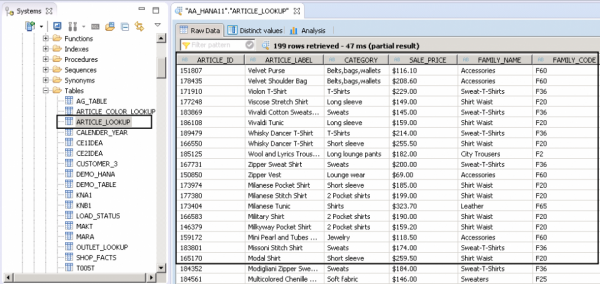
Let us see the below table ARTICLE_LOOKUP, we will create a database view with first 4 columns and will hide Family_NAME and FAMILY_CODE.
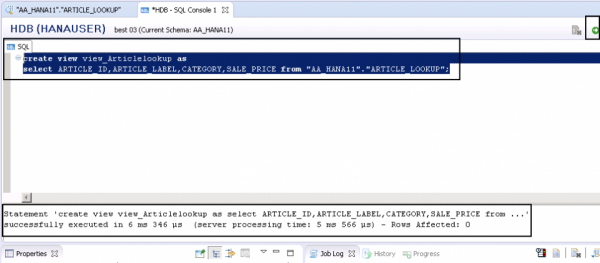
SQL statement- To create a view on the above table, write down the below SQL statement
create view view_Articlelookup as
select ARTICLE_ID,ARTICLE_LABEL,CATEGORY,SALE_PRICE from "AA_HANA11"."ARTICLE_LOOKUP";
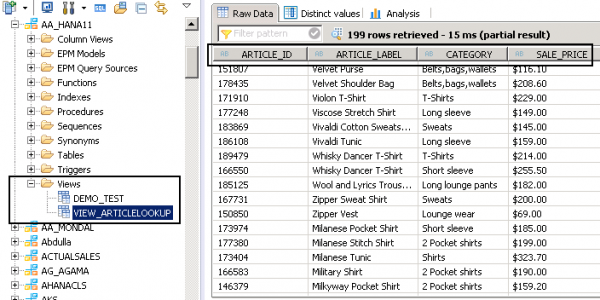
This will create a database view in the mentioned schema and you can check it in Views folder (schema name here-AA_HANA11). You can see a view with the name- view_Articlelookup and only 4 data columns are there.

Updated on: 2020-06-22T08:39:43+05:30
2K+ Views

Advertisements