
Article Categories
- All Categories
-
 Data Structure
-
 Networking
-
 RDBMS
RDBMS
-
 Operating System
-
 Java
Java
-
 MS Excel
-
 iOS
iOS
-
 HTML
HTML
-
 CSS
CSS
-
 Android
-
 Python
-
 C Programming
-
 C++
C++
-
 C#
C#
-
 MongoDB
-
 MySQL
MySQL
-
 Javascript
-
 PHP
PHP
-
 Economics & Finance
Checking active process in SAP system and which code is running
There are a couple of transactions ? SM66 and SM50 that can be used to check active processes in the SAP system and monitor which code is currently running.
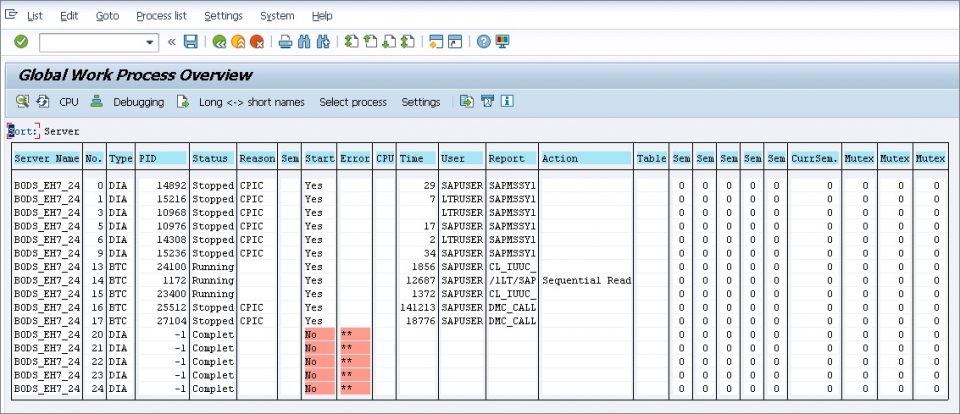
Transaction SM66 - Global Process Overview
The transaction SM66 is used to see all the active processes across the entire SAP system landscape. This provides a comprehensive view of all work processes running on all application servers in your SAP environment.
To monitor a specific process using SM66 ?
- Select the particular process you want to monitor by clicking on the process entry
- Click the "debugging" button to start monitoring the selected process
Transaction SM50 - Local Process Overview
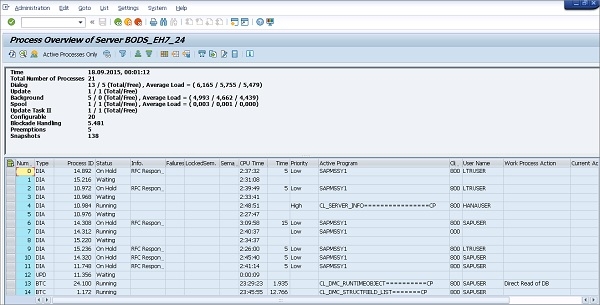
The transaction SM50 shows only the processes running on the current application server where you are logged in. This provides a more focused view of local work processes.
To monitor your program using SM50 ?
- Navigate to "Administration" menu
- Select "Program" option
- Choose the "Debugging" option
You need to identify the specific process in which your program is running by examining the process details, including the program name, user, and transaction code.
The following shows the Transaction code SM50 Process Overview screen of Application Server ?
Key Differences
The main difference between these transactions is their scope ?
- SM66 ? Global view of all processes across all application servers
- SM50 ? Local view of processes on the current application server only
Conclusion
Both SM66 and SM50 are essential tools for monitoring active SAP processes and debugging running code. Use SM66 for system-wide process monitoring and SM50 for local application server analysis.

5K+ Views
