
Article Categories
- All Categories
-
 Data Structure
-
 Networking
-
 RDBMS
RDBMS
-
 Operating System
-
 Java
Java
-
 MS Excel
-
 iOS
iOS
-
 HTML
HTML
-
 CSS
CSS
-
 Android
-
 Python
-
 C Programming
-
 C++
C++
-
 C#
C#
-
 MongoDB
-
 MySQL
MySQL
-
 Javascript
-
 PHP
PHP
-
 Economics & Finance
Working on a cost center report in SAP
Generating a cost center report in SAP is straightforward, even for beginners. If you need details about how work orders are related to cost centers, this guide will help you understand the relationship and access the necessary data.
All orders, whether they are internal orders or work orders, are linked to a specific cost center. Each order will have an associated cost center, and you can find this relationship by referring to the following Controlling tables:
Key SAP Tables for Cost Center Reports
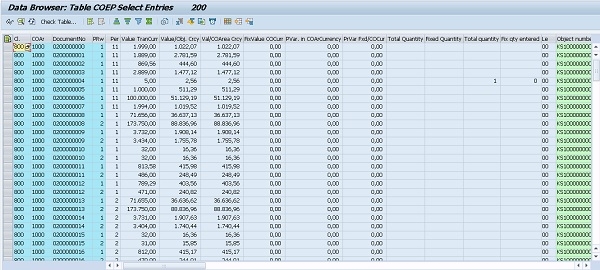
COEP Table
COEP (CO Line Items) contains detailed cost center postings and order information. This table provides comprehensive details about cost center, order, and other financial data over a specific period or year.
COEP has a large number of columns and can be selected while displaying data in a web browser ?
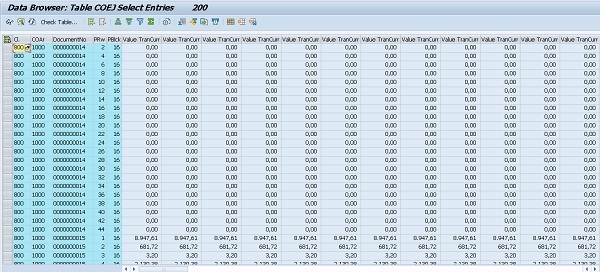
COEJ Table
COEJ (CO Object: Line Items (by year)) also contains the same type of information and can be selected while displaying data in a web browser ?
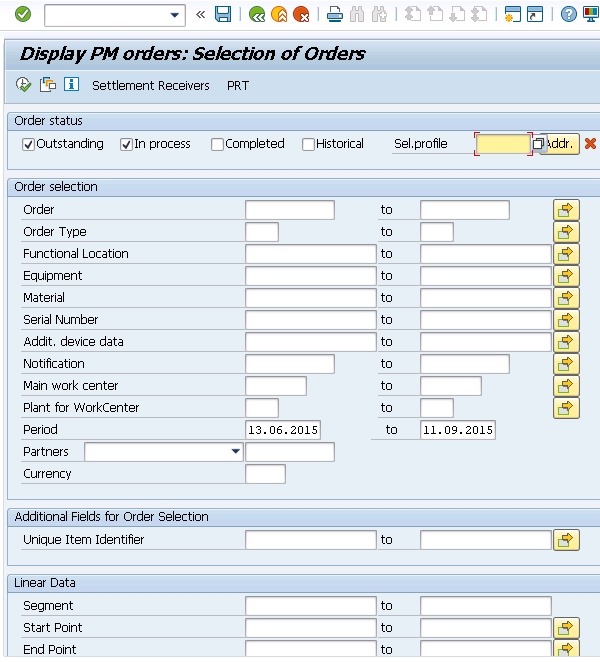
IW39 Transaction
For more detailed information about work orders, you can use transaction IW39 (PM Order List) to extract comprehensive details about work orders and their cost center assignments ?
Conclusion
By using tables COEP and COEJ along with transaction IW39, you can easily generate comprehensive cost center reports that show the relationship between work orders and their assigned cost centers in SAP.

610 Views
