
Article Categories
- All Categories
-
 Data Structure
-
 Networking
-
 RDBMS
RDBMS
-
 Operating System
-
 Java
Java
-
 MS Excel
-
 iOS
iOS
-
 HTML
HTML
-
 CSS
CSS
-
 Android
-
 Python
-
 C Programming
-
 C++
C++
-
 C#
C#
-
 MongoDB
-
 MySQL
MySQL
-
 Javascript
-
 PHP
PHP
-
 Economics & Finance
RFC returns exception while using SAP RFC_READ_TABLE to output data to software
When working with SAP RFC_READ_TABLE function module, you may encounter RFC exceptions that prevent data extraction to external software. You can check if there are any short dumps in the SAP system using T-Code: ST22. When there are short dumps, it leaves the ABAP Processor in an invalid state. This results in a failed call with an unspecified error message.
Checking Short Dumps in SAP
To diagnose RFC exceptions with RFC_READ_TABLE, follow these steps −
Step 1: Access the SAP system and navigate to transaction code ST22 (ABAP Runtime Error Analysis).
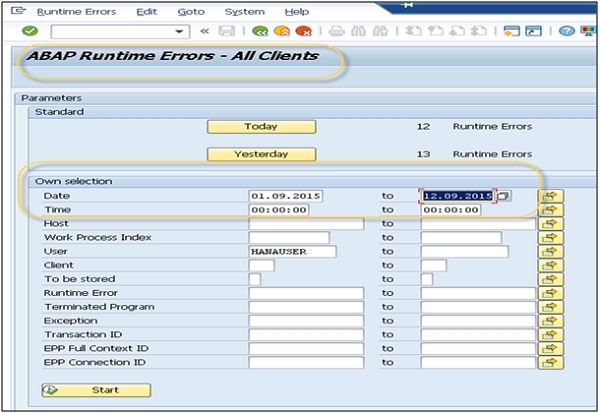
Step 2: Review the dump analysis to identify the root cause of the RFC exception. Common issues include authorization problems, table access restrictions, or memory limitations.
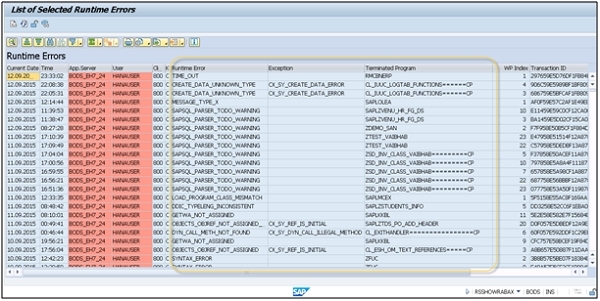
Common Causes and Solutions
The most frequent causes of RFC_READ_TABLE exceptions are −
- Authorization Issues: User lacks proper authorization for table access
- Table Restrictions: Some tables are protected and cannot be read directly
- Memory Limitations: Large result sets may exceed memory limits
- Connection Problems: Network or RFC connection instability
Prevention and Best Practices
To avoid RFC exceptions when using RFC_READ_TABLE −
- Ensure proper S_TABU_DIS authorization for table access
- Use appropriate
WHEREconditions to limit result sets - Implement proper error handling in your external software
- Consider using custom function modules for complex data extraction
By following these troubleshooting steps and monitoring short dumps through ST22, you can effectively resolve RFC exceptions and ensure reliable data extraction from SAP systems.

634 Views
