
Article Categories
- All Categories
-
 Data Structure
-
 Networking
-
 RDBMS
RDBMS
-
 Operating System
-
 Java
Java
-
 MS Excel
-
 iOS
iOS
-
 HTML
HTML
-
 CSS
CSS
-
 Android
-
 Python
-
 C Programming
-
 C++
C++
-
 C#
C#
-
 MongoDB
-
 MySQL
MySQL
-
 Javascript
-
 PHP
PHP
-
 Economics & Finance
Selected Reading
Create an INCLUDE in SAP system
Creating an INCLUDE in an SAP system is a straightforward process that can be accomplished through two main transaction codes. An INCLUDE is a modular programming object in SAP that contains reusable ABAP code segments.
Method 1: Using Transaction SE38
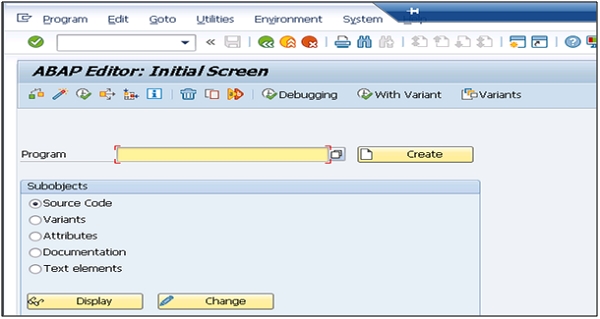
The most common way to create an INCLUDE is through transaction SE38 (ABAP Editor). Follow these steps −
- Open transaction
SE38in your SAP system - Enter the desired INCLUDE name in the program field
- Press the Create button
- Select Include Program as the program type
- Fill in the program attributes and save
Method 2: Using Transaction SE80
Alternatively, you can create an INCLUDE through the Object Navigator using transaction SE80 −
- Open transaction
SE80(Object Navigator) - Select the appropriate development package from the dropdown
- Right-click on the package or program folder
- Choose Create ? ABAP Program ? Include Program
- Specify the INCLUDE name and confirm creation
INCLUDE Naming Conventions
When creating INCLUDEs, follow SAP naming conventions −
- Use meaningful names that indicate the INCLUDE's purpose
- Consider prefixes like
ZorYfor custom developments - Maintain consistency with your organization's naming standards
Both methods will create the INCLUDE object in your SAP system, allowing you to write reusable ABAP code that can be included in multiple programs using the INCLUDE statement.

Updated on: 2026-03-13T20:46:33+05:30
314 Views

Advertisements