
Article Categories
- All Categories
-
 Data Structure
-
 Networking
-
 RDBMS
RDBMS
-
 Operating System
-
 Java
Java
-
 MS Excel
-
 iOS
iOS
-
 HTML
HTML
-
 CSS
CSS
-
 Android
-
 Python
-
 C Programming
-
 C++
C++
-
 C#
C#
-
 MongoDB
-
 MySQL
MySQL
-
 Javascript
-
 PHP
PHP
-
 Economics & Finance
Converting date type SYDATUM in a format like MM/DD/YY in SAP ABAP
It depends if you want to write it to a list screen or you want to convert it to a text variable. To write it to a list screen, you can use below code −
WRITE I_my_dateMM/DD/YYYY
To convert it to a text variable, you can use below command −
WRITE l_my_dateTO l_my_text MM/DD/YYYY
If you want to set the date in SAPscript form, you can use SET DATE MASK command. You can specify date fields to be printed in specified format −
/: SET DATE MASK= 'date_mask'
In the date mask, you can use the following codes −
DD: day (two digits)
DDD: day name - abbreviated
DDDD: day name - written out in full
MM: month (two digits)
MMM: month name - abbreviated
MMMM: month name - written out in full
YY: year (two digits)
YYYY: year (four digits)
You can also reset date mask to default setting by using an “empty string” as below −
/: SET DATE MASK= ' '
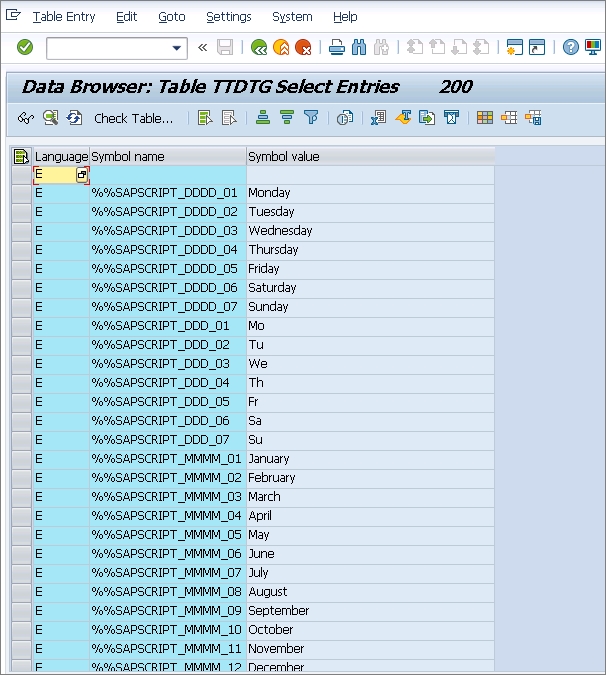
Also note that the full forms of days and months are stored in table - “TTDTG” which is language dependent and with the below keys-
%%SAPSCRIPT_DDD_dd:abbreviated day name
%%SAPSCRIPT_DDDD_dd:full form of day name
%%SAPSCRIPT_MMM_mm:abbreviated month name
%%SAPSCRIPT_MMMM_mm:full form of month name
dd: day number 01= Monday,..., 07 = Sunday
mm: month number 01 = January,..., 12 = December
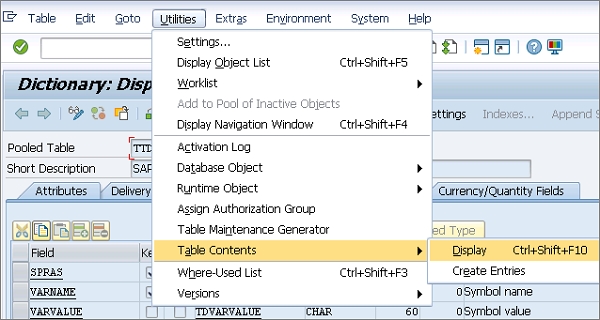
To see table fields, navigate to T-code SE11 → Enter Table name TTDTG → Display
To see table fields, navigate to Utilities → Table Content → Display

6K+ Views
