
Article Categories
- All Categories
-
 Data Structure
-
 Networking
-
 RDBMS
RDBMS
-
 Operating System
-
 Java
Java
-
 MS Excel
-
 iOS
iOS
-
 HTML
HTML
-
 CSS
CSS
-
 Android
-
 Python
-
 C Programming
-
 C++
C++
-
 C#
C#
-
 MongoDB
-
 MySQL
MySQL
-
 Javascript
-
 PHP
PHP
-
 Economics & Finance
Adding a BCC recipient in Infoview publication
The BCC (Blind Carbon Copy) option allows you to send email copies to recipients without other recipients seeing their addresses. However, BCC availability depends on your Business Objects version.
Version Compatibility
The BCC functionality has limited support across different SAP Business Objects versions. According to SAP Note 1369269, this feature was not available in earlier versions.
SAP Note 1369269 - Unable to Schedule Reports through BCC
Symptom ? 'BCC' option not available while scheduling reports to email.
Reproducing the Issue ? Schedule a report with destination as email.
Environment ? Business Objects Enterprise XI 3.1
Resolution ? The 'BCC' option is currently not supported by the product.
Current Implementation Status
As per SAP Note 1626654, the BCC functionality has been implemented in newer versions of the platform.
Reproducing the Issue
- Log on to BI launchpad, InfoView or Central Management Console
- Schedule a document to email
- There is no way to set the BCC field in older versions
Resolution
The ability to specify the BCC field has been implemented with SAP BusinessObjects BI Platform 4.0 Feature Pack 3 (FP3) and later versions.
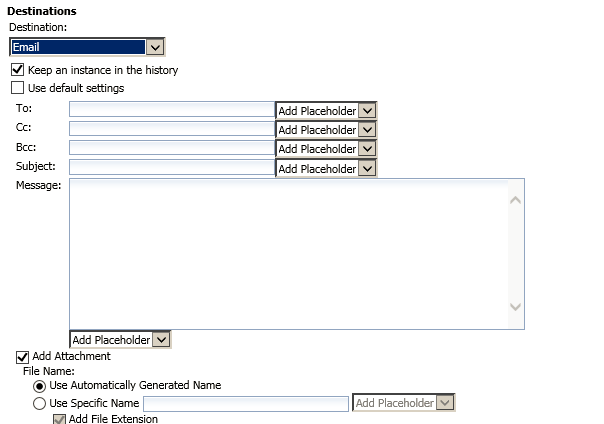
In supported versions, you can access the BCC option through the email scheduling interface as shown below ?
Conclusion
BCC functionality for email scheduling is only available in SAP BusinessObjects BI Platform 4.0 FP3 and later versions. Users on older versions need to upgrade to access this feature.

225 Views
