
- VBScript - Home
- VBScript - Overview
- VBScript - Syntax
- VBScript - Enabling
- VBScript - Placement
- VBScript - Variables
- VBScript - Constants
- VBScript - Operators
- VBScript - Decisions
- VBScript - Loops
- VBScript - Events
- VBScript - Cookies
- VBScript - Numbers
- VBScript - Strings
- VBScript - Arrays
- VBScript - Date
- VBScript - Procedures
- VBScript - Dialog Boxes
- VBScript - Object Oriented
- VBScript - Reg Expressions
- VBScript - Error Handling
- VBScript - Misc Statements
- VBScript Useful Resources
- VBScript - Questions and Answers
- VBScript - Quick Guide
- VBScript - Useful Resources
- VBScript - Discussion
VBScript If..ElseIf..Else Statements
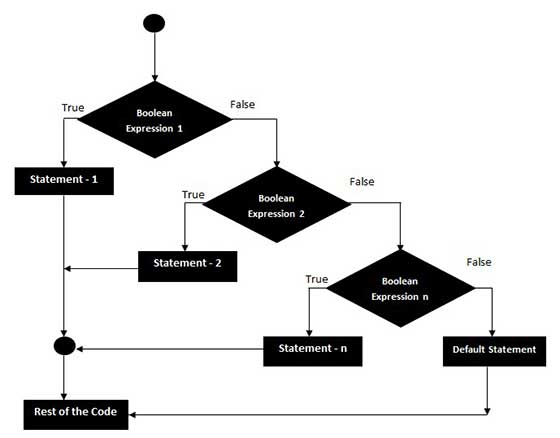
An If statement followed by one or more ElseIf Statements that consists of boolean expressions and then followed by a default else statement, which executes when all the condition becomes false.
Syntax
The syntax of an If-ElseIf-Else statement in VBScript is −
If(boolean_expression) Then
   Statement 1
	.....
	.....
   Statement n
ElseIf (boolean_expression) Then
   Statement 1
	.....
	....
   Statement n
ElseIf (boolean_expression) Then
   Statement 1
	.....
	....
   Statement n
Else
   Statement 1
	.....
	....
   Statement n
End If
Flow Diagram
Example
<!DOCTYPE html>
<html>
   <body>
      <script language = "vbscript" type = "text/vbscript">
         Dim a
         a = -5

         If a > 0 Then
            Document.write "a is a POSITIVE Number"
         ElseIf a < 0 Then
            Document.write "a is a NEGATIVE Number"
         Else
            Document.write "a is EQUAL than ZERO"
         End If
      </script>
   </body>
</html>
When the above code is executed, it produces the following result −
a is a NEGATIVE Number
vbscript_decisions.htm
Advertisements