
- Scala Collections - Home
- Scala Collections - Overview
- Scala Collections - Environment Setup
- Scala Collections - Arrays
- Scala Collections - Array
- Scala Collections - Multi-Dimensional Array
- Scala Collections - Array using Range
- Scala Collections - ArrayBuffer
- Scala Collections - Lists
- Scala Collections - List
- Scala Collections - ListBuffer
- Scala Collections - ListSet
- Scala Collections - Vector
- Scala Collections - Sets
- Scala Collections - Set
- Scala Collections - BitSet
- Scala Collections - HashSet
- Scala Collections - TreeSet
- Scala Collections - Maps
- Scala Collections - Map
- Scala Collections - HashMap
- Scala Collections - ListMap
- Scala Collections - Miscellaneous
- Scala Collections - Iterator
- Scala Collections - Option
- Scala Collections - Queue
- Scala Collections - Tuple
- Scala Collections - Seq
- Scala Collections - Stack
- Scala Collections - Stream
- Scala Collections Combinator methods
- Scala Collections - drop
- Scala Collections - dropWhile
- Scala Collections - filter
- Scala Collections - find
- Scala Collections - flatMap
- Scala Collections - flatten
- Scala Collections - fold
- Scala Collections - foldLeft
- Scala Collections - foldRight
- Scala Collections - map
- Scala Collections - partition
- Scala Collections - reduce
- Scala Collections - scan
- Scala Collections - zip
- Scala Collections Useful Resources
- Scala Collections - Quick Guide
- Scala Collections - Useful Resources
- Scala Collections - Discussion
Scala Collections - Quick Guide
Scala Collections - Overview
Introduction
Scala has a rich set of collection library. Collections are containers of things. Those containers can be sequenced, linear sets of items like List, Tuple, Option, Map, etc. The collections may have an arbitrary number of elements or be bounded to zero or one element (e.g., Option).
Collections may be strict or lazy. Lazy collections have elements that may not consume memory until they are accessed, like Ranges. Additionally, collections may be mutable (the contents of the reference can change) or immutable (the thing that a reference refers to is never changed). Note that immutable collections may contain mutable items.
For some problems, mutable collections work better, and for others, immutable collections work better. When in doubt, it is better to start with an immutable collection and change it later if you need mutable ones.
This chapter throws light on the most commonly used collection types and most frequently used operations over those collections.
Scala Collections
| Sr.No | Collections with Description |
|---|---|
| 1 | Scala Lists Scala's List[T] is a linked list of type T. |
| 2 | Scala Sets A set is a collection of pairwise different elements of the same type. |
| 3 |
Scala Maps A Map is a collection of key/value pairs. Any value can be retrieved based on its key. |
| 4 | Scala Tuples Unlike an array or list, a tuple can hold objects with different types. |
| 5 | Scala Options Option[T] provides a container for zero or one element of a given type. |
| 6 | Scala Iterators An iterator is not a collection, but rather a way to access the elements of a collection one by one. |
Scala Collections - Environment Setup
Scala can be installed on any UNIX flavored or Windows based system. Before you start installing Scala on your machine, you must have Java 1.8 or greater installed on your computer.
Follow the steps given below to install Scala.
Step 1: Verify Your Java Installation
First of all, you need to have Java Software Development Kit (SDK) installed on your system. To verify this, execute any of the following two commands depending on the platform you are working on.
If the Java installation has been done properly, then it will display the current version and specification of your Java installation. A sample output is given in the following table.
| Platform | Command | Sample Output |
|---|---|---|
| Windows |
Open Command Console and type − \>java version |
Java version "21.0.1" Java (TM) SE Run Time Environment (build 21.0.1+12-LTS-29) Java Hotspot (TM) 64-bit Server VM (build 21.0.1+12-LTS-29, mixed mode) |
| Linux |
Open Command terminal and type − $java version |
Java version "21.0.1" Open JDK Runtime Environment (rhel-2.8.10.4.el6_4-x86_64) Open JDK 64-Bit Server VM (build 25.31-b07, mixed mode) |
We assume that the readers of this tutorial have Java SDK version 21.0.1 installed on their system.
In case you do not have Java SDK, download its current version from http://www.oracle.com/technetwork/java/javase/downloads/index.html and install it.
Example
For Windows
C:\Windows\System32>java --version
C:\Windows\System32>java --version
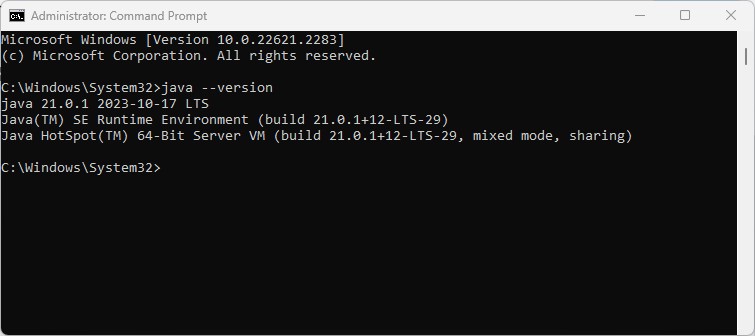
This will be the output, if Java is installed on your computer −
Microsoft Windows [Version 10.0.22621.2283]
(c) Microsoft Corporation. All rights reserved.

C:\Windows\System32>java --version
java 21.0.1 2023-10-17 LTS
Java(TM) SE Runtime Environment (build 21.0.1+12-LTS-29)
Java HotSpot(TM) 64-Bit Server VM (build 21.0.1+12-LTS-29, mixed mode, sharing)

C:\Windows\System32>
For Linux
$ java -version
This will be the output, if Java is installed on your computer −
java version "21.0.1"
Java(TM) SE Runtime Environment (build 21.0.1+9-LTS)
Java HotSpot(TM) 64-Bit Server VM (build 21.0.1+9-LTS, mixed mode)
If the Java installation has been done properly, it will display the current version and specification of your Java installation. If Java is not already installed on your computer, then there will be an error message.
Step 2: Set Your Java Environment
Set the environment variable JAVA_HOME to point to the base directory location where Java is installed on your machine. For example,
| Sr.No | Platform & Description |
|---|---|
| 1 |
Windows Set JAVA_HOME to C:\ProgramFiles\java\jdk21.0.1 |
| 2 |
Linux Export JAVA_HOME=/usr/local/java-current |
Append the full path of Java compiler location to the System Path.
| Sr.No | Platform & Description |
|---|---|
| 1 |
Windows Append the String "C:\Program Files\Java\jdk21.0.1\bin" to the end of the system variable PATH. |
| 2 |
Linux Export PATH=$PATH:$JAVA_HOME/bin/ |
Execute the command java -version from the command prompt as explained above.
Step 3: Install Scala
You can download Scala from http://www.scala-lang.org/downloads. At the time of writing this tutorial, I downloaded cs-x86_64-pc-win32.exe. Make sure you have admin privilege to proceed. Now, execute the following command at the command prompt
| Platform | Command & Output | Description |
|---|---|---|
| Windows | cs-x86_64-pc-win32.exe |
This command will display an installation wizard, which will guide you to install Scala on your windows machine. During installation, it will ask for license agreement, simply accept it and further it will ask a path where Scala will be installed. I selected default given path C:\Program Files\Scala, you can select a suitable path as per your convenience. |
| Linux |
Command − curl -fL https://github.com/coursier/coursier/releases/latest/download/cs-x86_64-pc-linux.gz | gzip -d > cs && chmod +x cs && ./cs setup Output − Welcome to the installation of Scala 3.8.3! The homepage is at − http://Scala-lang.org/ press 1 to continue, 2 to quit, 3 to redisplay 1................................................ [ Starting to unpack ] [ Processing package: Software Package Installation (1/1) ] [ Unpacking finished ] [ Console installation done ] |
During installation, it will ask for license agreement, to accept it type 1 and it will ask a path where Scala will be installed. I entered /usr/local/share, you can select a suitable path as per your convenience. |
For example, in Windows −
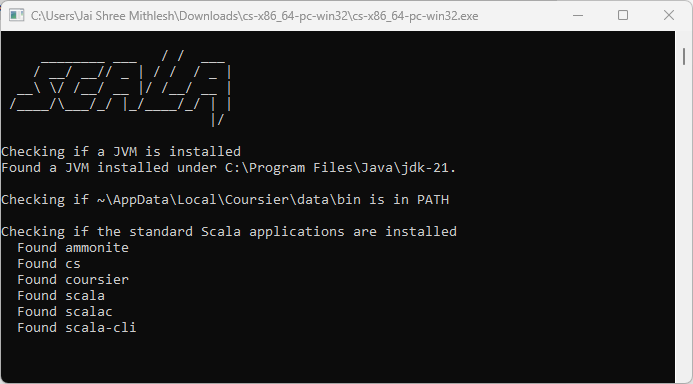
Finally, open a new command prompt and type Scala -version and press Enter. You should see the following −
| Platform | Command | Output |
|---|---|---|
| Windows | \>scala -version |
Scala code runner version 3.8.3 -- Copyright 2002-2026, LAMP/EPFL |
| Linux | $scala -version |
Scala code runner version 3.8.3 Copyright 2002-2026, LAMP/EPFL |
For example, in Windows −
C:\Windows\System32>scala --version
Scala code runner version 3.8.3 -- Copyright 2002-2026, LAMP/EPFL

C:\Windows\System32>
Testing and Running Scala using Commands
You can open cmd and run these commands to execute them. For example, in Windows −
Microsoft Windows [Version 10.0.22621.2283]
(c) Microsoft Corporation. All rights reserved.

C:\Users\Jai Shree Mithlesh>scala --version
Scala code runner version 3.8.3 -- Copyright 2002-2023, LAMP/EPFL

C:\Users\Jai Shree Mithlesh>scala
Welcome to Scala 3.8.3 (21.0.1, Java Java HotSpot(TM) 64-Bit Server VM).
Type in expressions for evaluation. Or try :help.

scala> println("Hello, tutorialspoint")
Hello, tutorialspoint

scala> 4+5
val res0: Int = 9

scala> 10/6
val res1: Int = 1

scala>
Note that you can also use Scala on various IDEs, like IntelliJ and VSCode with metals.
Scala Collections - Arrays
Scala provides a data structure, the array, which stores a fixed-size sequential collection of elements of the same type. An array is used to store a collection of data, but it is often more useful to think of an array as a collection of variables of the same type.
Instead of declaring individual variables, such as number0, number1, ..., and number99, you declare one array variable such as numbers and use numbers[0], numbers[1], and ..., numbers[99] to represent individual variables. This tutorial introduces how to declare array variables, create arrays, and process arrays using indexed variables. The index of the first element of an array is the number zero and the index of the last element is the total number of elements minus one.
Declaring Array Variables
To use an array in a program, you must declare a variable to reference the array and you must specify the type of array the variable can reference.
The following is the syntax for declaring an array variable.
Syntax
var z:Array[String] = new Array[String](3)

or

var z = new Array[String](3)
Here, z is declared as an array of Strings that may hold up to three elements. Values can be assigned to individual elements or get access to individual elements, it can be done by using commands like the following −
Command
z(0) = "Zara"; z(1) = "Nuha"; z(4/2) = "Ayan"
Here, the last example shows that in general the index can be any expression that yields a whole number. There is one more way of defining an array −
var z = Array("Zara", "Nuha", "Ayan")
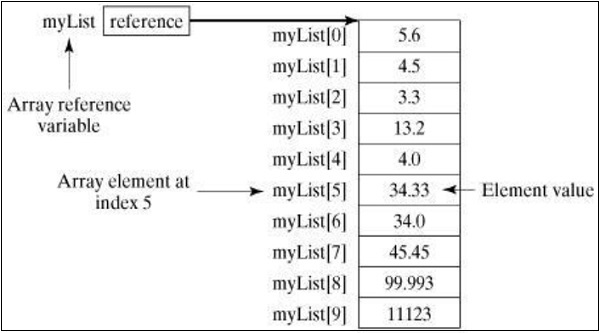
Following picture represents an array myList. Here, myList holds ten double values and the indices are from 0 to 9.
Processing Arrays
When processing array elements, we often use loop contol structures because all of the elements in an array are of the same type and the size of the array is known.
Below is an example program of showing how to create, initialize and process arrays −
Example
object Demo {
def main(args: Array[String]) {
var myList = Array(1.9, 2.9, 3.4, 3.5)
// Print all the array elements
for ( x <- myList ) {
println( x )
}
// Summing all elements
var total = 0.0;
for ( i <- 0 to (myList.length - 1)) {
total += myList(i);
}
println("Total is " + total);
// Finding the largest element
var max = myList(0);
for ( i <- 1 to (myList.length - 1) ) {
if (myList(i) > max) max = myList(i);
}
println("Max is " + max);
}
}
Save the above program in Demo.scala. The following commands are used to compile and execute this program.
Command
\>scalac Demo.scala
\>scala Demo
Output
1.9
2.9
3.4
3.5
Total is 11.7
Max is 3.5
Scala does not directly support various array operations and provides various methods to process arrays in any dimension. If you want to use the different methods then it is required to import Array._ package.
Scala Collections - Multidimensional Arrays
There are many situations where you would need to define and use multi-dimensional arrays (i.e., arrays whose elements are arrays). For example, matrices and tables are examples of structures that can be realized as two-dimensional arrays.
Declaring multi-dimensional arrays
The following is the example of defining a two-dimensional array −
var myMatrix = ofDim[Int](3,3)
This is an array that has three elements each being an array of integers that has three elements.
Processing Multidimensional Array
Try the following example program to process a multi-dimensional array −
Example
import Array._
object Demo {
def main(args: Array[String]) {
var myMatrix = ofDim[Int](3,3)
// build a matrix
for (i <- 0 to 2) {
for ( j <- 0 to 2) {
myMatrix(i)(j) = j;
}
}
// Print two dimensional array
for (i <- 0 to 2) {
for ( j <- 0 to 2) {
print(" " + myMatrix(i)(j));
}
println();
}
}
}
Save the above program in Demo.scala. The following commands are used to compile and execute this program.
Command
\>scalac Demo.scala
\>scala Demo
Output
0 1 2
0 1 2
0 1 2
Scala Collections - Array with Range
Use of range() method to generate an array containing a sequence of increasing integers in a given range. You can use the final argument as step to create the sequence; if you do not use the final argument, then step would be assumed as 1.
Let us take an example of creating an array of range (10, 20, 2): It means creating an array with elements between 10 and 20 and range difference 2. Elements in the array are 10, 12, 14, 16, and 18.
Another example: range (10, 20). Here range difference is not given so by default it assumes 1 element. It creates an array with the elements in between 10 and 20 with range difference 1. Elements in the array are 10, 11, 12, 13, ..., and 19.
Syntax
To create an array with a specified range and step, you can use the Array.range method with three arguments: the start value, the end value, and the step value.
Syntax with Step
val arrayName: Array[Int] = Array.range(start, end, step)
Syntax without Step
val arrayName: Array[Int] = Array.range(start, end)
1. Creating an Array with Range
You can create arrays using a range of values in Scala. This is used for sequences of numbers without explicitly specifying each element.
Example
For example, you can create an array of integers from 1 to 10 using the Array.range method, like this:
object Demo {
   def main(args: Array[String]): Unit = {
      val rangeArray: Array[Int] = Array.range(1, 11)
      println(rangeArray.mkString(", "))
   }
}
Save the above program in Demo.scala. The following commands are used to compile and execute this program.
Command
\>scalac Demo.scala
\>scala Demo
Output
1, 2, 3, 4, 5, 6, 7, 8, 9, 10
2. Using Array.fill with Ranges
You can also use the Array.fill method in combination with ranges to initialize an array with specific values.
Example
For example, creating an array of 10 elements, all initialized to 42:
object Demo {
   def main(args: Array[String]): Unit = {
      val fillArray: Array[Int] = Array.fill(10)(42)
      println(fillArray.mkString(", "))
   }
}
Save the above program in Demo.scala. The following commands are used to compile and execute this program.
Command
\>scalac Demo.scala
\>scala Demo
Output
42, 42, 42, 42, 42, 42, 42, 42, 42, 42
3. Using Array.tabulate with Ranges
You to create an array and initialize its elements based on a function using Array.tabulate method.
Example
For example, you can create an array where each element is the square of its index:
object Demo {
   def main(args: Array[String]): Unit = {
      val tabulateArray: Array[Int] = Array.tabulate(10)(n => n * n)
      println(tabulateArray.mkString(", "))
   }
}
Save the above program in Demo.scala. The following commands are used to compile and execute this program.
Command
\>scalac Demo.scala
\>scala Demo
Output
0, 1, 4, 9, 16, 25, 36, 49, 64, 81
4. Printing Arrays with Ranges
You can print array in Scala easily. You can use the mkString method to convert the array elements into a string separated by commas, or any other delimiter.
Example
object Demo {
   def main(args: Array[String]): Unit = {
      val rangeArray: Array[Int] = Array.range(1, 11)
      println(rangeArray.mkString(", "))
   }
}
For multidimensional arrays, you can use nested loops or the foreach method to print the elements in a formatted way.
Example
object Demo {
   def printArray[T](array: Array[T]): Unit =
   println(array.mkString(", "))

   def main(args: Array[String]): Unit = {
      val array1D: Array[Int] = Array.range(1, 11)
      printArray(array1D)
   }
}
Save the above program in Demo.scala. The following commands are used to compile and execute this program.
Command
\>scalac Demo.scala
\>scala Demo
Output
1, 2, 3, 4, 5, 6, 7, 8, 9, 10
Example Usage in Scala Programs
This is simple example to create and print arrays with ranges in a Scala program:
object Demo {
   def main(args: Array[String]): Unit = {
      // Creating arrays with ranges
      val rangeArray = Array.range(1, 11)
      val evenArray = Array.range(2, 21, 2)

      // Printing arrays
      println("Range Array: " + rangeArray.mkString(", "))
      println("Even Array: " + evenArray.mkString(", "))
   }
}
Save the above program in Demo.scala. The following commands are used to compile and execute this program.
Command
\>scalac Demo.scala
\>scala Demo
Output
Range Array: 1, 2, 3, 4, 5, 6, 7, 8, 9, 10
Even Array: 2, 4, 6, 8, 10, 12, 14, 16, 18, 20
Arrays with ranges are useful for generating sequences of values in Scala.
Scala Collections - ArrayBuffer
Scala provides a data structure, the ArrayBuffer, which can change size when initial size falls short. As array is of fix size and more elements cannot be occupied in an array, ArrayBuffer is an alternative to array where size is flexible.
Internally ArrayBuffer maintains an array of current size to store elements. When a new element is added, size is checked. In case underlying array is full then a new larger array is created and all elements are copied to larger array.
Declaring ArrayBuffer Variables
The following is the syntax for declaring an ArrayBuffer variable.
Syntax
var z = ArrayBuffer[String]()
Here, z is declared as an array-buffer of Strings which is initially empty. Values can be added by using commands like the following −
Command
z += "Zara";
z += "Nuha";
z += "Ayan";
Processing ArrayBuffer
Below is an example program of showing how to create, initialize and process ArrayBuffer −
Example
import scala.collection.mutable.ArrayBuffer
object Demo {
   def main(args: Array[String]) = {
      var myList = ArrayBuffer("Zara","Nuha","Ayan")
      println(myList);
      // Add an element
      myList += "Welcome";
      // Add two element
      myList += ("To", "Tutorialspoint");
      println(myList);
      // Remove an element
      myList -= "Welcome";
      // print second element
      println(myList(1));
   }
}
Save the above program in Demo.scala. The following commands are used to compile and execute this program.
Command
\>scalac Demo.scala
\>scala Demo
Output
ArrayBuffer(Zara, Nuha, Ayan)
ArrayBuffer(Zara, Nuha, Ayan, Welcome, To, Tutorialspoint)
Nuha
Scala Collections - List
Scala Lists are quite similar to arrays which means, all the elements of a list have the same type but there are two important differences. First, lists are immutable, which means elements of a list cannot be changed by assignment. Second, lists represent a linked list whereas arrays are flat.
The type of a list that has elements of type T is written as List[T].
Try the following example, here are few lists defined for various data types.
// List of Strings
val fruit: List[String] = List("apples", "oranges", "pears")
// List of Integers
val nums: List[Int] = List(1, 2, 3, 4)
// Empty List.
val empty: List[Nothing] = List()
// Two dimensional list
val dim: List[List[Int]] = List(
   List(1, 0, 0),
   List(0, 1, 0),
   List(0, 0, 1)
)
All lists can be defined using two fundamental building blocks, a tail Nil and ::, which is pronounced cons. Nil also represents the empty list. All the above lists can be defined as follows.
// List of Strings
val fruit = "apples" :: ("oranges" :: ("pears" :: Nil))
// List of Integers
val nums = 1 :: (2 :: (3 :: (4 :: Nil)))
// Empty List.
val empty = Nil
// Two dimensional list
val dim = (1 :: (0 :: (0 :: Nil))) ::
   (0 :: (1 :: (0 :: Nil))) ::
   (0 :: (0 :: (1 :: Nil))) :: Nil
Basic Operations on Lists
All operations on lists can be expressed in terms of the following three methods.
| Sr.No | Methods & Description |
|---|---|
| 1 |
head This method returns the first element of a list. |
| 2 |
tail This method returns a list consisting of all elements except the first. |
| 3 |
isEmpty This method returns true if the list is empty otherwise false. |
The following example shows how to use the above methods.
Example
object Demo {
   def main(args: Array[String]) {
      val fruit = "apples" :: ("oranges" :: ("pears" :: Nil))
      val nums = Nil
      println( "Head of fruit : " + fruit.head )
      println( "Tail of fruit : " + fruit.tail )
      println( "Check if fruit is empty : " + fruit.isEmpty )
      println( "Check if nums is empty : " + nums.isEmpty )
   }
}
Save the above program in Demo.scala. The following commands are used to compile and execute this program.
Command
\>scalac Demo.scala
\>scala Demo
Output
Head of fruit : apples
Tail of fruit : List(oranges, pears)
Check if fruit is empty : false
Check if nums is empty : true
Concatenating Lists
You can use either ::: operator or List.:::() method or List.concat() method to add two or more lists. Please find the following example given below −
Example
object Demo {
   def main(args: Array[String]) {
      val fruit1 = "apples" :: ("oranges" :: ("pears" :: Nil))
      val fruit2 = "mangoes" :: ("banana" :: Nil)
      // use two or more lists with ::: operator
      var fruit = fruit1 ::: fruit2
      println( "fruit1 ::: fruit2 : " + fruit )
      // use two lists with Set.:::() method
      fruit = fruit1.:::(fruit2)
      println( "fruit1.:::(fruit2) : " + fruit )
      // pass two or more lists as arguments
      fruit = List.concat(fruit1, fruit2)
      println( "List.concat(fruit1, fruit2) : " + fruit  )
   }
}
Save the above program in Demo.scala. The following commands are used to compile and execute this program.
Command
\>scalac Demo.scala
\>scala Demo
Output
fruit1 ::: fruit2 : List(apples, oranges, pears, mangoes, banana)
fruit1.:::(fruit2) : List(mangoes, banana, apples, oranges, pears)
List.concat(fruit1, fruit2) : List(apples, oranges, pears, mangoes, banana)
Creating Uniform Lists
You can use List.fill() method creates a list consisting of zero or more copies of the same element. Try the following example program.
Example
object Demo {
   def main(args: Array[String]) {
      val fruit = List.fill(3)("apples") // Repeats apples three times.
      println( "fruit : " + fruit  )
      val num = List.fill(10)(2)         // Repeats 2, 10 times.
      println( "num : " + num  )
   }
}
Save the above program in Demo.scala. The following commands are used to compile and execute this program.
Command
\>scalac Demo.scala
\>scala Demo
Output
fruit : List(apples, apples, apples)
num : List(2, 2, 2, 2, 2, 2, 2, 2, 2, 2)
Tabulating a Function
You can use a function along with List.tabulate() method to apply on all the elements of the list before tabulating the list. Its arguments are just like those of List.fill: the first argument list gives the dimensions of the list to create, and the second describes the elements of the list. The only difference is that instead of the elements being fixed, they are computed from a function.
Try the following example program.
Example
object Demo {
   def main(args: Array[String]) {
      // Creates 5 elements using the given function.
      val squares = List.tabulate(6)(n => n * n)
      println( "squares : " + squares  )
      val mul = List.tabulate( 4,5 )( _ * _ )
      println( "mul : " + mul  )
   }
}
Save the above program in Demo.scala. The following commands are used to compile and execute this program.
Command
\>scalac Demo.scala
\>scala Demo
Output
squares : List(0, 1, 4, 9, 16, 25)
mul : List(List(0, 0, 0, 0, 0), List(0, 1, 2, 3, 4),
   List(0, 2, 4, 6, 8), List(0, 3, 6, 9, 12))
Reverse List Order
You can use List.reverse method to reverse all elements of the list. The Following example shows the usage.
Example
object Demo {
   def main(args: Array[String]) {
      val fruit = "apples" :: ("oranges" :: ("pears" :: Nil))
      println( "Before reverse fruit : " + fruit )
      println( "After reverse fruit : " + fruit.reverse )
   }
}
Save the above program in Demo.scala. The following commands are used to compile and execute this program.
Command
\>scalac Demo.scala
\>scala Demo
Output
Before reverse fruit : List(apples, oranges, pears)
After reverse fruit : List(pears, oranges, apples)
Scala Collections - ListBuffer
Scala provides a data structure, the ListBuffer, which is more efficient than List while adding/removing elements in a list. It provides methods to prepend, append elements to a list.
Declaring ListBuffer Variables
The following is the syntax for declaring an ListBuffer variable.
Syntax
var z = ListBuffer[String]()
Here, z is declared as an list-buffer of Strings which is initially empty. Values can be added by using commands like the following −
Command
z += "Zara";
z += "Nuha";
z += "Ayan";
Processing ListBuffer
Below is an example program of showing how to create, initialize and process ListBuffer −
Example
import scala.collection.mutable.ListBuffer
object Demo {
   def main(args: Array[String]) = {
      var myList = ListBuffer("Zara","Nuha","Ayan")
      println(myList);
      // Add an element
      myList += "Welcome";
      // Add two element
      myList += ("To", "Tutorialspoint");
      println(myList);
      // Remove an element
      myList -= "Welcome";
      // print second element
      println(myList(1));
   }
}
Save the above program in Demo.scala. The following commands are used to compile and execute this program.
Command
\>scalac Demo.scala
\>scala Demo
Output
ListBuffer(Zara, Nuha, Ayan)
ListBuffer(Zara, Nuha, Ayan, Welcome, To, Tutorialspoint)
Nuha
Prepending Elements
You can prepend elements to the ListBuffer using the prepend method. This method adds elements to the beginning of the ListBuffer.
Example
Try following example for prepending elements to ListBuffer -
import scala.collection.mutable.ListBuffer

object Demo {
   def main(args: Array[String]) = {
      var myList = ListBuffer("Zara", "Nuha", "Ayan")
      // Prepend an element
      myList.prepend("Hello")
      println(myList)
      // Prepend multiple elements
      myList.prepend("Greetings", "From")
      println(myList)
   }
}
Save the above program in Demo.scala. Use the following commands to compile and execute this program.
Command
> scalac Demo.scala
> scala Demo
Output
ListBuffer(Hello, Zara, Nuha, Ayan)
ListBuffer(Greetings, From, Hello, Zara, Nuha, Ayan)
Clearing ListBuffer
You can clear all elements from a ListBuffer using the clear method. This method removes all elements, making the ListBuffer empty.
Example
Try following example for clearing a ListBuffer −
import scala.collection.mutable.ListBuffer

object Demo {
   def main(args: Array[String]) = {
      var myList = ListBuffer("Zara", "Nuha", "Ayan")
      println(myList)
      // Clear the ListBuffer
      myList.clear()
      println("ListBuffer after clear: " + myList)
   }
}
Save the above program in Demo.scala. Use the following commands to compile and execute this program.
Command
> scalac Demo.scala
> scala Demo
Output
ListBuffer(Zara, Nuha, Ayan)
ListBuffer after clear: ListBuffer()
Inserting Elements at Specific Index
You can insert elements at a specific index in the ListBuffer using the insert method. This allows you to add elements at any position within the ListBuffer.
Example
Try following example for inserting elements at given index to ListBuffer −
import scala.collection.mutable.ListBuffer

object Demo {
   def main(args: Array[String]) = {
      var myList = ListBuffer("Zara", "Nuha", "Ayan")
      println(myList)
      // Insert an element at index 1
      myList.insert(1, "Hello")
      println(myList)
      // Insert multiple elements at index 2
      myList.insertAll(2, Seq("Greetings", "From"))
      println(myList)
   }
}
Save the above program in Demo.scala. Use the following commands to compile and execute this program.
Command
> scalac Demo.scala
> scala Demo
Output
ListBuffer(Zara, Nuha, Ayan)
ListBuffer(Zara, Hello, Nuha, Ayan)
ListBuffer(Zara, Hello, Greetings, From, Nuha, Ayan)
Converting ListBuffer to List
You can convert a ListBuffer to an immutable List using the toList method. This is useful when you want to work with an immutable version of the ListBuffer.
Example
Try following example for converting a ListBuffer to list -
import scala.collection.mutable.ListBuffer

object Demo {
   def main(args: Array[String]) = {
      var myList = ListBuffer("Zara", "Nuha", "Ayan")
      println(myList)
      // Convert ListBuffer to List
      val immutableList = myList.toList
      println("Immutable List: " + immutableList)
   }
}
Save the above program in Demo.scala. Use the following commands to compile and execute this program.
Command
> scalac Demo.scala
> scala Demo
Output
ListBuffer(Zara, Nuha, Ayan)
Immutable List: List(Zara, Nuha, Ayan)
Sorting Elements in ListBuffer
You can sort the elements of a ListBuffer using the sorted method, which returns a new ListBuffer with the elements sorted.
Example
Try following example for sorting elements of ListBuffer -
import scala.collection.mutable.ListBuffer

object Demo {
   def main(args: Array[String]) = {
      var myList = ListBuffer("Zara", "Nuha", "Ayan")
      println(myList)
      // Sort the ListBuffer
      val sortedList = myList.sorted
      println("Sorted ListBuffer: " + sortedList)
   }
}
Save the above program in Demo.scala. Use the following commands to compile and execute this program.
Command
> scalac Demo.scala
> scala Demo
Output
ListBuffer(Zara, Nuha, Ayan)
Sorted ListBuffer: ListBuffer(Ayan, Nuha, Zara)
Reversing Elements in ListBuffer
You can reverse the elements of a ListBuffer using the reverse method, which returns a new ListBuffer with the elements in reverse order.
Example
Try following example for reversing elements in ListBuffer -
import scala.collection.mutable.ListBuffer

object Demo {
   def main(args: Array[String]) = {
      var myList = ListBuffer("Zara", "Nuha", "Ayan")
      println(myList)
      // Reverse the ListBuffer
      val reversedList = myList.reverse
      println("Reversed ListBuffer: " + reversedList)
   }
}
Save the above program in Demo.scala. Use the following commands to compile and execute this program.
Command
> scalac Demo.scala
> scala Demo
Output
ListBuffer(Zara, Nuha, Ayan)
Reversed ListBuffer: ListBuffer(Ayan, Nuha, Zara)
Appending Elements
You can append elements to the ListBuffer using the append method. This method adds elements to the end of the ListBuffer.
Example
Try following example for appending elements to ListBuffer -
import scala.collection.mutable.ListBuffer

object Demo {
   def main(args: Array[String]) = {
      var myList = ListBuffer("Zara", "Nuha", "Ayan")
      println(myList)
      // Append an element
      myList.append("Hello")
      println(myList)
      // Append multiple elements
      myList.append("Greetings", "From")
      println(myList)
   }
}
Save the above program in Demo.scala. Use the following commands to compile and execute this program.
Command
> scalac Demo.scala
> scala Demo
Output
ListBuffer(Zara, Nuha, Ayan)
ListBuffer(Zara, Nuha, Ayan, Hello)
ListBuffer(Zara, Nuha, Ayan, Hello, Greetings, From)
Removing Elements by Index
You can remove elements from the ListBuffer by specifying the index using the remove method. This method removes the element at the specified index.
Example
Try following example for removing element from a given index -
import scala.collection.mutable.ListBuffer

object Demo {
   def main(args: Array[String]) = {
      var myList = ListBuffer("Zara", "Nuha", "Ayan")
      println(myList)
      // Remove the element at index 1
      myList.remove(1)
      println(myList)
      // Remove the element at index 0
      myList.remove(0)
      println(myList)
   }
}
Save the above program in Demo.scala. Use the following commands to compile and execute this program.
Command
> scalac Demo.scala
> scala Demo
Output
ListBuffer(Zara, Nuha, Ayan)
ListBuffer(Zara, Ayan)
ListBuffer(Ayan)
Scala ListBuffer Summary
- ListBuffer in Scala is a mutable data structure that provides efficient methods for adding and removing elements.
- You can prepend, append, and remove elements from a ListBuffer using various methods.
- ListBuffer can be cleared, elements can be inserted at specific indices, and it can be converted to an immutable List.
- Advanced operations include sorting and reversing the elements of a ListBuffer.
- You can also append elements and remove elements by specifying their index.
Scala Collections - ListSet
Scala Set is a collection of pairwise different elements of the same type. In other words, a Set is a collection that contains no duplicate elements. ListSet implements immutable sets and uses list structure. Elements insertion order is preserved while storing the elements.
Declaring ListSet Variables
The following is the syntax for declaring an ListSet variable.
Syntax
var z : ListSet[String] = ListSet("Zara","Nuha","Ayan")
Here, z is declared as an list-set of Strings which has three members. Values can be added by using commands like the following −
Command
var myList1: ListSet[String] = myList + "Naira";
Processing ListSet
Below is an example program of showing how to create, initialize and process ListSet −
Example
import scala.collection.immutable.ListSet
object Demo {
   def main(args: Array[String]) = {
      var myList: ListSet[String] = ListSet("Zara","Nuha","Ayan");
      // Add an element
      var myList1: ListSet[String] = myList + "Naira";
      // Remove an element
      var myList2: ListSet[String] = myList - "Nuha";
      // Create empty set
      var myList3: ListSet[String] = ListSet.empty[String];
      println(myList);
      println(myList1);
      println(myList2);
      println(myList3);
   }
}
Save the above program in Demo.scala. The following commands are used to compile and execute this program.
Command
\>scalac Demo.scala
\>scala Demo
Output
ListSet(Ayan, Nuha, Zara)
ListSet(Naira, Ayan, Nuha, Zara)
ListSet(Ayan, Zara)
ListSet()
Checking Membership
You can check if a value is present in a ListSet using the contains method. This method returns true if the value is present and false otherwise.
Example
Try following example for checking membership whether these are existed or not -
import scala.collection.immutable.ListSet

object Demo {
   def main(args: Array[String]) = {
      var mySet = ListSet("Zara", "Nuha", "Ayan")
      // Check if the ListSet contains "Nuha"
      println(mySet.contains("Nuha"))
      // Check if the ListSet contains "Naira"
      println(mySet.contains("Naira"))
   }
}
Save the above program in Demo.scala. Use the following commands to compile and execute this program.
Command
> scalac Demo.scala
> scala Demo
Output
true
false
Common Set Operations
You can perform various common set operations such as union, intersection, and difference on ListSet. These operations are useful for comparing and combining sets.
- Union: For all unique elements from both sets.
- Intersection: For common unique elements from both sets.
- Difference: For elements from the first set that are not in the second set.
Example
import scala.collection.immutable.ListSet

object Demo {
   def main(args: Array[String]) = {
      val set1 = ListSet("Zara", "Nuha", "Ayan")
      val set2 = ListSet("Ayan", "Naira", "Maira")

      // Perform union operation
      val unionSet = set1 union set2
      println("Union: " + unionSet)

      // Perform intersection operation
      val intersectionSet = set1 intersect set2
      println("Intersection: " + intersectionSet)

      // Perform difference operation
      val differenceSet = set1 diff set2
      println("Difference: " + differenceSet)
   }
}
Save the above program in Demo.scala. Use the following commands to compile and execute this program.
Command
> scalac Demo.scala
> scala Demo
Output
Union: ListSet(Naira, Maira, Ayan, Nuha, Zara)
Intersection: ListSet(Ayan)
Difference: ListSet(Nuha, Zara)
Finding Maximum and Minimum Elements
You can find the maximum and minimum elements in a ListSet using the max and min methods, respectively.
Example
Try following example for finding min and max elements in ListSet -
import scala.collection.immutable.ListSet

object Demo {
   def main(args: Array[String]) = {
      val numbers = ListSet(5, 2, 8, 1, 4)
      // Find the maximum element
      println("Max element: " + numbers.max)
      // Find the minimum element
      println("Min element: " + numbers.min)
   }
}
Save the above program in Demo.scala. Use the following commands to compile and execute this program.
Command
> scalac Demo.scala
> scala Demo
Output
Max element: 8
Min element: 1
Subset and Superset
You can check if one ListSet is a subset of another using the subsetOf method. Similarly, you can check if a set is a superset of another using the supersetOf method.
Example
Try following example for checking subset and superset in ListSet -
import scala.collection.immutable.ListSet

object Demo {
   def main(args: Array[String]) = {
      val set1 = ListSet("Zara", "Nuha")
      val set2 = ListSet("Zara", "Nuha", "Ayan")
      // Check if set1 is a subset of set2
      val isSubset = set1.subsetOf(set2)
      println("Is set1 a subset of set2? " + isSubset)
      // Check if set2 is a superset of set1
      val isSuperset = set2.subsetOf(set1)
      println("Is set2 a superset of set1? " + isSuperset)
   }
}
Save the above program in Demo.scala. Use the following commands to compile and execute this program.
Command
> scalac Demo.scala
> scala Demo
Output
Is set1 a subset of set2? true
Is set2 a superset of set1? false
Transforming Elements
You can transform the elements of a ListSet using the map method. This method applies a function to each element of the set and returns a new set with the transformed elements.
Example
Try following example for doubling elements of ListSet -
import scala.collection.immutable.ListSet

object Demo {
   def main(args: Array[String]) = {
      val numbers = ListSet(1, 2, 3, 4, 5)
      // Transform the elements by doubling them
      val doubled = numbers.map(_ * 2)
      println(doubled)
   }
}
Save the above program in Demo.scala. Use the following commands to compile and execute this program.
Command
> scalac Demo.scala
> scala Demo
Output
ListSet(2, 4, 6, 8, 10)
Filtering Elements
You can filter elements of a ListSet using the filter method. This method returns a new set containing only the elements that satisfy a given predicate.
Example
Try following example for filtering only even numbers in ListSet -
import scala.collection.immutable.ListSet

object Demo {
   def main(args: Array[String]) = {
      val numbers = ListSet(1, 2, 3, 4, 5)
      // Filter elements that are even
      val evens = numbers.filter(_ % 2 == 0)
      println(evens)
   }
}
Save the above program in Demo.scala. Use the following commands to compile and execute this program.
Command
> scalac Demo.scala
> scala Demo
Output
ListSet(2, 4)
Scala ListSet Summary
- ListSet in Scala is a collection of unique elements that keeps the insertion order.
- ListSet is immutable by default. There is no mutable
- You can add, remove, and check for elements in a ListSet.
- Common set operations such as union, intersection, and difference can be performed on ListSet.
- You can find the maximum and minimum elements in a set.
- You can check for subset and superset relationships between sets.
- You can transform and filter elements in a ListSet.
Scala Collections - Vector
Scala Vector is a general purpose immutable data structure where elements can be accessed randomly. It is generally used for large collections of data.
Declaring Vector Variables
The following is the syntax for declaring an Vector variable.
Syntax
var z : Vector[String] = Vector("Zara","Nuha","Ayan")
Here, z is declared as an vector of Strings which has three members. Values can be added by using commands like the following −
Command
var vector1: Vector[String] = z + "Naira";
Processing Vector
Below is an example program of showing how to create, initialize and process Vector −
Example
import scala.collection.immutable.Vector
object Demo {
   def main(args: Array[String]) = {
      var vector: Vector[String] = Vector("Zara","Nuha","Ayan");
      // Add an element
      var vector1: Vector[String] = vector :+ "Naira";
      // Reverse an element
      var vector2: Vector[String] = vector.reverse;
      // sort a vector
      var vector3: Vector[String] = vector1.sorted;
      println(vector);
      println(vector1);
      println(vector2);
      println(vector3);
   }
}
Save the above program in Demo.scala. The following commands are used to compile and execute this program.
Command
\>scalac Demo.scala
\>scala Demo
Output
Vector(Zara, Nuha, Ayan)
Vector(Zara, Nuha, Ayan, Naira)
Vector(Ayan, Nuha, Zara)
Vector(Ayan, Naira, Nuha, Zara)
Accessing Elements
You can access elements in a Vector using their indices. It is a constant-time operation. So, Vectors are efficient for random access.
Example
object Demo {
   def main(args: Array[String]) = {
      var vector: Vector[String] = Vector("Zara", "Nuha", "Ayan")
      println("First element: " + vector(0))
      println("Second element: " + vector(1))
      println("Third element: " + vector(2))
   }
}
Save the above program in Demo.scala. Use the following commands to compile and execute this program.
Command
> scalac Demo.scala
> scala Demo
Output
First element: Zara
Second element: Nuha
Third element: Ayan
Updating Elements
Since vectors are immutable. So, if you update an element, it creates a new Vector with the updated value. Try following example for updating elements -
Example
object Demo {
   def main(args: Array[String]) = {
      var vector: Vector[String] = Vector("Zara", "Nuha", "Ayan")
      var updatedVector: Vector[String] = vector.updated(1, "Naira")

      println("Original vector: " + vector)
      println("Updated vector: " + updatedVector)
   }
}
Save the above program in Demo.scala. Use the following commands to compile and execute this program.
Command
> scalac Demo.scala
> scala Demo
Output
Original vector: Vector(Zara, Nuha, Ayan)
Updated vector: Vector(Zara, Naira, Ayan)
Concatenating Vectors
You can concatenate two or more Vectors using the ++ operator. You can also use the Vector.++() method for concatenating vectors. Try following example for concatenating vectors -
Example
object Demo {
   def main(args: Array[String]) = {
      var vector1: Vector[String] = Vector("Zara", "Nuha")
      var vector2: Vector[String] = Vector("Ayan", "Naira")

      // Use ++ operator
      var concatenatedVector = vector1 ++ vector2
      println("vector1 ++ vector2: " + concatenatedVector)

      // Use ++ method
      concatenatedVector = vector1.++(vector2)
      println("vector1.++(vector2): " + concatenatedVector)
   }
}
Save the above program in Demo.scala. Use the following commands to compile and execute this program.
Command
> scalac Demo.scala
> scala Demo
Output
vector1 ++ vector2: Vector(Zara, Nuha, Ayan, Naira)
vector1.++(vector2): Vector(Zara, Nuha, Ayan, Naira)
Iterating over Vectors
You can iterate over elements in a Vector using a foreach loop or other iteration methods.
Example
Try following example for iterating over a vector -
object Demo {
   def main(args: Array[String]) = {
      var vector: Vector[String] = Vector("Zara", "Nuha", "Ayan")

      vector.foreach { element =>
         println(element)
      }
   }
}
Save the above program in Demo.scala. Use the following commands to compile and execute this program.
Command
> scalac Demo.scala
> scala Demo
Output
Zara
Nuha
Ayan
Using map() Method
You can transform a Vector using map() function to each element. This is used for performing operations on each element and creating a new Vector with the transformed elements.
Example
Try following example for using map() method -
object Demo {
   def main(args: Array[String]) = {
      var vector: Vector[Int] = Vector(1, 2, 3)

      var doubledVector: Vector[Int] = vector.map(_ * 2)
      println("Doubled vector: " + doubledVector)
   }
}
Save the above program in Demo.scala. Use the following commands to compile and execute this program.
Command
> scalac Demo.scala
> scala Demo
Output
Doubled vector: Vector(2, 4, 6)
Using filter() Method
You can filter elements using the filter() method in a Vector based on a predicate function. It creates a new Vector containing only the elements that satisfy the given predicate.
Example
Try following example for using filter() method -
object Demo {
   def main(args: Array[String]) = {
      var vector: Vector[Int] = Vector(1, 2, 3, 4, 5)

      var evenVector: Vector[Int] = vector.filter(_ % 2 == 0)
      println("Even vector: " + evenVector)
   }
}
Save the above program in Demo.scala. Use the following commands to compile and execute this program.
Command
> scalac Demo.scala
> scala Demo
Output
Even vector: Vector(2, 4)
Scala Vector Summary
- Vectors are immutable data structures. These are optimized for random access and large collections. Vectors are also efficient for updates and appends.
- You can create vectors using the Vector companion object and add elements using the :+
- You can perform various operations on vectors, like reversing, sorting, and mapping.
- You can also perform operations, like concatenation, finding the length, retrieving elements at specific positions, and checking if the vector contains certain elements.
- There are various vector methods, like, head, tail, isEmpty, foreach, map, flatMap, filter, and fold.
Scala Collections - Set
Scala Set is a collection of pairwise different elements of the same type. In other words, a Set is a collection that contains no duplicate elements. There are two kinds of Sets, the immutable and the mutable. The difference between mutable and immutable objects is that when an object is immutable, the object itself can't be changed.
By default, Scala uses the immutable Set. If you want to use the mutable Set, you'll have to import scala.collection.mutable.Set class explicitly. If you want to use both mutable and immutable sets in the same collection, then you can continue to refer to the immutable Set as Set but you can refer to the mutable Set as mutable.Set.
Here is how you can declare immutable Sets −
Syntax
// Empty set of integer type
var s : Set[Int] = Set()
// Set of integer type
var s : Set[Int] = Set(1,3,5,7)

or

var s = Set(1,3,5,7)
While defining an empty set, the type annotation is necessary as the system needs to assign a concrete type to variable.
Basic Operations on set
All operations on sets can be expressed in terms of the following three methods −
| Sr.No | Methods & Description |
|---|---|
| 1 |
head This method returns the first element of a set. |
| 2 |
tail This method returns a set consisting of all elements except the first. |
| 3 |
isEmpty This method returns true if the set is empty otherwise false. |
Try the following example showing usage of the basic operational methods −
Example
object Demo {
   def main(args: Array[String]) {
      val fruit = Set("apples", "oranges", "pears")
      val nums: Set[Int] = Set()
      println( "Head of fruit : " + fruit.head )
      println( "Tail of fruit : " + fruit.tail )
      println( "Check if fruit is empty : " + fruit.isEmpty )
      println( "Check if nums is empty : " + nums.isEmpty )
   }
}
Save the above program in Demo.scala. The following commands are used to compile and execute this program.
Command
\>scalac Demo.scala
\>scala Demo
Output
Head of fruit : apples
Tail of fruit : Set(oranges, pears)
Check if fruit is empty : false
Check if nums is empty : true
Concatenating Sets
You can use either ++ operator or Set.++() method to concatenate two or more sets, but while adding sets it will remove duplicate elements.
The Following is the example to concatenate two sets.
Example
object Demo {
   def main(args: Array[String]) {
      val fruit1 = Set("apples", "oranges", "pears")
      val fruit2 = Set("mangoes", "banana")
      // use two or more sets with ++ as operator
      var fruit = fruit1 ++ fruit2
      println( "fruit1 ++ fruit2 : " + fruit )
      // use two sets with ++ as method
      fruit = fruit1.++(fruit2)
      println( "fruit1.++(fruit2) : " + fruit )
   }
}
Save the above program in Demo.scala. The following commands are used to compile and execute this program.
Command
\>scalac Demo.scala
\>scala Demo
Output
fruit1 ++ fruit2 : Set(banana, apples, mangoes, pears, oranges)
fruit1.++(fruit2) : Set(banana, apples, mangoes, pears, oranges)
Find Max, Min Elements in a Set
You can use Set.min method to find out the minimum and Set.max method to find out the maximum of the elements available in a set. Following is the example to show the program.
Example
object Demo {
   def main(args: Array[String]) {
      val num = Set(5,6,9,20,30,45)
      // find min and max of the elements
      println( "Min element in Set(5,6,9,20,30,45) : " + num.min )
      println( "Max element in Set(5,6,9,20,30,45) : " + num.max )
   }
}
Save the above program in Demo.scala. The following commands are used to compile and execute this program.
Command
\>scalac Demo.scala
\>scala Demo
Output
Min element in Set(5,6,9,20,30,45) : 5
Max element in Set(5,6,9,20,30,45) : 45
Find Common Values Insets
You can use either Set.& method or Set.intersect method to find out the common values between two sets. Try the following example to show the usage.
Example
object Demo {
   def main(args: Array[String]) {
      val num1 = Set(5,6,9,20,30,45)
      val num2 = Set(50,60,9,20,35,55)
      // find common elements between two sets
      println( "num1.&(num2) : " + num1.&(num2) )
      println( "num1.intersect(num2) : " + num1.intersect(num2) )
   }
}
Save the above program in Demo.scala. The following commands are used to compile and execute this program.
Command
\>scalac Demo.scala
\>scala Demo
Output
num1.&(num2) : Set(20, 9)
num1.intersect(num2) : Set(20, 9)
Scala Collections - BitSet
Bitset is a common base class for mutable and immutable bitsets. Bitsets are sets of non-negative integers and are represented as variable-size arrays of bits packed into 64-bit words. The memory footprint of a bitset is represented by the largest number stored in it.
Declaring BitSet Variables
The following is the syntax for declaring an BitSet variable.
Syntax
var z : BitSet = BitSet(0,1,2)
Here, z is declared as an bit-set of non-negative integers which has three members. Values can be added by using commands like the following −
Command
var myList1: BitSet = myList + 3;
Processing BitSet
Below is an example program of showing how to create, initialize and process BitSet −
Example
import scala.collection.immutable.BitSet

object Demo {
   def main(args: Array[String]) = {
      var mySet: BitSet = BitSet(0, 1, 2);
      // Add an element
      var mySet1: BitSet = mySet + 3;
      // Remove an element
      var mySet2: BitSet = mySet - 2;
      var mySet3: BitSet = BitSet(4, 5);
      // Adding sets
      var mySet4: BitSet = mySet1 ++ mySet3;
      println(mySet);
      println(mySet1);
      println(mySet2);
      println(mySet4);
   }
}
Save the above program in Demo.scala. The following commands are used to compile and execute this program.
Command
\>scalac Demo.scala
\>scala Demo
Output
BitSet(0, 1, 2)
BitSet(0, 1, 2, 3)
BitSet(0, 1)
BitSet(0, 1, 2, 3, 4, 5)
Checking Membership
You can check if a value is present in a BitSet using the contains method. This method returns true if the value is present, and false otherwise.
Example
Try following example for checking membership -
import scala.collection.immutable.BitSet

object Demo {
   def main(args: Array[String]) = {
      var mySet: BitSet = BitSet(0, 1, 2, 3, 4, 5)
      // Check if the BitSet contains 3
      println(mySet.contains(3))
      // Check if the BitSet contains 6
      println(mySet.contains(6))
   }
}
Save the above program in Demo.scala. Use the following commands to compile and execute this program.
Command
> scalac Demo.scala
> scala Demo
Output
true
false
Finding Maximum and Minimum Elements
You can find the maximum and minimum elements in a BitSet using the max and min methods, respectively.
Example
Try following example for finding min and max elements -
import scala.collection.immutable.BitSet

object Demo {
   def main(args: Array[String]) = {
      var mySet: BitSet = BitSet(0, 1, 2, 3, 4, 5)
      // Find the maximum element
      println("Max element: " + mySet.max)
      // Find the minimum element
      println("Min element: " + mySet.min)
   }
}
Save the above program in Demo.scala. Use the following commands to compile and execute this program.
Command
> scalac Demo.scala
> scala Demo
Output
Max element: 5
Min element: 0
Converting BitSet to List
You can convert a BitSet to a List using the toList method. This is useful when you need to work with a list of elements.
Example
Try following example for converting BitSet elements to List elements.
import scala.collection.immutable.BitSet

object Demo {
   def main(args: Array[String]) = {
      var mySet: BitSet = BitSet(0, 1, 2, 3, 4, 5)
      // Convert BitSet to List
      val myList = mySet.toList
      println("List: " + myList)
   }
}
Save the above program in Demo.scala. Use the following commands to compile and execute this program.
Command
> scalac Demo.scala
> scala Demo
Output
List: List(0, 1, 2, 3, 4, 5)
Converting BitSet to Array
You can convert a BitSet to an Array using the toArray method. This is useful when you need to work with an array of elements.
Example
Try following example for converting a BitSet to Array -
import scala.collection.immutable.BitSet

object Demo {
   def main(args: Array[String]) = {
      var mySet: BitSet = BitSet(0, 1, 2, 3, 4, 5)
      // Convert BitSet to Array
      val myArray = mySet.toArray
      println("Array: " + myArray.mkString(", "))
   }
}
Save the above program in Demo.scala. Use the following commands to compile and execute this program.
Command
> scalac Demo.scala
> scala Demo
Output
Array: 0, 1, 2, 3, 4, 5
Intersection of BitSets
You can find the intersection of two BitSets using the & operator. This method returns a new BitSet containing elements that are present in both BitSets.
Example
Try following example of intersection of BitSet -
import scala.collection.immutable.BitSet

object Demo {
   def main(args: Array[String]) = {
      var mySet1: BitSet = BitSet(0, 1, 2, 3, 4, 5)
      var mySet2: BitSet = BitSet(3, 4, 5, 6, 7, 8)
      // Intersection of two BitSets
      val intersectSet = mySet1 & mySet2
      println("Intersection: " + intersectSet)
   }
}
Save the above program in Demo.scala. Use the following commands to compile and execute this program.
Command
> scalac Demo.scala
> scala Demo
Output
Intersection: BitSet(3, 4, 5)
Difference of BitSets
You can find the difference of two BitSets using the &~ operator. This method returns a new BitSet containing elements that are present in the first BitSet but not in the second.
Example
Try following example of difference between two BitSets -
import scala.collection.immutable.BitSet

object Demo {
   def main(args: Array[String]) = {
      var mySet1: BitSet = BitSet(0, 1, 2, 3, 4, 5)
      var mySet2: BitSet = BitSet(3, 4, 5, 6, 7, 8)
      // Difference of two BitSets
      val diffSet = mySet1 &~ mySet2
      println("Difference: " + diffSet)
   }
}
Save the above program in Demo.scala. Use the following commands to compile and execute this program.
Command
> scalac Demo.scala
> scala Demo
Output
Difference: BitSet(0, 1, 2)
Checking Subset
You can check if one BitSet is a subset of another using the subsetOf method. This method returns true if all elements of the first BitSet are present in the second BitSet.
Example
Try following example for checking subset -
import scala.collection.immutable.BitSet

object Demo {
   def main(args: Array[String]) = {
      var mySet1: BitSet = BitSet(1, 2, 3)
      var mySet2: BitSet = BitSet(1, 2, 3, 4, 5)
      // Check if mySet1 is a subset of mySet2
      val isSubset = mySet1.subsetOf(mySet2)
      println("Is mySet1 a subset of mySet2? " + isSubset)
   }
}
Save the above program in Demo.scala. Use the following commands to compile and execute this program.
Command
> scalac Demo.scala
> scala Demo
Output
Is mySet1 a subset of mySet2? true
Scala BitSet Summary
- BitSet in Scala is a data structure that represents sets of non-negative integers using variable-size arrays of bits.
- You can perform set operations, like, union, intersection, and difference in elements of BitSet.
- You can also add, remove, and check membership of elements in BitSet.
- Scala supports both immutable and mutable BitSets.
- You can also apply higher-order functions like map, filter, and foreach in elements of BitSet.
Scala Collections - HashSet
Scala Set is a collection of pairwise different elements of the same type. In other words, a Set is a collection that contains no duplicate elements. HashSet implements immutable sets and uses hash table. Elements insertion order is not preserved.
Declaring HashSet Variables
The following is the syntax for declaring an HashSet variable.
Syntax
var z : HashSet[String] = HashSet("Zara","Nuha","Ayan")
Here, z is declared as an hash-set of Strings which has three members. Values can be added by using commands like the following −
Command
var myList1: HashSet[String] = myList + "Naira";
Processing HashSet
Below is an example program of showing how to create, initialize and process HashSet −
Example
import scala.collection.immutable.HashSet
object Demo {
   def main(args: Array[String]) = {
      var mySet: HashSet[String] = HashSet("Zara","Nuha","Ayan");
      // Add an element
      var mySet1: HashSet[String] = mySet + "Naira";
      // Remove an element
      var mySet2: HashSet[String] = mySet - "Nuha";
      // Create empty set
      var mySet3: HashSet[String] = HashSet.empty[String];
      println(mySet);
      println(mySet1);
      println(mySet2);
      println(mySet3);
   }
}
Save the above program in Demo.scala. The following commands are used to compile and execute this program.
Command
\>scalac Demo.scala
\>scala Demo
Output
HashSet(Zara, Nuha, Ayan)
HashSet(Zara, Nuha, Ayan, Naira)
HashSet(Zara, Ayan)
HashSet()
Checking Membership
You can check if a value is present in a HashSet using the contains method. This method returns true if the value is present and false otherwise.
Example
Try following example for checking membership whether these exist or not -
import scala.collection.immutable.HashSet

object Demo {
   def main(args: Array[String]) = {
      var mySet: HashSet[String] = HashSet("Zara", "Nuha", "Ayan")
      // Check if the HashSet contains "Nuha"
      println(mySet.contains("Nuha"))
      // Check if the HashSet contains "Naira"
      println(mySet.contains("Naira"))
   }
}
Save the above program in Demo.scala. Use the following commands to compile and execute this program.
Command
> scalac Demo.scala
> scala Demo
Output
true
false
Common Set Operations
You can perform various common set operations such as union, intersection, and difference on HashSet. These operations are useful for comparing and combining sets.
- Union - For all unique elements from both sets.
- Intersection - For common unique elements from both sets.
- Difference - For elements from the first set that are not in the second set.
Example
Try following example for these set operations -
import scala.collection.immutable.HashSet

object Demo {
   def main(args: Array[String]) = {
      val set1: HashSet[String] = HashSet("Zara", "Nuha", "Ayan")
      val set2: HashSet[String] = HashSet("Ayan", "Naira", "Maira")

      // Perform union operation
      val unionSet = set1 union set2
      println("Union: " + unionSet)

      // Perform intersection operation
      val intersectionSet = set1 intersect set2
      println("Intersection: " + intersectionSet)

      // Perform difference operation
      val differenceSet = set1 diff set2
      println("Difference: " + differenceSet)
   }
}
Save the above program in Demo.scala. Use the following commands to compile and execute this program.
Command
> scalac Demo.scala
> scala Demo
Output
Union: HashSet(Zara, Nuha, Ayan, Naira, Maira)
Intersection: HashSet(Ayan)
Difference: HashSet(Zara, Nuha)
Finding Maximum and Minimum Elements
You can find the maximum and minimum elements in a HashSet using the max and min methods, respectively.
Example
Try following example for finding max and min elements in Hashset -
import scala.collection.immutable.HashSet

object Demo {
   def main(args: Array[String]) = {
      val numbers: HashSet[Int] = HashSet(5, 2, 8, 1, 4)
      // Find the maximum element
      println("Max element: " + numbers.max)
      // Find the minimum element
      println("Min element: " + numbers.min)
   }
}
Save the above program in Demo.scala. Use the following commands to compile and execute this program.
Command
> scalac Demo.scala
> scala Demo
Output
Max element: 8
Min element: 1
Subset and Superset
You can check if one HashSet is a subset of another using the subsetOf method. Similarly, you can check if a set is a superset of another using the supersetOf method.
Example
Try following example for checking subset and superset in HashSet -
import scala.collection.immutable.HashSet

object Demo {
   def main(args: Array[String]) = {
      val set1: HashSet[String] = HashSet("Zara", "Nuha")
      val set2: HashSet[String] = HashSet("Zara", "Nuha", "Ayan")
      // Check if set1 is a subset of set2
      val isSubset = set1.subsetOf(set2)
      println("Is set1 a subset of set2? " + isSubset)
      // Check if set2 is a superset of set1
      val isSuperset = set2.subsetOf(set1)
      println("Is set2 a superset of set1? " + isSuperset)
   }
}
Save the above program in Demo.scala. Use the following commands to compile and execute this program.
Command
> scalac Demo.scala
> scala Demo
Output
Is set1 a subset of set2? true
Is set2 a superset of set1? false
Mutable HashSet
While HashSet in Scala is immutable by default, Scala also provides mutable versions of sets. Mutable sets allow in-place modification of elements.
Declaring Mutable HashSet
To use a mutable HashSet, you need to import scala.collection.mutable.HashSet.
Syntax
import scala.collection.mutable.HashSet
var z: HashSet[String] = HashSet("Zara", "Nuha", "Ayan")
Example
import scala.collection.mutable.HashSet

object Demo {
   def main(args: Array[String]) = {
      var mySet: HashSet[String] = HashSet("Zara", "Nuha", "Ayan")
      // Add an element to the mutable HashSet
      mySet += "Naira"
      // Remove an element from the mutable HashSet
      mySet -= "Nuha"
      // Print the modified HashSet
      println(mySet)
   }
}
Save the above program in Demo.scala. Use the following commands to compile and execute this program.
Command
> scalac Demo.scala
> scala Demo
Output
HashSet(Zara, Ayan, Naira)
Transforming Elements
You can transform the elements of a HashSet using the map method. This method applies a function to each element of the set and returns a new set with the transformed elements.
Example
Try following example for doubling each element of HashSet -
import scala.collection.immutable.HashSet

object Demo {
   def main(args: Array[String]) = {
      val numbers: HashSet[Int] = HashSet(1, 2, 3, 4, 5)
      // Transform the elements by doubling them
      val doubled = numbers.map(_ * 2)
      println(doubled)
   }
}
Save the above program in Demo.scala. Use the following commands to compile and execute this program.
Command
> scalac Demo.scala
> scala Demo
Output
HashSet(2, 4, 6, 8, 10)
Filtering Elements
You can filter elements of a HashSet using the filter method. This method returns a new set containing only the elements that satisfy a given predicate.
Example
Try following example for filtering even numbers in HashSet -
import scala.collection.immutable.HashSet

object Demo {
   def main(args: Array[String]) = {
      val numbers: HashSet[Int] = HashSet(1, 2, 3, 4, 5)
      // Filter elements that are even
      val evens = numbers.filter(_ % 2 == 0)
      println(evens)
   }
}
Save the above program in Demo.scala. Use the following commands to compile and execute this program.
Command
> scalac Demo.scala
> scala Demo
Output
HashSet(2, 4)
Scala HashSet Summary
- HashSet in Scala is a collection of unique elements.
- HashSet is immutable by default, but mutable versions are also available.
- You can add, remove, and check for elements in a HashSet.
- Common set operations such as union, intersection, and difference can be performed on HashSet.
- You can find the maximum and minimum elements in a set.
- You can check for subset and superset relationships between sets.
- You can transform and filter elements in a HashSet.
Scala Collections - TreeSet
Scala Set is a collection of pairwise different elements of the same type. In other words, a Set is a collection that contains no duplicate elements. TreeSet implements immutable sets and keeps elements in sorted order.
Declaring TreeSet Variables
The following is the syntax for declaring an TreeSet variable.
Syntax
var z : TreeSet[String] = TreeSet("Zara","Nuha","Ayan")
Here, z is declared as an tree-set of Strings which has three members. Values can be added by using commands like the following −
Command
var myList1: TreeSet[String] = myList + "Naira";
Processing TreeSet
Below is an example program of showing how to create, initialize and process TreeSet −
Example
import scala.collection.immutable.TreeSet

object Demo {
   def main(args: Array[String]) = {
      var mySet: TreeSet[String] = TreeSet("Zara","Nuha","Ayan");
      // Add an element
      var mySet1: TreeSet[String] = mySet + "Naira";
      // Remove an element
      var mySet2: TreeSet[String] = mySet - "Nuha";
      // Create empty set
      var mySet3: TreeSet[String] = TreeSet.empty[String];
      println(mySet);
      println(mySet1);
      println(mySet2);
      println(mySet3);
   }
}
Save the above program in Demo.scala. The following commands are used to compile and execute this program.
Command
\>scalac Demo.scala
\>scala Demo
Output
TreeSet(Ayan, Nuha, Zara)
TreeSet(Ayan, Naira, Nuha, Zara)
TreeSet(Ayan, Zara)
TreeSet()
Checking Membership
You can check if a value is present in a TreeSet using the contains method. This method returns true if the value is present and false otherwise.
Example
Try the following example for checking membership whether these exist or not -
import scala.collection.immutable.TreeSet

object Demo {
   def main(args: Array[String]) = {
      var mySet: TreeSet[String] = TreeSet("Zara", "Nuha", "Ayan")
      // Check if the TreeSet contains "Nuha"
      println(mySet.contains("Nuha"))
      // Check if the TreeSet contains "Naira"
      println(mySet.contains("Naira"))
   }
}
Save the above program in Demo.scala. Use the following commands to compile and execute this program.
Command
> scalac Demo.scala
> scala Demo
Output
true
false
Common Set Operations
You can perform various common set operations such as union, intersection, and difference on TreeSet. These operations are useful for comparing and combining sets.
- Union: For all unique elements from both sets.
- Intersection: For common unique elements from both sets.
- Difference: For elements from the first set that are not in the second set.
Example
Try the following example for these set operations -
import scala.collection.immutable.TreeSet

object Demo {
   def main(args: Array[String]) = {
      val set1: TreeSet[String] = TreeSet("Zara", "Nuha", "Ayan")
      val set2: TreeSet[String] = TreeSet("Ayan", "Naira", "Maira")

      // Perform union operation
      val unionSet = set1 union set2
      println("Union: " + unionSet)

      // Perform intersection operation
      val intersectionSet = set1 intersect set2
      println("Intersection: " + intersectionSet)

      // Perform difference operation
      val differenceSet = set1 diff set2
      println("Difference: " + differenceSet)
   }
}
Save the above program in Demo.scala. Use the following commands to compile and execute this program.
Command
> scalac Demo.scala
> scala Demo
Output
Union: TreeSet(Ayan, Maira, Naira, Nuha, Zara)
Intersection: TreeSet(Ayan)
Difference: TreeSet(Nuha, Zara)
Finding Maximum and Minimum Elements
You can find the maximum and minimum elements in a TreeSet using the max and min methods, respectively.
Example
Try the following example for finding max and min elements in TreeSet -
import scala.collection.immutable.TreeSet

object Demo {
   def main(args: Array[String]) = {
      val numbers: TreeSet[Int] = TreeSet(5, 2, 8, 1, 4)
      // Find the maximum element
      println("Max element: " + numbers.max)
      // Find the minimum element
      println("Min element: " + numbers.min)
   }
}
Save the above program in Demo.scala. Use the following commands to compile and execute this program.
Command
> scalac Demo.scala
> scala Demo
Output
Max element: 8
Min element: 1
Subset and Superset
You can check if one TreeSet is a subset of another using the subsetOf method. Similarly, you can check if a set is a superset of another using the supersetOf method.
Example
Try the following example for checking subset and superset in TreeSet -
import scala.collection.immutable.TreeSet

object Demo {
   def main(args: Array[String]) = {
      val set1: TreeSet[String] = TreeSet("Zara", "Nuha")
      val set2: TreeSet[String] = TreeSet("Zara", "Nuha", "Ayan")
      // Check if set1 is a subset of set2
      val isSubset = set1.subsetOf(set2)
      println("Is set1 a subset of set2? " + isSubset)
      // Check if set2 is a superset of set1
      val isSuperset = set2.subsetOf(set1)
      println("Is set2 a superset of set1? " + isSuperset)
   }
}
Save the above program in Demo.scala. Use the following commands to compile and execute this program.
Command
> scalac Demo.scala
> scala Demo
Output
Is set1 a subset of set2? true
Is set2 a superset of set1? false
Mutable TreeSet
While TreeSet in Scala is immutable by default, Scala also provides mutable versions of sets. Mutable sets allow in-place modification of elements.
Declaring Mutable TreeSet
To use a mutable TreeSet, you need to import scala.collection.mutable.TreeSet.
Syntax
import scala.collection.mutable.TreeSet
var z: TreeSet[String] = TreeSet("Zara", "Nuha", "Ayan")
Example
import scala.collection.mutable.TreeSet

object Demo {
   def main(args: Array[String]) = {
      var mySet: TreeSet[String] = TreeSet("Zara", "Nuha", "Ayan")
      // Add an element to the mutable TreeSet
      mySet += "Naira"
      // Remove an element from the mutable TreeSet
      mySet -= "Nuha"
      // Print the modified TreeSet
      println(mySet)
   }
}
Save the above program in Demo.scala. Use the following commands to compile and execute this program.
Command
> scalac Demo.scala
> scala Demo
Output
TreeSet(Ayan, Naira, Zara)
Transforming Elements
You can transform the elements of a TreeSet using the map method. This method applies a function to each element of the set and returns a new set with the transformed elements.
Try the following example for doubling each element of TreeSet -
Example
import scala.collection.immutable.TreeSet

object Demo {
   def main(args: Array[String]) = {
      val numbers: TreeSet[Int] = TreeSet(1, 2, 3, 4, 5)
      // Transform the elements by doubling them
      val doubled = numbers.map(_ * 2)
      println(doubled)
   }
}
Save the above program in Demo.scala. Use the following commands to compile and execute this program.
Command
> scalac Demo.scala
> scala Demo
Output
TreeSet(2, 4, 6, 8, 10)
Filtering Elements
You can filter elements of a TreeSet using the filter method. This method returns a new set containing only the elements that satisfy a given predicate.
Try the following example for filtering even numbers in TreeSet -
Example
import scala.collection.immutable.TreeSet

object Demo {
   def main(args: Array[String]) = {
      val numbers: TreeSet[Int] = TreeSet(1, 2, 3, 4, 5)
      // Filter elements that are even
      val evens = numbers.filter(_ % 2 == 0)
      println(evens)
   }
}
Save the above program in Demo.scala. Use the following commands to compile and execute this program.
Command
> scalac Demo.scala
> scala Demo
Output
TreeSet(2, 4)
TreeSet Summary
- TreeSet is a collection of unique elements in sorted order.
- TreeSet is immutable by default, but mutable versions are also available.
- You can add, remove, and check for elements in a TreeSet.
- Common set operations such as union, intersection, and difference can be performed on TreeSet.
- You can find the maximum and minimum elements in a set.
- You can check for subset and superset relationships between sets.
- You can transform and filter elements in a TreeSet.
Scala Collections - Map
Scala map is a collection of key/value pairs. Any value can be retrieved based on its key. Keys are unique in the Map, but values need not be unique. Maps are also called Hash tables. There are two kinds of Maps, the immutable and the mutable. The difference between mutable and immutable objects is that when an object is immutable, the object itself can't be changed.
By default, Scala uses the immutable Map. If you want to use the mutable Map, you'll have to import scala.collection.mutable.Map class explicitly. If you want to use both mutable and immutable Maps in the same, then you can continue to refer to the immutable Map as Map but you can refer to the mutable set as mutable.Map.
The Following is the example statements to declare immutable Maps −
// Empty hash table whose keys are strings and values are integers:
var A:Map[Char,Int] = Map()

// A map with keys and values.
val colors = Map("red" -> "#FF0000", "azure" -> "#F0FFFF")
While defining empty map, the type annotation is necessary as the system needs to assign a concrete type to variable. If we want to add a key-value pair to a Map, we can use the operator + as follows.
A + = ('I' -> 1)
A + = ('J' -> 5)
A + = ('K' -> 10)
A + = ('L' -> 100)
Basic Operations on MAP
All operations on maps can be expressed in terms of the following three methods.
| Sr.No | Methods & Description |
|---|---|
| 1 |
keys This method returns an iterable containing each key in the map. |
| 2 |
values This method returns an iterable containing each value in the map. |
| 3 |
isEmpty This method returns true if the map is empty otherwise false. |
Try the following example program showing usage of the Map methods.
Example
object Demo {
   def main(args: Array[String]) {
      val colors = Map(
         "red" -> "#FF0000", "azure" -> "#F0FFFF", "peru" -> "#CD853F"
      )
      val nums: Map[Int, Int] = Map()
      println( "Keys in colors : " + colors.keys )
      println( "Values in colors : " + colors.values )
      println( "Check if colors is empty : " + colors.isEmpty )
      println( "Check if nums is empty : " + nums.isEmpty )
   }
}
Save the above program in Demo.scala. The following commands are used to compile and execute this program.
Command
\>scalac Demo.scala
\>scala Demo
Output
Keys in colors : Set(red, azure, peru)
Values in colors : MapLike(#FF0000, #F0FFFF, #CD853F)
Check if colors is empty : false
Check if nums is empty : true
Concatenating Maps
You can use either ++ operator or Map.++() method to concatenate two or more Maps, but while adding Maps it will remove duplicate keys.
Try the following example program to concatenate two Maps.
Example
object Demo {
   def main(args: Array[String]) {
      val colors1 = Map(
         "red" -> "#FF0000", "azure" -> "#F0FFFF", "peru" -> "#CD853F"
      )
      val colors2 = Map(
         "blue" -> "#0033FF", "yellow" -> "#FFFF00", "red" -> "#FF0000"
      )
      // use two or more Maps with ++ as operator
      var colors = colors1 ++ colors2
      println( "colors1 ++ colors2 : " + colors )
      // use two maps with ++ as method
      colors = colors1.++(colors2)
      println( "colors1.++(colors2)) : " + colors )
   }
}
Save the above program in Demo.scala. The following commands are used to compile and execute this program.
Command
\>scalac Demo.scala
\>scala Demo
Output
colors1 ++ colors2 : Map(blue -> #0033FF, azure -> #F0FFFF,
   peru -> #CD853F, yellow -> #FFFF00, red -> #FF0000)

colors1.++(colors2)) : Map(blue -> #0033FF, azure -> #F0FFFF,
   peru -> #CD853F, yellow -> #FFFF00, red -> #FF0000)
Print Keys and Values from a Map
You can iterate through the keys and values of a Map using "foreach" loop. Here, we used method foreach associated with iterator to walk through the keys. Following is the example program.
Example
object Demo {
   def main(args: Array[String]) {
      val colors = Map("red" -> "#FF0000", "azure" -> "#F0FFFF","peru" -> "#CD853F")

      colors.keys.foreach{
         i =>
         print( "Key = " + i )
         println(" Value = " + colors(i) )
      }
   }
}
Save the above program in Demo.scala. The following commands are used to compile and execute this program.
Command
\>scalac Demo.scala
\>scala Demo
Output
Key = red Value = #FF0000
Key = azure Value = #F0FFFF
Key = peru Value = #CD853F
Check for a key in Map
You can use either Map.contains method to test if a given key exists in the map or not. Try the Following example program to key checking.
Example
object Demo {
   def main(args: Array[String]) {
      val colors = Map(
         "red" -> "#FF0000", "azure" -> "#F0FFFF", "peru" -> "#CD853F"
      )
      if( colors.contains( "red" )) {
         println("Red key exists with value :"  + colors("red"))
      } else {
         println("Red key does not exist")
      }
      if( colors.contains( "maroon" )) {
         println("Maroon key exists with value :"  + colors("maroon"))
      } else {
         println("Maroon key does not exist")
      }
   }
}
Save the above program in Demo.scala. The following commands are used to compile and execute this program.
Command
\>scalac Demo.scala
\>scala Demo
Output
Red key exists with value :#FF0000
Maroon key does not exist
Scala Collections - HashMap
Scala map is a collection of key/value pairs. Any value can be retrieved based on its key. Keys are unique in the Map, but values need not be unique. HashMap implements immutable map and uses hash table to implement the same.
Declaring HashMap Variables
The following is the syntax for declaring an HashMap variable.
Syntax
val colors = HashMap("red" -> "#FF0000", "azure" -> "#F0FFFF", "peru" -> "#CD853F")
Here, colors is declared as an hash-map of Strings, Int which has three key-value pairs. Values can be added by using commands like the following −
Command
var myMap1: HashMap[Char, Int] = colors + ("black" -> "#000000");
Processing HashMap
Below is an example program of showing how to create, initialize and process HashMap −
Example
import scala.collection.immutable.HashMap
object Demo {
def main(args: Array[String]) = {
var myMap: HashMap[String,String] = HashMap(
"red" -> "#FF0000", "azure" -> "#F0FFFF", "peru" -> "#CD853F"
);
// Add an element
var myMap1: HashMap[String,String] = myMap + ("white" -> "#FFFFFF");
// Print key values
myMap.keys.foreach{
i =>
print( "Key = " + i )
println(" Value = " + myMap(i) )
}
if( myMap.contains( "red" )) {
println("Red key exists with value :" + myMap("red"))
} else {
println("Red key does not exist")
}
if( myMap.contains( "maroon" )) {
println("Maroon key exists with value :" + myMap("maroon"))
} else {
println("Maroon key does not exist")
}
//removing element
var myMap2: HashMap[String,String] = myMap - ("white");
// Create empty map
var myMap3: HashMap[String,String] = HashMap.empty[String, String];
println(myMap1);
println(myMap2);
println(myMap3);
}
}
Save the above program in Demo.scala. The following commands are used to compile and execute this program.
Command
\>scalac Demo.scala \>scala Demo
Output
Key = azure Value = #F0FFFF Key = peru Value = #CD853F Key = red Value = #FF0000 Red key exists with value :#FF0000 Maroon key does not exist HashMap(azure -> #F0FFFF, peru -> #CD853F, white -> #FFFFFF, red -> #FF0000) HashMap(azure -> #F0FFFF, peru -> #CD853F, red -> #FF0000) HashMap()
Concatenating Maps
You can use either the ++ operator or the Map.++() method to concatenate two or more Maps, but while adding Maps, it will remove duplicate keys.
Example
Try the following example program to concatenate two Maps -
import scala.collection.immutable.HashMap
object Demo {
def main(args: Array[String]) = {
val colors1 = HashMap(
"red" -> "#FF0000", "azure" -> "#F0FFFF", "peru" -> "#CD853F"
)
val colors2 = HashMap(
"blue" -> "#0033FF", "yellow" -> "#FFFF00", "red" -> "#FF0000"
)
// Use two or more Maps with ++ as operator
var colors = colors1 ++ colors2
println("colors1 ++ colors2 : " + colors)
// Use two maps with ++ as method
colors = colors1.++(colors2)
println("colors1.++(colors2)) : " + colors)
}
}
Save the above program in Demo.scala. Use the following commands to compile and execute this program.
Command
> scalac Demo.scala > scala Demo
Output
colors1 ++ colors2 : HashMap(blue -> #0033FF, azure -> #F0FFFF, peru -> #CD853F, yellow -> #FFFF00, red -> #FF0000) colors1.++(colors2)) : HashMap(blue -> #0033FF, azure -> #F0FFFF, peru -> #CD853F, yellow -> #FFFF00, red -> #FF0000)
Print Keys and Values from a Map
You can iterate through the keys and values of a Map using a foreach loop. Here, we used the method foreach associated with the iterator to walk through the keys. Following is the example program.
Example
import scala.collection.immutable.HashMap
object Demo {
def main(args: Array[String]) = {
val colors = HashMap("red" -> "#FF0000", "azure" -> "#F0FFFF", "peru" -> "#CD853F")
colors.keys.foreach { i =>
print("Key = " + i)
println(" Value = " + colors(i))
}
}
}
Save the above program in Demo.scala. Use the following commands to compile and execute this program.
Command
> scalac Demo.scala > scala Demo
Output
Key = red Value = #FF0000 Key = azure Value = #F0FFFF Key = peru Value = #CD853F
Removing Key-Value Pairs from a Map
You can remove key-value pairs from a Map using the - operator or the Map.-() method. Both methods return a new map with the specified key-value pairs removed.
Example
Try the following example for removing key-value pairs from a map -
import scala.collection.immutable.HashMap
object Demo {
def main(args: Array[String]) = {
val colors = HashMap("red" -> "#FF0000", "azure" -> "#F0FFFF", "peru" -> "#CD853F")
// Remove a key-value pair using the - operator
val updatedColors1 = colors - "red"
println("Map without red : " + updatedColors1)
// Remove a key-value pair using the - method
val updatedColors2 = colors.-("azure")
println("Map without azure : " + updatedColors2)
}
}
Save the above program in Demo.scala. Use the following commands to compile and execute this program.
Command
> scalac Demo.scala > scala Demo
Output
Map without red : HashMap(azure -> #F0FFFF, peru -> #CD853F) Map without azure : HashMap(red -> #FF0000, peru -> #CD853F)
Merging Maps
You can merge two maps using the ++ operator or the Map.++() method. Both methods combine the key-value pairs of the maps, with the values from the second map overwriting the values from the first map in case of duplicate keys.
Example
Try the following example for merging HashMaps -
import scala.collection.immutable.HashMap
object Demo {
def main(args: Array[String]) = {
val map1 = HashMap("A" -> 1, "B" -> 2, "C" -> 3)
val map2 = HashMap("B" -> 20, "D" -> 4)
// Merge two maps using the ++ operator
val mergedMap1 = map1 ++ map2
println("Merged map using ++ operator: " + mergedMap1)
// Merge two maps using the ++ method
val mergedMap2 = map1.++(map2)
println("Merged map using ++ method: " + mergedMap2)
}
}
Save the above program in Demo.scala. Use the following commands to compile and execute this program.
Command
> scalac Demo.scala > scala Demo
Output
Merged map using ++ operator: HashMap(A -> 1, B -> 20, C -> 3, D -> 4) Merged map using ++ method: HashMap(A -> 1, B -> 20, C -> 3, D -> 4)
Filtering Maps
You can filter a map based on certain conditions using the filter method. This method returns a new map containing only the key-value pairs that satisfy the predicate function.
Example
Try the following example for filtering even numbers of HashMap -
import scala.collection.immutable.HashMap
object Demo {
def main(args: Array[String]) = {
val scores = HashMap("Alice" -> 100, "Bob" -> 95, "Charlie" -> 85, "David" -> 75)
// Filter scores where the value is greater than 90
val highScores = scores.filter { case (_, score) => score > 90 }
println("High scores: " + highScores)
}
}
Save the above program in Demo.scala. Use the following commands to compile and execute this program.
Command
> scalac Demo.scala > scala Demo
Output
High scores: HashMap(Alice -> 100, Bob -> 95)
Transforming Maps
You can transform a map by applying a transformation function to each key-value pair using the map method. This method returns a new map with the transformed key-value pairs.
Example
import scala.collection.immutable.HashMap
object Demo {
def main(args: Array[String]) = {
val prices = HashMap("Apple" -> 2.5, "Orange" -> 1.8, "Banana" -> 1.2)
// Apply 10% discount to all prices
val discountedPrices = prices.map { case (fruit, price) => (fruit, price * 0.9) }
println("Discounted prices: " + discountedPrices)
}
}
Save the above program in Demo.scala. Use the following commands to compile and execute this program.
Command
> scalac Demo.scala > scala Demo
Output
Discounted prices: HashMap(Apple -> 2.25, Orange -> 1.62, Banana -> 1.08)
Scala Collections - ListMap
Scala map is a collection of key/value pairs. Any value can be retrieved based on its key. Keys are unique in the Map, but values need not be unique. ListMap implements immutable map and uses list to implement the same. It is used with small number of elements.
Declaring ListMap Variables
The following is the syntax for declaring an ListMap variable.
Syntax
val colors = ListMap("red" -> "#FF0000", "azure" -> "#F0FFFF", "peru" -> "#CD853F")
Here, colors is declared as an hash-map of Strings, Int which has three key-value pairs. Values can be added by using commands like the following −
Command
var myMap1: ListMap[Char, Int] = colors + ("black" -> "#000000");
Processing ListMap
Below is an example program of showing how to create, initialize and process ListMap −
Example
import scala.collection.immutable.ListMap
object Demo {
def main(args: Array[String]) = {
var myMap: ListMap[String,String] = ListMap(
"red" -> "#FF0000", "azure" -> "#F0FFFF", "peru" -> "#CD853F"
);
// Add an element
var myMap1: ListMap[String,String] = myMap + ("white" -> "#FFFFFF");
// Print key values
myMap.keys.foreach{
i =>
print( "Key = " + i )
println(" Value = " + myMap(i) )
}
if( myMap.contains( "red" )) {
println("Red key exists with value :" + myMap("red"))
} else {
println("Red key does not exist")
}
if( myMap.contains( "maroon" )) {
println("Maroon key exists with value :" + myMap("maroon"))
} else {
println("Maroon key does not exist")
}
//removing element
var myMap2: ListMap[String,String] = myMap - ("white");
// Create empty map
var myMap3: ListMap[String,String] = ListMap.empty[String, String];
println(myMap1);
println(myMap2);
println(myMap3);
}
}
Save the above program in Demo.scala. The following commands are used to compile and execute this program.
Command
\>scalac Demo.scala \>scala Demo
Output
Key = red Value = #FF0000 Key = azure Value = #F0FFFF Key = peru Value = #CD853F Red key exists with value :#FF0000 Maroon key does not exist ListMap(red -> #FF0000, azure -> #F0FFFF, peru -> #CD853F, white -> #FFFFFF) ListMap(red -> #FF0000, azure -> #F0FFFF, peru -> #CD853F) ListMap()
Concatenating Maps
You can use either the ++ operator or the Map.++() method to concatenate two or more Maps, but while adding Maps, it will remove duplicate keys.
Example
Try the following example program to concatenate two Maps -
import scala.collection.immutable.ListMap
object Demo {
def main(args: Array[String]) = {
val colors1 = ListMap(
"red" -> "#FF0000", "azure" -> "#F0FFFF", "peru" -> "#CD853F"
)
val colors2 = ListMap(
"blue" -> "#0033FF", "yellow" -> "#FFFF00", "red" -> "#FF0000"
)
// Use two or more Maps with ++ as operator
var colors = colors1 ++ colors2
println("colors1 ++ colors2 : " + colors)
// Use two maps with ++ as method
colors = colors1.++(colors2)
println("colors1.++(colors2)) : " + colors)
}
}
Save the above program in Demo.scala. Use the following commands to compile and execute this program.
Command
> scalac Demo.scala > scala Demo
Output
colors1 ++ colors2 : ListMap(blue -> #0033FF, azure -> #F0FFFF, peru -> #CD853F, yellow -> #FFFF00, red -> #FF0000) colors1.++(colors2)) : ListMap(blue -> #0033FF, azure -> #F0FFFF, peru -> #CD853F, yellow -> #FFFF00, red -> #FF0000)
Print Keys and Values from a Map
You can iterate through the keys and values of a Map using a foreach loop. Here, we used the method foreach associated with the iterator to walk through the keys. Following is the example program.
Example
import scala.collection.immutable.ListMap
object Demo {
def main(args: Array[String]) = {
val colors = ListMap("red" -> "#FF0000", "azure" -> "#F0FFFF", "peru" -> "#CD853F")
colors.keys.foreach { i =>
print("Key = " + i)
println(" Value = " + colors(i))
}
}
}
Save the above program in Demo.scala. Use the following commands to compile and execute this program.
Command
> scalac Demo.scala > scala Demo
Output
Key = red Value = #FF0000 Key = azure Value = #F0FFFF Key = peru Value = #CD853F
Removing Key-Value Pairs from a Map
You can remove key-value pairs from a Map using the - operator or the Map.-() method. Both methods return a new map with the specified key-value pairs removed.
Example
Try the following example for removing key-value pairs from a map -
import scala.collection.immutable.ListMap
object Demo {
def main(args: Array[String]) = {
val colors = ListMap("red" -> "#FF0000", "azure" -> "#F0FFFF", "peru" -> "#CD853F")
// Remove a key-value pair using the - operator
val updatedColors1 = colors - "red"
println("Map without red : " + updatedColors1)
// Remove a key-value pair using the - method
val updatedColors2 = colors.-("azure")
println("Map without azure : " + updatedColors2)
}
}
Save the above program in Demo.scala. Use the following commands to compile and execute this program.
Command
> scalac Demo.scala > scala Demo
Output
Map without red : ListMap(azure -> #F0FFFF, peru -> #CD853F) Map without azure : ListMap(red -> #FF0000, peru -> #CD853F)
Merging Maps
You can merge two maps using the ++ operator or the Map.++() method. Both methods combine the key-value pairs of the maps, with the values from the second map overwriting the values from the first map in case of duplicate keys.
Example
import scala.collection.immutable.ListMap
object Demo {
def main(args: Array[String]) = {
val map1 = ListMap("A" -> 1, "B" -> 2, "C" -> 3)
val map2 = ListMap("B" -> 20, "D" -> 4)
// Merge two maps using the ++ operator
val mergedMap1 = map1 ++ map2
println("Merged map using ++ operator: " + mergedMap1)
// Merge two maps using the ++ method
val mergedMap2 = map1.++(map2)
println("Merged map using ++ method: " + mergedMap2)
}
}
Save the above program in Demo.scala. Use the following commands to compile and execute this program.
Command
> scalac Demo.scala > scala Demo
Output
Merged map using ++ operator: ListMap(A -> 1, B -> 20, C -> 3, D -> 4) Merged map using ++ method: ListMap(A -> 1, B -> 20, C -> 3, D -> 4)
Filtering Maps
You can filter a map based on certain conditions using the filter method. This method returns a new map containing only the key-value pairs that satisfy the predicate function.
Example
Try the following example for filtering maps -
import scala.collection.immutable.ListMap
object Demo {
def main(args: Array[String]) = {
val scores = ListMap("Alice" -> 100, "Bob" -> 95, "Charlie" -> 85, "David" -> 75)
// Filter scores where the value is greater than 90
val highScores = scores.filter { case (_, score) => score > 90 }
println("High scores: " + highScores)
}
}
Save the above program in Demo.scala. Use the following commands to compile and execute this program.
Command
> scalac Demo.scala > scala Demo
Output
High scores: ListMap(Alice -> 100, Bob -> 95)
Transforming Maps
You can transform a map by applying a transformation function to each key-value pair using the map method. This method returns a new map with the transformed key-value pairs.
Example
import scala.collection.immutable.ListMap
object Demo {
def main(args: Array[String]) = {
val prices = ListMap("Apple" -> 2.5, "Orange" -> 1.8, "Banana" -> 1.2)
// Apply 10% discount to all prices
val discountedPrices = prices.map { case (fruit, price) => (fruit, price * 0.9) }
println("Discounted prices: " + discountedPrices)
}
}
Save the above program in Demo.scala. Use the following commands to compile and execute this program.
Command
> scalac Demo.scala > scala Demo
Output
Discounted prices: ListMap(Apple -> 2.25, Orange -> 1.62, Banana -> 1.08)
Scala Collections - Iterator
An iterator is not a collection, but rather a way to access the elements of a collection one by one. The two basic operations on an iterator it are next and hasNext. A call to it.next() will return the next element of the iterator and advance the state of the iterator. You can find out whether there are more elements to return using Iterator's it.hasNext method.
The most straightforward way to "step through" all the elements returned by an iterator is to use a while loop. Let us follow the following example program.
Example
object Demo {
def main(args: Array[String]) {
val it = Iterator("a", "number", "of", "words")
while (it.hasNext){
println(it.next())
}
}
}
Save the above program in Demo.scala. The following commands are used to compile and execute this program.
Command
\>scalac Demo.scala \>scala Demo
Output
a number of words
Find Min & Max Valued Element
You can use it.min and it.max methods to find out the minimum and maximum valued elements from an iterator. Here, we used ita and itb to perform two different operations because iterator can be traversed only once. Following is the example program.
Example
object Demo {
def main(args: Array[String]) {
val ita = Iterator(20,40,2,50,69, 90)
val itb = Iterator(20,40,2,50,69, 90)
println("Maximum valued element " + ita.max )
println("Minimum valued element " + itb.min )
}
}
Save the above program in Demo.scala. The following commands are used to compile and execute this program.
Command
\>scalac Demo.scala \>scala Demo
Output
Maximum valued element 90 Minimum valued element 2
Find the Length of the Iterator
You can use either it.size or it.length methods to find out the number of elements available in an iterator. Here, we used ita and itb to perform two different operations because iterator can be traversed only once. Following is the example program.
Example
object Demo {
def main(args: Array[String]) {
val ita = Iterator(20,40,2,50,69, 90)
val itb = Iterator(20,40,2,50,69, 90)
println("Value of ita.size : " + ita.size )
println("Value of itb.length : " + itb.length )
}
}
Save the above program in Demo.scala. The following commands are used to compile and execute this program.
Command
\>scalac Demo.scala \>scala Demo
Output
Value of ita.size : 6 Value of itb.length : 6
Scala Collections - Options
Scala Option[ T ] is a container for zero or one element of a given type. An Option[T] can be either Some[T] or None object, which represents a missing value. For instance, the get method of Scala's Map produces Some(value) if a value corresponding to a given key has been found, or None if the given key is not defined in the Map.
Option type is used frequently in Scala programs and you can compare this with the null value available in Java which indicate no value. For example, the get method of java.util.HashMap returns either a value stored in the HashMap, or null if no value was found.
Let's say we have a method that retrieves a record from the database based on a primary key.
def findPerson(key: Int): Option[Person]
The method will return Some[Person] if the record is found but None if the record is not found. Let us follow the following program.
Example
object Demo {
def main(args: Array[String]) {
val capitals = Map("France" -> "Paris", "Japan" -> "Tokyo")
println("capitals.get( \"France\" ) : " + capitals.get( "France" ))
println("capitals.get( \"India\" ) : " + capitals.get( "India" ))
}
}
Save the above program in Demo.scala. The following commands are used to compile and execute this program.
Command
\>scalac Demo.scala \>scala Demo
Output
capitals.get( "France" ) : Some(Paris) capitals.get( "India" ) : None
The most common way to take optional values apart is through a pattern match. For example try the following program.
Example
object Demo {
def main(args: Array[String]) {
val capitals = Map("France" -> "Paris", "Japan" -> "Tokyo")
println("show(capitals.get( \"Japan\")) : " + show(capitals.get( "Japan")) )
println("show(capitals.get( \"India\")) : " + show(capitals.get( "India")) )
}
def show(x: Option[String]) = x match {
case Some(s) => s
case None => "?"
}
}
Save the above program in Demo.scala. The following commands are used to compile and execute this program.
Command
\>scalac Demo.scala \>scala Demo
Output
show(capitals.get( "Japan")) : Tokyo show(capitals.get( "India")) : ?
Using getOrElse() Method
Following is the example program to show how to use getOrElse() method to access a value or a default when no value is present.
Example
object Demo {
def main(args: Array[String]) {
val a:Option[Int] = Some(5)
val b:Option[Int] = None
println("a.getOrElse(0): " + a.getOrElse(0) )
println("b.getOrElse(10): " + b.getOrElse(10) )
}
}
Save the above program in Demo.scala. The following commands are used to compile and execute this program.
Command
\>scalac Demo.scala \>scala Demo
Output
a.getOrElse(0): 5 b.getOrElse(10): 10
Using isEmpty() Method
Following is the example program to show how to use isEmpty() method to check if the option is None or not.
Example
object Demo {
def main(args: Array[String]) {
val a:Option[Int] = Some(5)
val b:Option[Int] = None
println("a.isEmpty: " + a.isEmpty )
println("b.isEmpty: " + b.isEmpty )
}
}
Save the above program in Demo.scala. The following commands are used to compile and execute this program.
Command
\>scalac Demo.scala \>scala Demo
Example
a.isEmpty: false b.isEmpty: true
Scala Collections - Queue
Queue is First In First Out, FIFO data structure and allows to insert and retrieve elements in FIFO manner.
Declaring Queue Variables
The following is the syntax for declaring an Queue variable.
Syntax
val queue = Queue(1, 2, 3, 4, 5)
Here, queue is declared as an Queue of numbers. Value can be added at front by using commands like the following −
Command
queue.enqueue(6)
Value can be retrived at front by using commands like the following −
Command
queue.dequeue()
Processing Queue
Below is an example program of showing how to create, initialize and process Queue −
Example
import scala.collection.mutable.Queue
object Demo {
def main(args: Array[String]) = {
var queue = Queue(1, 2, 3, 4, 5);
// Print queue elements
queue.foreach{(element:Int) => print(element + " ")}
println();
// Print first element
println("First Element: " + queue.front)
// Add an element
queue.enqueue(6);
// Print queue elements
queue.foreach{(element:Int) => print(element+ " ")}
println();
// Remove an element
var dq = queue.dequeue;
// Print dequeued element
println("Dequeued Element: " + dq)
// Print queue elements
queue.foreach{(element:Int) => print(element+ " ")}
}
}
Save the above program in Demo.scala. The following commands are used to compile and execute this program.
Command
\>scalac Demo.scala \>scala Demo
Output
1 2 3 4 5 First Element: 1 1 2 3 4 5 6 Dequeued Element: 1 2 3 4 5 6
Checking if the Queue is Empty
To check if the Queue is empty, you can use the isEmpty method. This method returns true if the Queue is empty, otherwise false. This is useful for ensuring that the Queue has elements before performing operations that assume it is not empty.
Syntax
val isEmpty = queue.isEmpty
Example
import scala.collection.mutable.Queue
object Demo {
def main(args: Array[String]): Unit = {
val queue = Queue[Int]()
println(s"Is queue empty? ${queue.isEmpty}")
// Enqueue an element into the queue
queue.enqueue(1)
println(s"Is queue empty? ${queue.isEmpty}")
}
}
Save the above program in Demo.scala. Use the following commands to compile and execute this program.
Command
> scalac Demo.scala > scala Demo
Output
Is queue empty? true Is queue empty? false
Iterating through a Queue
You can iterate through the elements of a Queue using a foreach loop. This allows you to perform an action on each element in the Queue, which can be useful for tasks like printing elements or applying a function to each one.
Example
Try following example for iterating through a queue -
import scala.collection.mutable.Queue
object Demo {
def main(args: Array[String]): Unit = {
val queue = Queue(1, 2, 3, 4, 5)
// Iterate and print each element in the queue
queue.foreach(element => println(element))
}
}
Save the above program in Demo.scala. Use the following commands to compile and execute this program.
Command
> scalac Demo.scala > scala Demo
Output
1 2 3 4 5
Transforming Queues
You can transform a Queue by applying a transformation function to each element using the map method. This method returns a new Queue with the transformed elements, allowing for operations like scaling, formatting, or any other transformation.
Example
Try following example for doubling elements of queue -
import scala.collection.mutable.Queue
object Demo {
def main(args: Array[String]): Unit = {
val queue = Queue(1, 2, 3, 4, 5)
// Transform each element in the queue by doubling it
val doubledQueue = queue.map(_ * 2)
println(doubledQueue)
}
}
Save the above program in Demo.scala. Use the following commands to compile and execute this program.
Command
> scalac Demo.scala > scala Demo
Output
Queue(2, 4, 6, 8, 10)
Filtering Queues
You can filter elements in a Queue based on a predicate function using the filter method. This method returns a new Queue containing only the elements that satisfy the predicate, which is useful for extracting subsets of the data.
Example
Try following example for filtering even numbers from given queue -
import scala.collection.mutable.Queue
object Demo {
def main(args: Array[String]): Unit = {
val queue = Queue(1, 2, 3, 4, 5)
// Filter and keep only even elements in the queue
val evenQueue = queue.filter(_ % 2 == 0)
println(evenQueue)
}
}
Save the above program in Demo.scala. Use the following commands to compile and execute this program.
Command
> scalac Demo.scala > scala Demo
Output
Queue(2, 4)
Converting a Queue to Other Collections
You can convert a Queue to other collections such as lists, arrays, and sequences. This is useful when you need to use the Queue data in a different context where a different type of collection is required.
Example
Try following example for converting a queue to other collections -
import scala.collection.mutable.Queue
object Demo {
def main(args: Array[String]): Unit = {
val queue = Queue(1, 2, 3, 4, 5)
// Convert queue to list
val list = queue.toList
// Convert queue to array
val array = queue.toArray
// Convert queue to sequence
val seq = queue.toSeq
println(list)
println(array.mkString(", "))
println(seq)
}
}
Save the above program in Demo.scala. Use the following commands to compile and execute this program.
Command
> scalac Demo.scala > scala Demo
Output
List(1, 2, 3, 4, 5) 1, 2, 3, 4, 5 Queue(1, 2, 3, 4, 5)
Scala Queue Summary
- Queues are mutable collections that follow the FIFO principle.
- You can perform basic operations such as enqueuing, dequeuing, and checking the front element on a Queue.
- Queues can be iterated, transformed, filtered, and converted to other collections.
- Scala provides the Queue class in the collection.mutable package for creating and manipulating queues.
Scala Collections - Tuple
Scala tuple combines a fixed number of items together so that they can be passed around as a whole. Unlike an array or list, a tuple can hold objects with different types but they are also immutable.
The following is an example of a tuple holding an integer, a string, and the console.
val t = (1, "hello", Console)
Which is syntactic sugar (short cut) for the following −
val t = new Tuple3(1, "hello", Console)
The actual type of a tuple depends upon the number and of elements it contains and the types of those elements. Thus, the type of (99, "Luftballons") is Tuple2[Int, String]. The type of ('u', 'r', "the", 1, 4, "me") is Tuple6[Char, Char, String, Int, Int, String]
Tuples are of type Tuple1, Tuple2, Tuple3 and so on. There currently is an upper limit of 22 in the Scala if you need more, then you can use a collection, not a tuple. For each TupleN type, where 1 <= N <= 22, Scala defines a number of element-access methods. Given the following definition −
val t = (4,3,2,1)
To access elements of a tuple t, you can use method t._1 to access the first element, t._2 to access the second, and so on. For example, the following expression computes the sum of all elements of t.
val sum = t._1 + t._2 + t._3 + t._4
You can use Tuple to write a method that takes a List[Double] and returns the count, the sum, and the sum of squares returned in a three-element Tuple, a Tuple3[Int, Double, Double]. They are also useful to pass a list of data values as messages between actors in concurrent programming.
Try the following example program. It shows how to use a tuple.
Example
object Demo {
def main(args: Array[String]) {
val t = (4,3,2,1)
val sum = t._1 + t._2 + t._3 + t._4
println( "Sum of elements: " + sum )
}
}
Save the above program in Demo.scala. The following commands are used to compile and execute this program.
Commands
\>scalac Demo.scala \>scala Demo
Output
Sum of elements: 10
Iterate over the Tuple
You can use Tuple.productIterator() method to iterate over all the elements of a Tuple.
Try the following example program to iterate over tuples.
Example
object Demo {
def main(args: Array[String]) {
val t = (4,3,2,1)
t.productIterator.foreach{ i =>println("Value = " + i )}
}
}
Save the above program in Demo.scala. The following commands are used to compile and execute this program.
Commands
\>scalac Demo.scala \>scala Demo
Output
Value = 4 Value = 3 Value = 2 Value = 1
Converting to String
You can use Tuple.toString() method to concatenate all the elements of the tuple into a string. Try the following example program to convert to String.
Example
object Demo {
def main(args: Array[String]) {
val t = new Tuple3(1, "hello", Console)
println("Concatenated String: " + t.toString() )
}
}
Save the above program in Demo.scala. The following commands are used to compile and execute this program.
Command
\>scalac Demo.scala \>scala Demo
Output
Concatenated String: (1,hello,scala.Console$@281acd47)
Swap the Elements
You can use Tuple.swap method to swap the elements of a Tuple2.
Try the following example program to swap the elements.
Example
object Demo {
def main(args: Array[String]) {
val t = new Tuple2("Scala", "hello")
println("Swapped Tuple: " + t.swap )
}
}
Save the above program in Demo.scala. The following commands are used to compile and execute this program.
Command
\>scalac Demo.scala \>scala Demo
Output
Swapped tuple: (hello,Scala)
Scala Collections - Seq
Scala Seq is a trait to represent immutable sequences. This structure provides index based access and various utility methods to find elements, their occurences and subsequences. A Seq maintains the insertion order.
Declaring Seq Variables
The following is the syntax for declaring an Seq variable.
Syntax
val seq: Seq[Int] = Seq(1, 2, 3, 4, 5)
Here, seq is declared as an Seq of numbers. Seq provides commands like the following −
Command
val isPresent = seq.contains(4); val contains = seq.endsWith(Seq(4,5)); var lastIndexOf = seq.lasIndexOf(5);
Processing Seq
Below is an example program of showing how to create, initialize and process Seq −
Example
import scala.collection.immutable.Seq
object Demo {
def main(args: Array[String]) = {
var seq = Seq(1, 2, 3, 4, 5, 3)
// Print seq elements
seq.foreach{(element:Int) => print(element + " ")}
println()
println("Seq ends with (5,3): " + seq.endsWith(Seq(5, 3)))
println("Seq contains 4: " + seq.contains(4))
println("Last index of 3: " + seq.lastIndexOf(3))
println("Reversed Seq" + seq.reverse)
}
}
Save the above program in Demo.scala. The following commands are used to compile and execute this program.
Command
\>scalac Demo.scala \>scala Demo
Output
1 2 3 4 5 3 Seq ends with (5,3): true Seq contains 4: true Last index of 3: 5 Reversed SeqList(3, 5, 4, 3, 2, 1)
Finding Elements
You can find elements in a Seq using methods like indexOf, find, and count. These methods provide a way to locate elements based on conditions.
Example
Try following example for finding element in given sequence -
import scala.collection.immutable.Seq
object Demo {
def main(args: Array[String]) = {
val seq = Seq(1, 2, 3, 4, 5, 3)
// Find the index of the first occurrence of an element
val index = seq.indexOf(3)
println("First index of 3: " + index)
// Find the first element that matches a condition
val firstEven = seq.find(_ % 2 == 0)
println("First even number: " + firstEven.getOrElse("None"))
// Count the number of elements that match a condition
val count = seq.count(_ > 3)
println("Count of elements > 3: " + count)
}
}
Save the above program in Demo.scala. Use the following commands to compile and execute this program.
Command
> scalac Demo.scala > scala Demo
Output
First index of 3: 2 First even number: 2 Count of elements > 3: 2
Filtering Seq
You can filter elements in a Seq using the filter method. This method returns a new Seq containing only the elements that satisfy the predicate.
Example
Try following example for filtering numbers greater than 3 in the given sequence -
import scala.collection.immutable.Seq
object Demo {
def main(args: Array[String]) = {
val seq = Seq(1, 2, 3, 4, 5, 3)
// Filter elements greater than 3
val filteredSeq = seq.filter(_ > 3)
println("Filtered Seq (elements > 3): " + filteredSeq)
}
}
Save the above program in Demo.scala. Use the following commands to compile and execute this program.
Command
> scalac Demo.scala > scala Demo
Output
Filtered Seq (elements > 3): List(4, 5)
Transforming Seq
You can transform a Seq by applying a transformation function to each element using the map method. This method returns a new Seq with the transformed elements.
Example
Try following example for doubling elements of given sequence -
import scala.collection.immutable.Seq
object Demo {
def main(args: Array[String]) = {
val seq = Seq(1, 2, 3, 4, 5)
// Double each element in the Seq
val doubledSeq = seq.map(_ * 2)
println("Doubled Seq: " + doubledSeq)
}
}
Save the above program in Demo.scala. Use the following commands to compile and execute this program.
Command
> scalac Demo.scala > scala Demo
Output
Doubled Seq: List(2, 4, 6, 8, 10)
Reducing Seq
You can reduce a Seq to a single value using methods like reduceLeft, reduceRight, and foldLeft. These methods apply a binary operation to the elements of the Seq.
Example
Try following example for summing and product of given elements in sequence -
import scala.collection.immutable.Seq
object Demo {
def main(args: Array[String]) = {
val seq = Seq(1, 2, 3, 4, 5)
// Sum of all elements in the Seq
val sum = seq.reduceLeft(_ + _)
println("Sum of elements: " + sum)
// Product of all elements in the Seq
val product = seq.reduceRight(_ * _)
println("Product of elements: " + product)
}
}
Save the above program in Demo.scala. Use the following commands to compile and execute this program.
Command
> scalac Demo.scala > scala Demo
Output
Sum of elements: 15 Product of elements: 120
Converting Seq to Other Collections
You can convert a Seq to other collections such as lists, arrays, and sets. This is useful when you need to use the Seq data in a different context where a different type of collection is required.
Example
Try following example for converting sequence to other collections -
import scala.collection.immutable.Seq
object Demo {
def main(args: Array[String]) = {
val seq = Seq(1, 2, 3, 4, 5)
// Convert Seq to List
val list = seq.toList
// Convert Seq to Array
val array = seq.toArray
// Convert Seq to Set
val set = seq.toSet
println("List: " + list)
println("Array: " + array.mkString(", "))
println("Set: " + set)
}
}
Save the above program in Demo.scala. Use the following commands to compile and execute this program.
Command
> scalac Demo.scala > scala Demo
Output
List: List(1, 2, 3, 4, 5) Array: 1, 2, 3, 4, 5 Set: Set(5, 1, 2, 3, 4)
Scala Seq Summary
- Seqs in Scala are immutable collections that maintain the insertion order.
- You can perform various operations such as finding elements, filtering, transforming, and reducing Seqs.
- Seqs can be converted to other collections like lists, arrays, and sets.
- Scala provides the Seq trait in the scala.collection.immutable package for creating and manipulating sequences.
Scala Collections - Stack
Stack is Last In First Out, LIFO data structure and allows to insert and retrieve element at top, in LIFO manner.
Declaring Stack Variables
The following is the syntax for declaring an Stack variable.
Syntax
val stack = Stack(1, 2, 3, 4, 5)
Here, stack is declared as an Stack of numbers. Value can be added at top by using commands like the following −
Command
stack.push(6)
Value can be retrived from top by using commands like the following −
Command
stack.top
Value can be removed from top by using commands like the following −
Command
stack.pop
Processing Stack
Below is an example program of showing how to create, initialize and process Stack −
Example
import scala.collection.mutable.Stack
object Demo {
def main(args: Array[String]) = {
var stack: Stack[Int] = Stack();
// Add elements
stack.push(1);
stack.push(2);
// Print element at top
println("Top Element: " + stack.top)
// Print element
println("Removed Element: " + stack.pop())
// Print element
println("Top Element: " + stack.top)
}
}
Save the above program in Demo.scala. The following commands are used to compile and execute this program.
Command
\>scalac Demo.scala \>scala Demo
Output
Top Element: 2 Removed Element: 2 Top Element: 1
Checking if the Stack is Empty
To check if the Stack is empty, you can use the isEmpty method. This method returns true if the Stack is empty, otherwise false. This is useful for ensuring that the Stack has elements before performing operations that assume it is not empty.
Syntax
val isEmpty = stack.isEmpty
Example
import scala.collection.mutable.Stack
object Demo {
def main(args: Array[String]): Unit = {
val stack = Stack[Int]()
println(s"Is stack empty? ${stack.isEmpty}")
// Push 1 into empty stack
stack.push(1)
println(s"Is stack empty? ${stack.isEmpty}")
}
}
Save the above program in Demo.scala. Use the following commands to compile and execute this program.
Command
> scalac Demo.scala > scala Demo
Output
Is stack empty? true Is stack empty? false
Iterating through a Stack
You can iterate through the elements of a Stack using a foreach loop. This allows you to perform an action on each element in the Stack, which can be useful for tasks like printing elements or applying a function to each one.
Example
import scala.collection.mutable.Stack
object Demo {
def main(args: Array[String]): Unit = {
val stack = Stack(1, 2, 3, 4, 5)
// Iterating through stack using foreach
stack.foreach(element => println(element))
}
}
Save the above program in Demo.scala. Use the following commands to compile and execute this program.
Command
> scalac Demo.scala > scala Demo
Output
1 2 3 4 5
Transforming Stacks
You can transform a Stack by applying a transformation function to each element using the map method. This method returns a new Stack with the transformed elements, allowing for operations like scaling, formatting, or any other transformation.
Example
Try following example for transforming stack elements -
import scala.collection.mutable.Stack
object Demo {
def main(args: Array[String]): Unit = {
val stack = Stack(1, 2, 3, 4, 5)
// Doubling elements of stack using map function
val doubledStack = stack.map(_ * 2)
println(doubledStack)
}
}
Save the above program in Demo.scala. Use the following commands to compile and execute this program.
Command
> scalac Demo.scala > scala Demo
Output
Stack(2, 4, 6, 8, 10)
Filtering Stacks
You can filter elements in a Stack based on a predicate function using the filter method. This method returns a new Stack containing only the elements that satisfy the predicate, which is useful for extracting subsets of the data.
Example
import scala.collection.mutable.Stack
object Demo {
def main(args: Array[String]): Unit = {
val stack = Stack(1, 2, 3, 4, 5)
// Filter even numbers of stack using filter function
val evenStack = stack.filter(_ % 2 == 0)
println(evenStack)
}
}
Save the above program in Demo.scala. Use the following commands to compile and execute this program.
Command
> scalac Demo.scala > scala Demo
Output
Stack(2, 4)
Converting a Stack to Other Collections
You can convert a Stack to other collections such as lists, arrays, or sequences. This is useful when you need to use the Stack data in a different context where a different type of collection is required.
Example
Try following example for converting a stack into other collections -
import scala.collection.mutable.Stack
object Demo {
def main(args: Array[String]): Unit = {
val stack = Stack(1, 2, 3, 4, 5)
// Convert stack into list
val list = stack.toList
// Convert stack into array
val array = stack.toArray
// Convert stack into sequence
val seq = stack.toSeq
println(list)
println(array.mkString(", "))
println(seq)
}
}
Save the above program in Demo.scala. Use the following commands to compile and execute this program.
Command
> scalac Demo.scala > scala Demo
Output
List(1, 2, 3, 4, 5) 1, 2, 3, 4, 5 Stack(1, 2, 3, 4, 5)
Scala Stack Summary
- Stacks are mutable collections that follow the LIFO principle.
- You can perform basic operations such as pushing, popping, and checking the top element on a Stack.
- Stacks can be iterated, transformed, filtered, and converted to other collections.
- Scala provides the Stack class in the collection.mutable package for creating and manipulating stacks.
Scala Collections - Stream
Scala Stream is special list with lazy evaluation feature. In scala stream, elements are evaluated only when they are needed. Stream supports lazy computation and is performance savvy.
Declaring Stream Variables
The following is the syntax for declaring an Stream variable.
Syntax
val stream = 1 #:: 2 #:: 3 #:: Stream.empty
Here, stream is declared as a stream of numbers. Here 1 is head of stream, 2, 3 are tail of stream. Stream.empty marks the end of the stream. Values can be retrived using take commands like the following −
Command
stream.take(2)
Processing Stream
Below is an example program of showing how to create, initialize and process Stream −
Example
import scala.collection.immutable.Stream
object Demo {
def main(args: Array[String]) = {
val stream = 1 #:: 2 #:: 3 #:: Stream.empty
// print stream
println(stream)
// Print first two elements
stream.take(2).print
println()
// Create an empty stream
val stream1: Stream[Int] = Stream.empty[Int]
// Print element
println(s"Stream: $stream1")
}
}
Save the above program in Demo.scala. The following commands are used to compile and execute this program.
Command
\>scalac Demo.scala \>scala Demo
Output
Stream(1, <not computed>) 1, 2 Stream: Stream()
Creating Infinite Streams
Streams can be used to create infinite sequences. Since they are lazily evaluated, elements are only computed as needed. Here is how you can create an infinite stream:
Example
This example demonstrates how to create an infinite stream using Stream.from and how to take a limited number of elements from it for processing –
object Demo {
def main(args: Array[String]) = {
val infiniteStream = Stream.from(1)
// Take first 5 elements from the infinite stream
infiniteStream.take(5).print
println()
}
}
Save the above program in Demo.scala. Use the following commands to compile and execute this program.
Command
> scalac Demo.scala > scala Demo
Output
1, 2, 3, 4, 5, empty
Using Stream with Functions
Streams can also be created using functions. This is particularly useful for generating sequences based on a computation.
Example
This example shows how to use a recursive function to generate a Fibonacci sequence as a stream. The function fib generates the sequence, and take is used to retrieve the first 10 elements –
object Demo {
def main(args: Array[String]) = {
def fib(a: Int, b: Int): Stream[Int] = a #:: fib(b, a + b)
val fibStream = fib(1, 1)
// Take first 10 Fibonacci numbers
fibStream.take(10).print
println()
}
}
Save the above program in Demo.scala. Use the following commands to compile and execute this program.
Command
> scalac Demo.scala > scala Demo
Output
1, 1, 2, 3, 5, 8, 13, 21, 34, 55, empty
Filtering Stream Elements
You can filter elements of a stream using the filter method, which allows you to create a new stream with only the elements that satisfy a given predicate.
Example
This example demonstrates how to filter a stream to keep only even numbers. The filter method is used to apply the predicate, and the result is printed –
object Demo {
def main(args: Array[String]) = {
val stream = 1 #:: 2 #:: 3 #:: 4 #:: 5 #:: Stream.empty
val evenStream = stream.filter(_ % 2 == 0)
// Print all even elements
evenStream.print
println()
}
}
Save the above program in Demo.scala. Use the following commands to compile and execute this program.
Command
> scalac Demo.scala > scala Demo
Output
2, 4, empty
Mapping Stream Elements
The map method allows you to transform each element of a stream using a function.
Example
This example shows how to use the map method to square each element of a stream. The resulting stream of squared values is then printed –
object Demo {
def main(args: Array[String]) = {
val stream = 1 #:: 2 #:: 3 #:: 4 #:: Stream.empty
val squaredStream = stream.map(x => x * x)
// Print all squared elements
squaredStream.print
println()
}
}
Save the above program in Demo.scala. Use the following commands to compile and execute this program.
Command
> scalac Demo.scala > scala Demo
Output
1, 4, 9, 16, empty
Reducing Stream Elements
The reduce method allows you to combine elements of a stream using a binary operation.
Example
This example demonstrates how to use the reduce method to sum all elements of a stream. The sum is then printed –
object Demo {
def main(args: Array[String]) = {
val stream = 1 #:: 2 #:: 3 #:: 4 #:: Stream.empty
val sum = stream.reduce(_ + _)
// Print the sum of elements
println(s"Sum: $sum")
}
}
Save the above program in Demo.scala. Use the following commands to compile and execute this program.
Command
> scalac Demo.scala > scala Demo
Output
Sum: 10
Scala Streams Summary
- Streams are special lists that support lazy evaluation.
- Elements in a stream are only evaluated when needed for performance and efficiency.
- Streams can be finite or infinite, with infinite streams being generated as needed.
- Streams can be created using simple declarations or functions.
- Various operations can be performed on streams, like filtering, mapping, and reducing elements.
- Streams can handle potentially infinite sequences and support lazy computation. So, these are powerful tools for functional programming in Scala.
Scala Collections - drop() method
drop() method is method used by List to select all elements except first n elements of the list.
Syntax
The following is the syntax of drop method.
def drop(n: Int): List[A]
Here, n is the number of elements to be dropped from the list. This method returns the all the elements of list except first n ones.
Usage
Below is an example program of showing how to use drop method −
Example
object Demo {
def main(args: Array[String]) = {
val list = List(1, 2, 3, 4, 5)
// print list
println(list)
//apply operation
val result = list.drop(3)
//print result
println(result)
}
}
Save the above program in Demo.scala. The following commands are used to compile and execute this program.
Command
\>scalac Demo.scala \>scala Demo
Output
List(1, 2, 3, 4, 5) List(4, 5)
Scala Collections - dropWhile() method
dropWhile() method is method used by List to drop all elements which satisfies a given condition.
Syntax
The following is the syntax of dropWhile method.
def dropWhile(p: (A) => Boolean): List[A]
Here, p: (A) => Boolean is a predicate or condition to be applied on each element of the list. This method returns the all the elements of list except dropped ones.
Usage
Below is an example program of showing how to use dropWhile method −
Example
object Demo {
def main(args: Array[String]) = {
val list = List(3, 6, 9, 4, 2)
// print list
println(list)
//apply operation
val result = list.dropWhile(x=>{x % 3 == 0})
//print result
println(result)
}
}
Save the above program in Demo.scala. The following commands are used to compile and execute this program.
Command
\>scalac Demo.scala \>scala Demo
Output
List(3, 6, 9, 4, 2) List(4, 2)
Scala Collections - filter() method
filter() method is method used by List to select all elements which satisfies a given predicate.
Syntax
The following is the syntax of filter method.
def filter(p: (A) => Boolean): List[A]
Here, p: (A) => Boolean is a predicate or condition to be applied on each element of the list. This method returns the all the elements of list which satisfiles the given condition.
Usage
Below is an example program of showing how to use filter method −
Example
object Demo {
def main(args: Array[String]) = {
val list = List(3, 6, 9, 4, 2)
// print list
println(list)
//apply operation
val result = list.filter(x=>{x % 3 == 0})
//print result
println(result)
}
}
Save the above program in Demo.scala. The following commands are used to compile and execute this program.
Command
\>scalac Demo.scala \>scala Demo
Output
List(3, 6, 9, 4, 2) List(3, 6, 9)
Scala Collections - find() method
find() method is method used by Iterators to find an element which satisfies a given predicate.
Syntax
The following is the syntax of find method.
def find(p: (A) => Boolean): Option[A]
Here, p: (A) => Boolean is a predicate or condition to be applied on each element of the iterator. This method returns the Option element containing the matched element of iterator which satisfiles the given condition.
Usage
Below is an example program of showing how to use find method −
Example
object Demo {
def main(args: Array[String]) = {
val iterator = Iterator(3, 6, 9, 4, 2)
//apply operation
val result = iterator.find(x=>{x % 3 == 0})
//print result
println(result)
}
}
Save the above program in Demo.scala. The following commands are used to compile and execute this program.
Command
\>scalac Demo.scala \>scala Demo
Output
Some(3)
Scala Collections - flatmap() method
flatMap() method is method of TraversableLike trait, it takes a predicate, applies it to each element of the collection and returns a new collection of elements returned by the predicate.
Syntax
The following is the syntax of flatMap method.
def flatMap[B](f: (A) ? GenTraversableOnce[B]): TraversableOnce[B]
Here, f: (A) ? GenTraversableOnce[B] is a predicate or condition to be applied on each element of the collection. This method returns the Option element containing the matched element of iterator which satisfiles the given condition.
Usage
Below is an example program of showing how to use flatMap method −
Example
object Demo {
def main(args: Array[String]) = {
val list = List(1, 5, 10)
//apply operation
val result = list.flatMap{x => List(x,x+1)}
//print result
println(result)
}
}
Save the above program in Demo.scala. The following commands are used to compile and execute this program.
Command
\>scalac Demo.scala \>scala Demo
Output
List(1, 2, 5, 6, 10, 11)
Scala Collections - flatten() method
flatten() method is a member GenericTraversableTemplate trait, it returns a single collection of elements by merging child collections.
Syntax
The following is the syntax of flatten method.
def flatten[B]: Traversable[B]
Here, f: (A) ? GenTraversableOnce[B] is a predicate or condition to be applied on each element of the collection. This method returns the Option element containing the matched element of iterator which satisfiles the given condition.
Usage
Below is an example program of showing how to use flatten method −
Example
object Demo {
def main(args: Array[String]) = {
val list = List(List(1,2), List(3,4))
//apply operation
val result = list.flatten
//print result
println(result)
}
}
Save the above program in Demo.scala. The following commands are used to compile and execute this program.
Command
\>scalac Demo.scala \>scala Demo
Output
List(1, 2, 3, 4)
Scala Collections - fold() method
fold() method is a member of TraversableOnce trait, it is used to collapse elements of collections.
Syntax
The following is the syntax of fold method.
def fold[A1 >: A](z: A1)(op: (A1, A1) ? A1): A1
Here, fold method takes associative binary operator function as a parameter. This method returns the result as value. It considers first input as initial value and second input as a function (which takes accumulated value and current item as input).
Usage
Below is an example program of showing how to use fold method −
Example
object Demo {
def main(args: Array[String]) = {
val list = List(1, 2, 3 ,4)
//apply operation to get sum of all elements of the list
val result = list.fold(0)(_ + _)
//print result
println(result)
}
}
Here we've passed 0 as initial value to fold function and then all values are added. Save the above program in Demo.scala. The following commands are used to compile and execute this program.
Command
\>scalac Demo.scala \>scala Demo
Output
10
Scala Collections - foldLeft() method
foldLeft() method is a member of TraversableOnce trait, it is used to collapse elements of collections. It navigates elements from Left to Right order. It is primarily used in recursive functions and prevents stack overflow exceptions.
Syntax
The following is the syntax of fold method.
def foldLeft[B](z: B)(op: (B, A) ? B): B
Here, foldLeft method takes associative binary operator function as a parameter. This method returns the result as value.
Usage
Below is an example program of showing how to use foldLeft method −
Example
object Demo {
def main(args: Array[String]) = {
val list = List(1, 2, 3 ,4)
//apply operation to get sum of all elements of the list
val result = list.foldLeft(0)(_ + _)
//print result
println(result)
}
}
Here we've passed 0 as initial value to fold function and then all values are added. Save the above program in Demo.scala. The following commands are used to compile and execute this program.
Command
\>scalac Demo.scala \>scala Demo
Output
10
Scala Collections - foldRight() method
foldRight() method is a member of TraversableOnce trait, it is used to collapse elements of collections. It navigates elements from Right to Left order.
Syntax
The following is the syntax of foldRight method.
def foldRight[B](z: B)(op: (B, A) ? B): B
Here, fold method takes associative binary operator function as a parameter. This method returns the resulted value.
Usage
Below is an example program of showing how to use foldRight method −
Example
object Demo {
def main(args: Array[String]) = {
val list = List(1, 2, 3 ,4)
//apply operation to get sum of all elements of the list
val result = list.foldRight(0)(_ + _)
//print result
println(result)
}
}
Here we've passed 0 as initial value to foldRight function and then all values are added. Save the above program in Demo.scala. The following commands are used to compile and execute this program.
Command
\>scalac Demo.scala \>scala Demo
Output
10
Scala Collections - map() method
map() method is a member of TraversableLike trait, it is used to run a predicate method on each elements of a collection. It returns a new collection.
Syntax
The following is the syntax of map method.
def map[B](f: (A) ? B): Traversable[B]
Here, map method takes a prediate function as a parameter. This method returns the updated collection.
Usage
Below is an example program of showing how to use map method −
Example
object Demo {
def main(args: Array[String]) = {
val list = List(1, 2, 3 ,4)
//apply operation to get twice of each element.
val result = list.map(_ * 2)
//print result
println(result)
}
}
Save the above program in Demo.scala. The following commands are used to compile and execute this program.
Command
\>scalac Demo.scala \>scala Demo
Output
List(2, 4, 6, 8)
Scala Collections - partition() method
partition() method is a member of TraversableLike trait, it is used to run a predicate method on each elements of a collection. It returns two collections, one collection is of elements which satisfiles a given predicate function and another collection is of elements which do not satisfy the given predicate function.
Syntax
The following is the syntax of map method.
def partition(p: (A) ? Boolean): (Repr, Repr)
Here, partition method takes a prediate function as a parameter. This method returns the collections.
Usage
Below is an example program of showing how to use partition method −
Example
object Demo {
def main(args: Array[String]) = {
val list = List(1, 2, 3, 4, 5, 6, 7)
//apply operation to get twice of each element.
val (result1, result2) = list.partition(x=>{x % 3 == 0})
//print result
println(result1)
println(result2)
}
}
Save the above program in Demo.scala. The following commands are used to compile and execute this program.
Command
\>scalac Demo.scala \>scala Demo
Output
List(3, 6) List(1, 2, 4, 5, 7)
Scala Collections - reduce() method
reduce() method is a member of TraversableOnce trait, it is used to collapse elements of collections. It is similar to fold method but it does not take initial value.
Syntax
The following is the syntax of reduce method.
def reduce[A1 >: A](op: (A1, A1) ? A1): A1
Here, reduce method takes associative binary operator function as a parameter. This method returns the resultant value.
Usage
Below is an example program of showing how to use fold method −
Example
object Demo {
def main(args: Array[String]) = {
val list = List(1, 2, 3 ,4)
//apply operation to get sum of all elements of the list
val result = list.reduce(_ + _)
//print result
println(result)
}
}
Save the above program in Demo.scala. The following commands are used to compile and execute this program.
Command
\>scalac Demo.scala \>scala Demo
Output
10
Scala Collections - scan() method
scan() method is a member of TraversableLike trait, it is similar to fold method but is used to apply a operation on each elements of collection and return a collection.
Syntax
The following is the syntax of fold method.
def scan[B >: A, That](z: B)(op: (B, B) ? B)(implicit cbf: CanBuildFrom[Repr, B, That]): That
Here, scan method takes associative binary operator function as a parameter. This method returns the updated collection as result. It considers first input as initial value and second input as a function.
Usage
Below is an example program of showing how to use scan method −
Example
object Demo {
def main(args: Array[String]) = {
val list = List(1, 2, 3 ,4)
//apply operation to create a running total of all elements of the list
val list1 = list.scan(0)(_ + _)
//print list
println(list1)
}
}
Here we've passed 0 as initial value to scan function and then all values are added. Save the above program in Demo.scala. The following commands are used to compile and execute this program.
Command
\>scalac Demo.scala \>scala Demo
Output
List(0, 1, 3, 6, 10)
Scala Collections - zip() method
zip() method is a member of IterableLike trait, it is used to merge a collection to current collection and result is a collection of pair of tuple elements from both collections.
Syntax
The following is the syntax of zip method.
def zip[B](that: GenIterable[B]): Iterable[(A, B)]
Here, zip method takes a collection as parameter. This method returns the updated collection of pair as result.
Usage
Below is an example program of showing how to use zip method −
Example
object Demo {
def main(args: Array[String]) = {
val list = List(1, 2, 3 ,4)
val list1 = List("A", "B", "C", "D")
//apply operation to create a zip of list
val list2 = list zip list1
//print list
println(list2)
}
}
Save the above program in Demo.scala. The following commands are used to compile and execute this program.
Command
\>scalac Demo.scala \>scala Demo
Output
List((1,A), (2,B), (3,C), (4,D))
