
- Node.js - Home
- Node.js - Introduction
- Node.js - Environment Setup
- Node.js - First Application
- Node.js - REPL Terminal
- Node.js - Command Line Options
- Node.js - Package Manager (NPM)
- Node.js - Callbacks Concept
- Node.js - Upload Files
- Node.js - Send an Email
- Node.js - Events
- Node.js - Event Loop
- Node.js - Event Emitter
- Node.js - Debugger
- Node.js - Global Objects
- Node.js - Console
- Node.js - Process
- Node.js - Scaling Application
- Node.js - Packaging
- Node.js - Express Framework
- Node.js - RESTFul API
- Node.js - Buffers
- Node.js - Streams
- Node.js - File System
- Node.js MySQL
- Node.js - MySQL Get Started
- Node.js - MySQL Create Database
- Node.js - MySQL Create Table
- Node.js - MySQL Insert Into
- Node.js - MySQL Select From
- Node.js - MySQL Where
- Node.js - MySQL Order By
- Node.js - MySQL Delete
- Node.js - MySQL Update
- Node.js - MySQL Join
- Node.js MongoDB
- Node.js - MongoDB Get Started
- Node.js - MongoDB Create Database
- Node.js - MongoDB Create Collection
- Node.js - MongoDB Insert
- Node.js - MongoDB Find
- Node.js - MongoDB Query
- Node.js - MongoDB Sort
- Node.js - MongoDB Delete
- Node.js - MongoDB Update
- Node.js - MongoDB Limit
- Node.js - MongoDB Join
- Node.js Modules
- Node.js - Modules
- Node.js - Built-in Modules
- Node.js - Utility Modules
- Node.js - Web Module
Node.js - MongoDB Create Collection
A MongoDB database is made up of one or more Collections. A Collection is a group of document objects. Once a database is created on the MongoDB server (a standalone server or a on a shared cluster in MongoDB Atlas), you can then create Collections in it. The mongodb driver for Node.js has a cerateCollection() method, that returns a Collection object.
Collection in MongoDB is similar to the table in a relational database. However, it doesn't have a predefined schema. Each document in a collection may consist of variable number of k-v pairs not necessarily with same keys in each document.
To create a collection, get the database object from the database connection and call the createCollection() method.
db.createCollection(name: string, options)
The name of the collection to create is passed as the argument. The method returns a Promise. Collection namespace validation is performed server-side.
const dbobj = await client.db(dbname);
const collection = await dbobj.createCollection("MyCollection");
Note that the collection is implicitly created when you insert a document in it even if it is not created before insertion.
const result = await client.db("mydatabase").collection("newcollection").insertOne({k1:v1, k2:v2});
Example
The following Node.js code creates a Collection named MyCollection in a MongoDB database named mydatabase.
const {MongoClient} = require('mongodb');

async function main(){

   const uri = "mongodb://localhost:27017/";

   const client = new MongoClient(uri);

   try {
      // Connect to the MongoDB cluster
      await client.connect();

      await newcollection(client, "mydatabase");
   } finally {
      // Close the connection to the MongoDB cluster
      await client.close();
   }
}

main().catch(console.error);


async function newcollection (client, dbname){
   const dbobj = await client.db(dbname);
   const collection = await dbobj.createCollection("MyCollection");
   console.log("Collection created");
   console.log(collection);
}
The MongoDB Compass shows that the MyCollection is created in mydatabase.
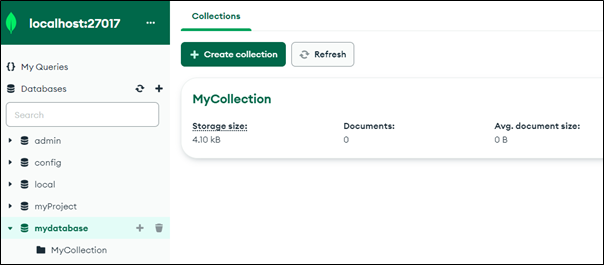
You can also verify the same in MongoDB shell.
> use mydatabase
< switched to db mydatabase
> show collections
< MyCollection
