
Article Categories
- All Categories
-
 Data Structure
-
 Networking
-
 RDBMS
RDBMS
-
 Operating System
-
 Java
Java
-
 MS Excel
-
 iOS
iOS
-
 HTML
HTML
-
 CSS
CSS
-
 Android
-
 Python
-
 C Programming
-
 C++
C++
-
 C#
C#
-
 MongoDB
-
 MySQL
MySQL
-
 Javascript
-
 PHP
PHP
-
 Economics & Finance
How to determine if C# .NET Core is installed?
Determining if C# .NET Core is installed on your system is essential for development and deployment. The dotnet command-line interface (CLI) provides several built-in options to check installation status, versions, and available components. These commands will display environment information if .NET Core is installed, or throw an error if it's not found.
Using dotnet --info
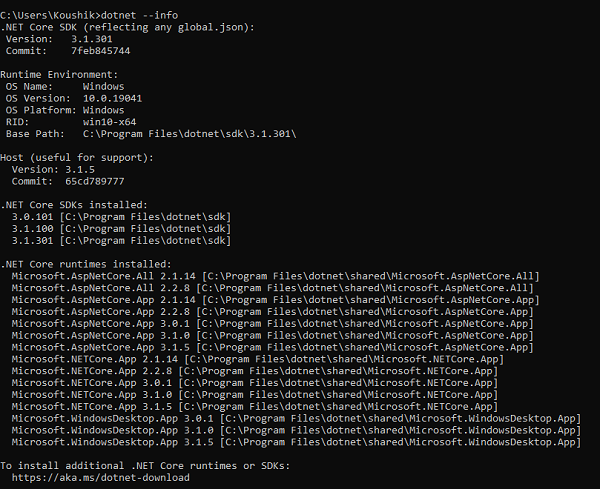
The --info option prints detailed information about the .NET Core installation and machine environment, including the current operating system and commit SHA of the .NET Core version −
dotnet --info
This command provides comprehensive details about your .NET installation, including SDK versions, runtime versions, and system information.
Using dotnet --version
The --version option prints the version of the .NET Core SDK currently in use −
dotnet --version
This is the quickest way to verify if .NET Core SDK is installed and check which version is active.

Using dotnet --list-runtimes
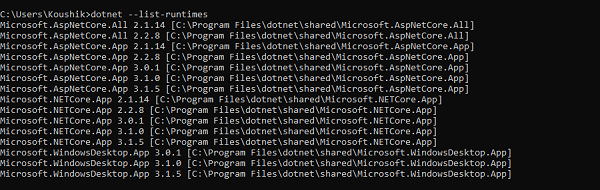
The --list-runtimes option displays all installed .NET Core runtimes. Note that an x86 version of the SDK lists only x86 runtimes, while an x64 version lists only x64 runtimes −
dotnet --list-runtimes
This command helps identify which runtime versions are available for running .NET applications.
Using dotnet --list-sdks
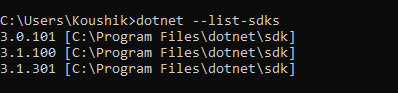
The --list-sdks option prints all installed .NET Core SDKs −
dotnet --list-sdks
This command is useful for development environments where multiple SDK versions might be installed.
Getting Help
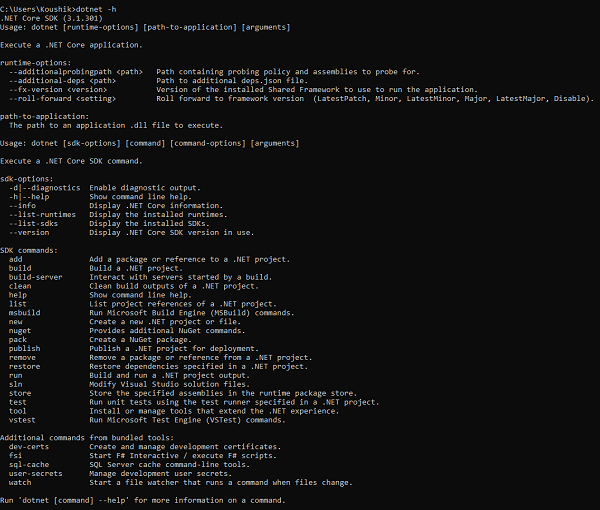
The -h or --help option displays a list of available commands and options −
dotnet --help
Command Summary
| Command | Purpose |
|---|---|
dotnet --info |
Shows detailed installation and environment information |
dotnet --version |
Displays the active SDK version |
dotnet --list-runtimes |
Lists all installed runtimes |
dotnet --list-sdks |
Lists all installed SDKs |
dotnet --help |
Shows available commands and options |
Conclusion
These dotnet CLI commands provide comprehensive ways to verify .NET Core installation status and gather detailed information about your development environment. Use dotnet --version for quick verification, dotnet --info for detailed information, and the list commands to see all available components.

3K+ Views
