
Article Categories
- All Categories
-
 Data Structure
-
 Networking
-
 RDBMS
RDBMS
-
 Operating System
-
 Java
Java
-
 MS Excel
-
 iOS
iOS
-
 HTML
HTML
-
 CSS
CSS
-
 Android
-
 Python
-
 C Programming
-
 C++
C++
-
 C#
C#
-
 MongoDB
-
 MySQL
MySQL
-
 Javascript
-
 PHP
PHP
-
 Economics & Finance
Write a program to display "Hello World" in react native?
Once React Native is installed on your system, you get a default code in App.js. This tutorial shows how to modify it to display "Hello World" on your mobile screen.
Default App.js Structure
When you create a new React Native project, the default App.js contains the following structure:
import React from 'react';
import { StyleSheet, Text, View } from 'react-native';

export default class App extends React.Component {
    render() {
        return (
            <View style={styles.container}>
                <Text>Open up App.js to start working on your app!</Text>
                <Text>Changes you make will automatically reload.</Text>
                <Text>Shake your phone to open the developer menu.</Text>
            </View>
        );
    }
}

const styles = StyleSheet.create({
    container: {
        flex: 1,
        backgroundColor: '#fff',
        alignItems: 'center',
        justifyContent: 'center',
    },
});
Required Imports
First, import the necessary React Native components:
import React from 'react';
import { StyleSheet, Text, View } from 'react-native';
The imports include:
- React - Core React library
- StyleSheet - For creating component styles
- Text - Component to display text
- View - Container component (like div in HTML)
Creating the Hello World Component
Replace the default text with "Hello World" and add custom styling:
export default class App extends React.Component {
    render() {
        return (
            <View style={styles.container}>
                <Text style={styles.helloText}>Hello World</Text>
            </View>
        );
    }
}
Adding Custom Styles
Create styles using StyleSheet.create() to make your "Hello World" text more visually appealing:
const styles = StyleSheet.create({
    container: {
        flex: 1,
        backgroundColor: '#fff',
        alignItems: 'center',
        justifyContent: 'center',
    },
    helloText: {
        color: 'green',
        fontSize: 25,
        fontWeight: 'bold'
    }
});
Complete Hello World Program
Here's the complete code for displaying "Hello World" in React Native:
import React from 'react';
import { StyleSheet, Text, View } from 'react-native';

export default class App extends React.Component {
    render() {
        return (
            <View style={styles.container}>
                <Text style={styles.helloText}>Hello World</Text>
            </View>
        );
    }
}

const styles = StyleSheet.create({
    container: {
        flex: 1,
        backgroundColor: '#fff',
        alignItems: 'center',
        justifyContent: 'center',
    },
    helloText: {
        color: 'green',
        fontSize: 25,
        fontWeight: 'bold'
    }
});
Key Points
- React Native uses JSX syntax similar to React web applications
- Styles are created using StyleSheet.create() for better performance
- The View component acts as a container, similar to a div in HTML
- Text must be wrapped in a Text component
- Style props are passed using curly braces: style={styles.styleName}
Output
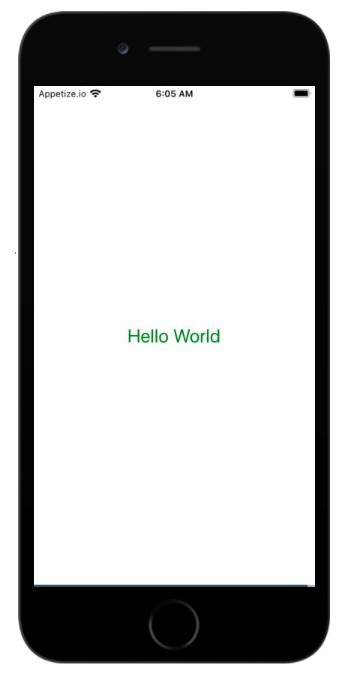
When you run this code, you'll see "Hello World" displayed in green text at the center of your mobile screen.
Conclusion
This simple React Native program demonstrates the basic structure of a mobile app. You've learned to import components, create a class component, and apply custom styles to display text on the screen.

2K+ Views
