
Article Categories
- All Categories
-
 Data Structure
-
 Networking
-
 RDBMS
RDBMS
-
 Operating System
-
 Java
Java
-
 MS Excel
-
 iOS
iOS
-
 HTML
HTML
-
 CSS
CSS
-
 Android
-
 Python
-
 C Programming
-
 C++
C++
-
 C#
C#
-
 MongoDB
-
 MySQL
MySQL
-
 Javascript
-
 PHP
PHP
-
 Economics & Finance
What is PID manager in Linux?
In Linux, when an executable stored on disk is called a program, and a program loaded into memory and running is called a process. A process is given a unique number called process ID (PID) that identifies that process to the system when it is started. If we ever need to kill a process, for example, we can refer to it by its PID. As each PID is unique, there is no ambiguity or risk of accidentally killing the wrong process (unless you enter the wrong PID).
The PID manager is a kernel subsystem responsible for allocating, managing, and recycling process identifiers in Linux. It ensures that each running process gets a unique PID and handles the reuse of PIDs when processes terminate.
How PID Manager Works
The PID manager maintains a bitmap or similar data structure to track which PIDs are currently in use. When a new process is created, the manager finds the next available PID and assigns it. When a process terminates, its PID is marked as available for future reuse.
PIDs in Linux typically range from 1 to 32768 by default, though this can be configured. The system cycles through available PIDs, wrapping around to lower numbers once the maximum is reached.
Viewing Process Information
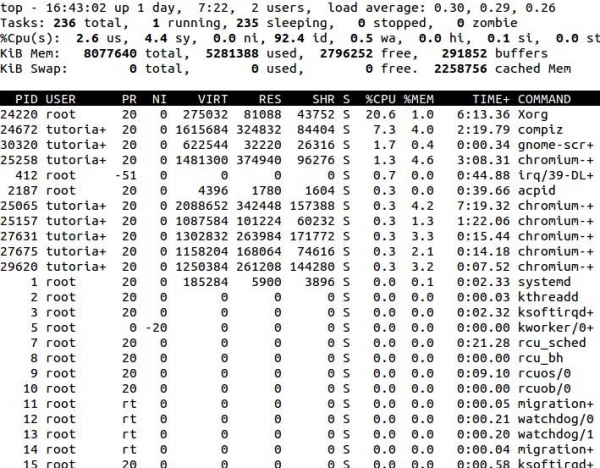
If we open top (in a terminal, type top and press enter), the PID column lists the process IDs of all processes currently loaded into memory regardless of state (sleeping, zombie, etc.). Both daemons (system processes) and user processes have their own process IDs. The PIDs are not always assigned in numerical order, so it's normal to see what appears to be a random selection of numbers.
The init Process
One very important process is called init. init is the mother of all processes on the system because all other processes run under it. Each process can be traced back to init, and it always has a PID of 1. The kernel itself has a PID of 0.
Key Features of PID Manager
Unique allocation − Ensures no two active processes share the same PID
Efficient reuse − Recycles PIDs from terminated processes
Range management − Handles the configured PID range limits
Thread support − Manages PIDs for both processes and threads
Common PID Management Commands
# View all processes with PIDs
ps aux

# Kill a process by PID
kill 1234

# View process tree showing parent-child relationships
pstree

# Check maximum PID value
cat /proc/sys/kernel/pid_max
Conclusion
The PID manager is a crucial kernel component that maintains process identity in Linux systems. It ensures efficient allocation and reuse of process identifiers, enabling reliable process management and system administration. Understanding PIDs helps in effective process monitoring and control.

2K+ Views
