
Article Categories
- All Categories
-
 Data Structure
-
 Networking
-
 RDBMS
RDBMS
-
 Operating System
-
 Java
Java
-
 MS Excel
-
 iOS
iOS
-
 HTML
HTML
-
 CSS
CSS
-
 Android
-
 Python
-
 C Programming
-
 C++
C++
-
 C#
C#
-
 MongoDB
-
 MySQL
MySQL
-
 Javascript
-
 PHP
PHP
-
 Economics & Finance
Selected Reading
What happens when JDialog is set with Modality type MODELESS in Java
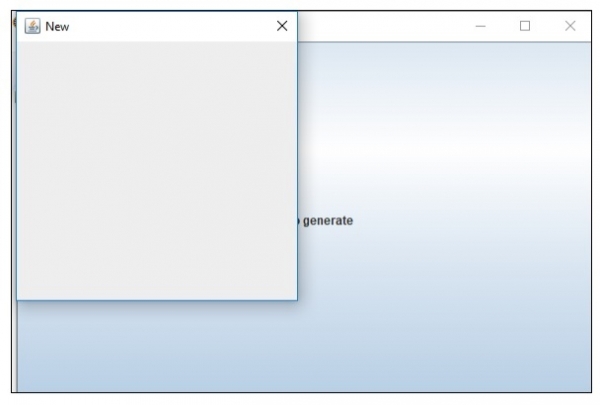
Modeless dialog boxes are on the screen and are available for use. The following is an example to set JDialog with Modality type MODELESS:
Example
import java.awt.Cursor;
import java.awt.Dialog.ModalityType;
import java.awt.Dimension;
import java.awt.event.ActionEvent;
import javax.swing.AbstractAction;
import javax.swing.JButton;
import javax.swing.JDialog;
import javax.swing.JFrame;
public class SwingDemo {
   public static void main(String[] args) {
      JFrame frame = new JFrame();
      frame.setSize(new Dimension(600, 400));
      JDialog dialog = new JDialog(frame, "New",ModalityType.MODELESS);
      dialog.setSize(300, 300);
      frame.add(new JButton(new AbstractAction("Click to generate") {
         @Override
         public void actionPerformed(ActionEvent e) {
            frame.setCursor(Cursor.getPredefinedCursor(Cursor.WAIT_CURSOR));
            dialog.setVisible(true);
         }
      }));
      frame.setVisible(true);
   }
}
Output
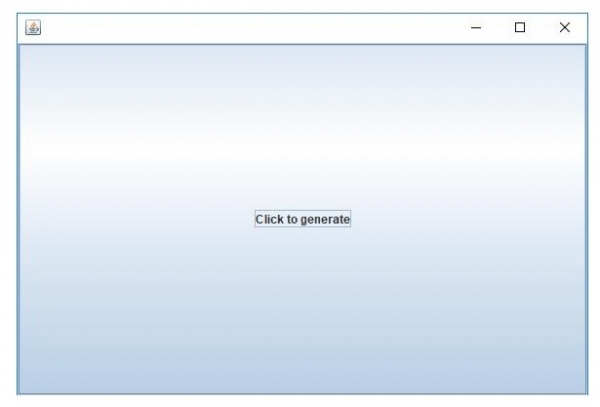
Now, click on it to generate a new Dailog. You can close both the dialog at any time since it is Modeless:

Updated on: 2019-07-30T22:30:26+05:30
263 Views

Advertisements