
Article Categories
- All Categories
-
 Data Structure
-
 Networking
-
 RDBMS
RDBMS
-
 Operating System
-
 Java
Java
-
 MS Excel
-
 iOS
iOS
-
 HTML
HTML
-
 CSS
CSS
-
 Android
-
 Python
-
 C Programming
-
 C++
C++
-
 C#
C#
-
 MongoDB
-
 MySQL
MySQL
-
 Javascript
-
 PHP
PHP
-
 Economics & Finance
What are the differences between JRadioButton and JCheckBox in Java?
Both JRadioButton and JCheckBox components can extend the JToggleButton class in Java, the main difference is that JRadioButton is a group of buttons in which only one button can be selected at a time, whereas JCheckBox is a group of checkboxes in which multiple items can be selected at a time.
JRadioButton
A JRadioButton is a component that represents an item with a state selected or unselected. Usually, a group of radio buttons is created to provide options to the user, but only one option can be selected at a time. JRadioButton will generate an ActionListener, ChangeListener, and ItemListener interfaces.
Instantiating JRadioButton:
JRadioButton Radio_Name = new JRadioButton();
The radio buttons are often used in a group to display multiple options, therefore, they are used with ButtonGroup class. The ButtonGroup has a property that only one button in a group is selected at a given time and it does not have the visual appearance.
Methods in JRadioButton
The important methods of JRadioButton are:
- setText()
- getText()
- setEnabled()
- setMnemonic()
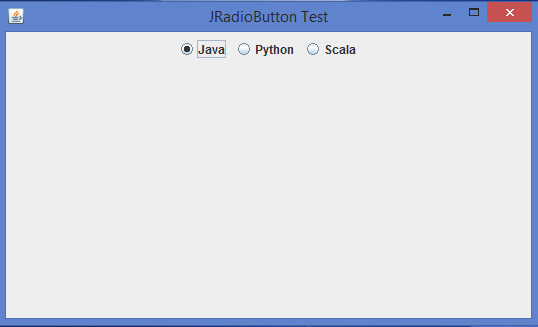
Example of JRadioButton
Below is an example of three checkboxes using JCheckBox in Java:
import java.awt.*;
import javax.swing.*;
public class JRadioButtonTest extends JFrame {
   public JRadioButtonTest() {
      super("JRadioButton Test");
      JRadioButton jrb1 = new JRadioButton("Java");
      JRadioButton jrb2 = new JRadioButton("Python");
      JRadioButton jrb3 = new JRadioButton("Scala");
      ButtonGroup group = new ButtonGroup();
      group.add(jrb1);
      group.add(jrb2);
      group.add(jrb3);
      setLayout(new FlowLayout());
      add(jrb1);
      add(jrb2);
      add(jrb3);
      setDefaultCloseOperation(JFrame.EXIT_ON_CLOSE);
      setSize(450,375);
      setLocationRelativeTo(null);
      setVisible(true);
   }
   public static void main(String[] args) {
      SwingUtilities.invokeLater(new Runnable() {
         @Override
         public void run() {
            new JRadioButtonTest();
        }
      });
   }
}
Output
JCheckBox
A JCheckBox is a component that represents an item that shows a state of selected or unselected. We can change this state by clicking on the checkbox of the component.A JCheckBox can generate either ItemListener or ActionListener interfaces.
Instantiating JCheckBox:
JCheckBox Checkbox_name = new JCheckBox();
A standard JCheckBox component contains a checkbox and a label that describes the purpose of the checkbox.
Methods in JCheckBox
The important methods of JCheckBox are:
- setLabel()
- getLabel()
- setState()
- getState()
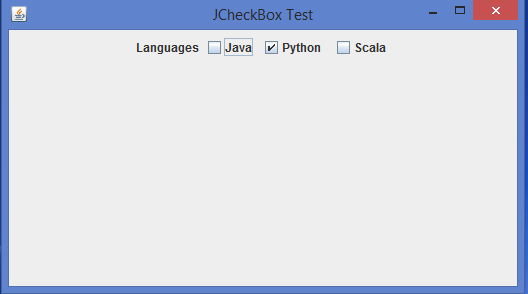
Example of JCheckBox
Below is an example of three checkboxes using JCheckBox in Java:
import java.awt.*;
import javax.swing.*;
public class JCheckBoxTest extends JFrame {
   JCheckBoxTest() {
      super("JCheckBox Test");
      JLabel lblHobbies = new JLabel("Languages");
      JCheckBox chkSports = new JCheckBox("Java");
      JCheckBox chkMusic = new JCheckBox("Python ",true);
      JCheckBox chkReading = new JCheckBox("Scala");
      setLayout(new FlowLayout());
      add(lblHobbies);
      add(chkSports);
      add(chkMusic);
      add(chkReading);
      setDefaultCloseOperation(JFrame.EXIT_ON_CLOSE);
      setSize(450,375);
      setLocationRelativeTo(null);
      setVisible(true);
   }
   public static void main(String[] args) {
      SwingUtilities.invokeLater(new Runnable() {
         @Override
         public void run() {
            new JCheckBoxTest();
         }
      });
   }
}
Output
Difference Table
The following are the key differences between JRadioButton and JCheckBox in Java:
| Criteria | JRadioButton | JCheckBox |
|---|---|---|
| Selection Behavior | Only one option can be selected in a group | Multiple options can be selected independently |
| Grouping | Usually grouped using ButtonGroup | No grouping required |
| Default Visual | Round button | Square checkbox |
| Event Listeners | ActionListener, ItemListener, ChangeListener | ActionListener, ItemListener |

4K+ Views
