
Article Categories
- All Categories
-
 Data Structure
-
 Networking
-
 RDBMS
RDBMS
-
 Operating System
-
 Java
Java
-
 MS Excel
-
 iOS
iOS
-
 HTML
HTML
-
 CSS
CSS
-
 Android
-
 Python
-
 C Programming
-
 C++
C++
-
 C#
C#
-
 MongoDB
-
 MySQL
MySQL
-
 Javascript
-
 PHP
PHP
-
 Economics & Finance
Selected Reading
Viewing data in a table in SAP HANA database
When the data is entered, you can see the data in this row-based table by going to the Data Preview option. To see the data, right-click on table name → Open Data Preview
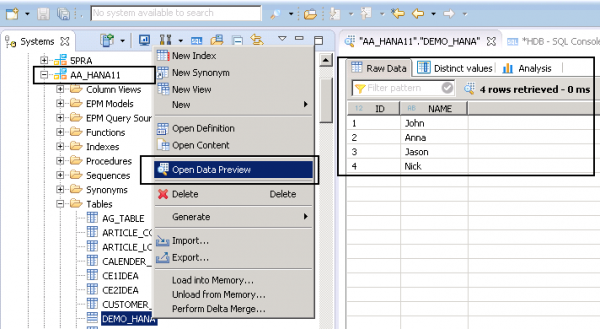
When you run Data Preview of a table, you can see full data under the Raw Data tab. You can also view distinct values and perform some analysis.

Updated on: 2020-06-22T10:45:47+05:30
2K+ Views

Advertisements