
Article Categories
- All Categories
-
 Data Structure
-
 Networking
-
 RDBMS
RDBMS
-
 Operating System
-
 Java
Java
-
 MS Excel
-
 iOS
iOS
-
 HTML
HTML
-
 CSS
CSS
-
 Android
-
 Python
-
 C Programming
-
 C++
C++
-
 C#
C#
-
 MongoDB
-
 MySQL
MySQL
-
 Javascript
-
 PHP
PHP
-
 Economics & Finance
Selected Reading
Inserting data in a table in SAP HANA
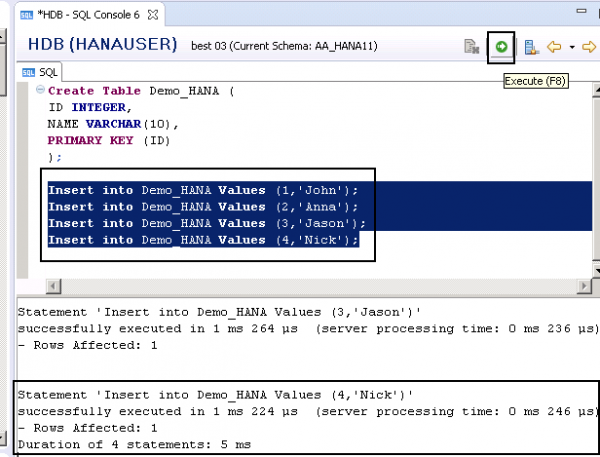
To insert the data, you need to run the Insert statement in SQL editor. “Demo_HANA” is table name.
Insert into Demo_HANA Values (1,'John');
Insert into Demo_HANA Values (2,'Anna');
Insert into Demo_HANA Values (3,'Jason');
Insert into Demo_HANA Values (4,'Nick');
In SQL editor, add INSERT statements and execute (F8) as below −

Updated on: 2020-02-21T10:37:26+05:30
2K+ Views

Advertisements