
Article Categories
- All Categories
-
 Data Structure
-
 Networking
-
 RDBMS
RDBMS
-
 Operating System
-
 Java
Java
-
 MS Excel
-
 iOS
iOS
-
 HTML
HTML
-
 CSS
CSS
-
 Android
-
 Python
-
 C Programming
-
 C++
C++
-
 C#
C#
-
 MongoDB
-
 MySQL
MySQL
-
 Javascript
-
 PHP
PHP
-
 Economics & Finance
Swift Program to find the area of the rectangle
This tutorial will discuss how to write a Swift program to find the area of the rectangle.
A rectangle is a quadrilateral or a closed two-dimensional shape with four sides. All the angles of a rectangle are equal (90 degrees) and the opposite sides are equal and parallel with each other.
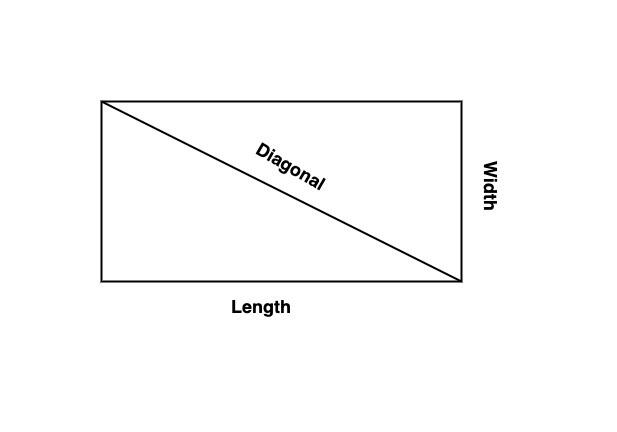
The area of the rectangle is known as the total space enclosed inside the boundaries of the rectangle. We can calculate the area of the rectangle by multiplying the length and width.
Formula for Area of Rectangle
Following is the formula for the area of the rectangle ?
Area = Length(L) * Width(W)
Below is a demonstration of the same ?
Input
Suppose our given input is ?
Length = 10
Width = 5
Output
The desired output would be ?
Area = 10 * 5 = 50.
Area = 50
Algorithm
Following is the algorithm ?
Step 1 ? Declare two variables of integer type to store the value of the length and width of the rectangle. Here the value of these variables can be pre-defined or user-defined.
Step 2 ? Declare an Area variable to store the area of the rectangle.
var RectArea = RectLength * RectWidth
Step 3 ? Print the output.
Example 1
The following program shows how to find the area of the rectangle.
<div class="execute"></div><div class="code-mirror  language-javascript" contenteditable="plaintext-only" spellcheck="false" style="outline: none; overflow-wrap: break-word; overflow-y: auto; white-space: pre-wrap;"><span class="token keyword">import</span> Foundation
<span class="token keyword">import</span> Glibc

<span class="token keyword">var</span> RectLength <span class="token operator">:</span> Int <span class="token operator">=</span> <span class="token number">20</span>
<span class="token keyword">var</span> RectWidth <span class="token operator">:</span> Int <span class="token operator">=</span> <span class="token number">10</span>

<span class="token keyword">var</span> RectArea <span class="token operator">=</span> RectLength <span class="token operator">*</span> RectWidth

<span class="token function">print</span><span class="token punctuation">(</span><span class="token string">"Length - "</span><span class="token punctuation">,</span> RectLength<span class="token punctuation">)</span>
<span class="token function">print</span><span class="token punctuation">(</span><span class="token string">"Width - "</span><span class="token punctuation">,</span> RectWidth<span class="token punctuation">)</span>
<span class="token function">print</span><span class="token punctuation">(</span><span class="token string">"So, Area of the rectangle- "</span><span class="token punctuation">,</span> RectArea<span class="token punctuation">)</span>
</div><div class="output-wrapper"><div class="console-close"></div><div class="code-output"></div></div>
Output
Length - 20
Width - 10
So, Area of the rectangle- 200
Here, in the above code, we find the area of the rectangle by multiplying the given length and width of the rectangle.
var RectArea = RectLength * RectWidth
That is ReactArea = 20 * 10 = 200. And display the area that is 200
Example 2
The following program shows how to find the area of the rectangle with user-defined inputs.
<div class="code-mirror  language-javascript" contenteditable="plaintext-only" spellcheck="false" style="outline: none; overflow-wrap: break-word; overflow-y: auto; white-space: pre-wrap;"><span class="token keyword">import</span> Foundation
<span class="token keyword">import</span> Glibc

<span class="token comment">// Taking input from the user </span>
<span class="token function">print</span><span class="token punctuation">(</span><span class="token string">"Please enter the length - "</span><span class="token punctuation">)</span>
<span class="token keyword">var</span> RectLength <span class="token operator">=</span> <span class="token function">Int</span><span class="token punctuation">(</span><span class="token function">readLine</span><span class="token punctuation">(</span><span class="token punctuation">)</span><span class="token operator">!</span><span class="token punctuation">)</span><span class="token operator">!</span>
<span class="token function">print</span><span class="token punctuation">(</span><span class="token string">"Please enter the width - "</span><span class="token punctuation">)</span>
<span class="token keyword">var</span> RectWidth <span class="token operator">=</span> <span class="token function">Int</span><span class="token punctuation">(</span><span class="token function">readLine</span><span class="token punctuation">(</span><span class="token punctuation">)</span><span class="token operator">!</span><span class="token punctuation">)</span><span class="token operator">!</span>

<span class="token comment">// Finding the area of the rectangle </span>
<span class="token keyword">var</span> RectArea <span class="token operator">=</span> RectLength <span class="token operator">*</span> RectWidth

<span class="token function">print</span><span class="token punctuation">(</span><span class="token string">"Entered Length - "</span><span class="token punctuation">,</span> RectLength<span class="token punctuation">)</span>
<span class="token function">print</span><span class="token punctuation">(</span><span class="token string">"Entered Width - "</span><span class="token punctuation">,</span> RectWidth<span class="token punctuation">)</span>
<span class="token function">print</span><span class="token punctuation">(</span><span class="token string">"So, Area of the rectangle- "</span><span class="token punctuation">,</span> RectArea<span class="token punctuation">)</span>
</div>
STDIN Input
Please enter the length -
6
Please enter the width -
3
Output
Entered Length -  6
Entered Width -  3
So, Area of the rectangle - 18
Here, in the above code, we find the area of the rectangle by multiplying the given length and width of the rectangle.
var RectArea = RectLength * RectW idth
Here we take the value of RectLength and RectWidth from the user using readLine() function and convert the entered value in the integer type using Int() function. So ReactArea = 6 * 3 = 18, And display the result that is 18.
Area of a rectangle in terms of diagonals
We can also calculate the area of the rectangle with the help of diagonal and width. A rectangle has two diagonals and both are equal.
Formula for Area of Rectangle using Diagonals
Following is the formula for the area of rectangle in terms of diagonals
Area = Width(? (Diagonal)<sup>2</sup> - (Width)<sup>2</sup>)
Example
The following program shows how to find the area of the rectangle using diagonals.
<div class="execute"></div><div class="code-mirror  language-javascript" contenteditable="plaintext-only" spellcheck="false" style="outline: none; overflow-wrap: break-word; overflow-y: auto; white-space: pre-wrap;"><span class="token keyword">import</span> Foundation
<span class="token keyword">import</span> Glibc

<span class="token keyword">var</span> RectDiagonal <span class="token operator">=</span> <span class="token number">30.0</span>
<span class="token keyword">var</span> RectWidth <span class="token operator">=</span> <span class="token number">10.0</span>

<span class="token comment">// Finding the area of the rectangle in terms of diagonals </span>
<span class="token keyword">var</span> RectArea <span class="token operator">=</span> RectWidth <span class="token operator">*</span> <span class="token punctuation">(</span><span class="token function">sqrt</span><span class="token punctuation">(</span><span class="token function">pow</span><span class="token punctuation">(</span>RectDiagonal<span class="token punctuation">,</span> <span class="token number">2</span><span class="token punctuation">)</span> <span class="token operator">-</span> <span class="token function">pow</span><span class="token punctuation">(</span>RectWidth<span class="token punctuation">,</span> <span class="token number">2</span><span class="token punctuation">)</span><span class="token punctuation">)</span><span class="token punctuation">)</span>

<span class="token function">print</span><span class="token punctuation">(</span><span class="token string">"Diagonal - "</span><span class="token punctuation">,</span> RectDiagonal<span class="token punctuation">)</span>
<span class="token function">print</span><span class="token punctuation">(</span><span class="token string">"Width - "</span><span class="token punctuation">,</span> RectWidth<span class="token punctuation">)</span>
<span class="token function">print</span><span class="token punctuation">(</span><span class="token string">"So, Area of the rectangle- "</span><span class="token punctuation">,</span> RectArea<span class="token punctuation">)</span>
</div><div class="output-wrapper"><div class="console-close"></div><div class="code-output"></div></div>
Output
Diagonal -  30.0
Width -  10.0
So, Area of the rectangle-  282.842712474619
Here in the above code, we find the area of the rectangle with the help of diagonal and width using the formula ?
var RectArea = RectWidth * (sqrt(pow(RectDiagonal, 2) - pow(RectWidth, 2)))
Here we find the square root using sqrt() function and pow() function is used to find the power. So the working of the above code is
ReactArea = 10.0 * (sqrt(pow(30.0, 2) - pow(10.0, 2))) = 10.0 * (sqrt(900 - 100)) = 10.0 * (sqrt(800)) = 10.0 * (28.2842712474619) = 282.842712474619

1K+ Views
