
Article Categories
- All Categories
-
 Data Structure
-
 Networking
-
 RDBMS
RDBMS
-
 Operating System
-
 Java
Java
-
 MS Excel
-
 iOS
iOS
-
 HTML
HTML
-
 CSS
CSS
-
 Android
-
 Python
-
 C Programming
-
 C++
C++
-
 C#
C#
-
 MongoDB
-
 MySQL
MySQL
-
 Javascript
-
 PHP
PHP
-
 Economics & Finance
Selected Reading
Setting Transparency Based on Pixel Values in Matplotlib
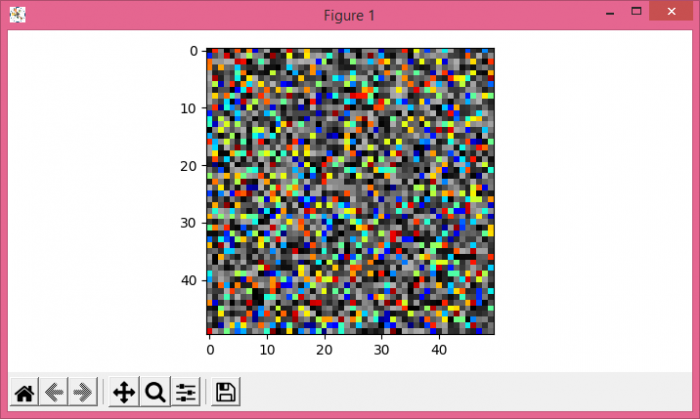
To set transparency based on pixel values in matplotlib, get masked data wherever data is less than certain values. Lesser value will result in full overlapping between two images.
Steps
Create data1 and data2 using numpy.
Get the masked data using numpy's masked_where() method.
Using subplots() method, create a figure and a set of subplots (fig and ax).
Display the data (data1 and masked data) as an image, i.e., on a 2D regular raster, using imshow() method, with different colormaps, jet and gray.
To display the figure, use show() method.
Example
import numpy as np
import matplotlib.pyplot as plt
import matplotlib.cm as cm
plt.rcParams["figure.figsize"] = [7.00, 3.50]
plt.rcParams["figure.autolayout"] = True
data1 = np.random.rand(50, 50)
data2 = np.random.rand(50, 50)
masked_data = np.ma.masked_where(data2 < .7, data2)
fig, ax = plt.subplots()
ax.imshow(data2, cmap=cm.gray)
ax.imshow(masked_data, cmap=cm.jet, interpolation='none')
plt.show()
Output

Updated on: 2021-05-08T09:07:03+05:30
1K+ Views

Advertisements