
Article Categories
- All Categories
-
 Data Structure
-
 Networking
-
 RDBMS
RDBMS
-
 Operating System
-
 Java
Java
-
 MS Excel
-
 iOS
iOS
-
 HTML
HTML
-
 CSS
CSS
-
 Android
-
 Python
-
 C Programming
-
 C++
C++
-
 C#
C#
-
 MongoDB
-
 MySQL
MySQL
-
 Javascript
-
 PHP
PHP
-
 Economics & Finance
Performing white TopHat operation on images using OpenCV
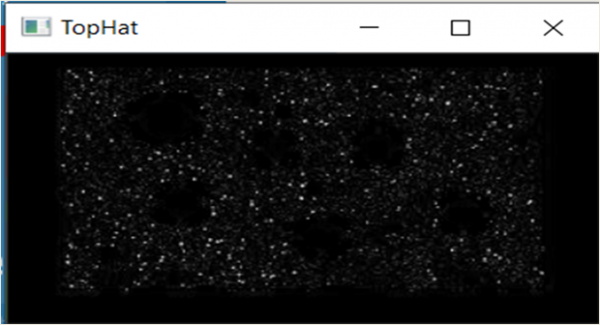
In this tutorial, we will perform the TopHat operation on images using OpenCV. TopHat operation is a morphological transformation that extracts small elements and details from images by highlighting bright objects on dark backgrounds. We will use the cv2.morphologyEx() function with the cv2.MORPH_TOPHAT operation.
What is TopHat Operation?
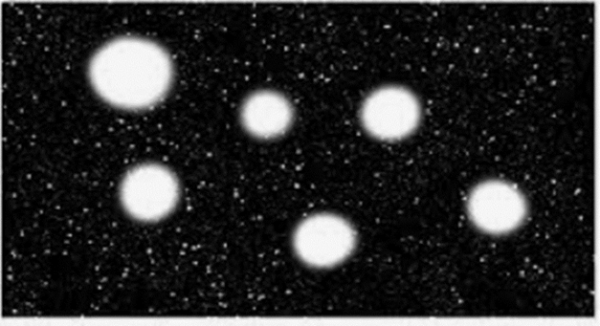
TopHat (also called White TopHat) is defined as the difference between the input image and its opening. It highlights small bright details that are smaller than the structuring element ?
Original Image
Algorithm
Step 1: Import OpenCV library
Step 2: Read the input image
Step 3: Define the kernel size and type
Step 4: Apply TopHat operation using cv2.morphologyEx()
Step 5: Display the result
Implementation
import cv2
import numpy as np

# Read the image
image = cv2.imread('tophat.jpg')

# Define kernel size and create structuring element
filter_size = (5, 5)
kernel = cv2.getStructuringElement(cv2.MORPH_RECT, filter_size)

# Apply TopHat morphological operation
tophat_image = cv2.morphologyEx(image, cv2.MORPH_TOPHAT, kernel)

# Display the results
cv2.imshow('Original Image', image)
cv2.imshow('TopHat Result', tophat_image)
cv2.waitKey(0)
cv2.destroyAllWindows()
Understanding Parameters
| Parameter | Description | Example Values |
|---|---|---|
image |
Input image | Grayscale or color image |
cv2.MORPH_TOPHAT |
TopHat operation flag | Fixed constant |
kernel |
Structuring element | (5,5), (7,7), (3,3) |
Different Kernel Types
import cv2
import numpy as np

# Create different kernel types
rect_kernel = cv2.getStructuringElement(cv2.MORPH_RECT, (5, 5))
ellipse_kernel = cv2.getStructuringElement(cv2.MORPH_ELLIPSE, (5, 5))
cross_kernel = cv2.getStructuringElement(cv2.MORPH_CROSS, (5, 5))

print("Rectangular kernel:")
print(rect_kernel)
print("\nElliptical kernel:")
print(ellipse_kernel)
Rectangular kernel:
[[1 1 1 1 1]
 [1 1 1 1 1]
 [1 1 1 1 1]
 [1 1 1 1 1]
 [1 1 1 1 1]]

Elliptical kernel:
[[0 0 1 0 0]
 [1 1 1 1 1]
 [1 1 1 1 1]
 [1 1 1 1 1]
 [0 0 1 0 0]]
Output
Key Points
- TopHat operation extracts small bright objects from dark backgrounds
- Kernel size affects the detail level − smaller kernels extract finer details
- Works best on images with good contrast between foreground and background
- Commonly used in text extraction, noise detection, and feature enhancement
Conclusion
TopHat morphological operation effectively enhances small bright details in images by computing the difference between the original image and its opening. This technique is valuable for extracting fine features and improving image analysis in computer vision applications.

1K+ Views
