
Article Categories
- All Categories
-
 Data Structure
-
 Networking
-
 RDBMS
RDBMS
-
 Operating System
-
 Java
Java
-
 MS Excel
-
 iOS
iOS
-
 HTML
HTML
-
 CSS
CSS
-
 Android
-
 Python
-
 C Programming
-
 C++
C++
-
 C#
C#
-
 MongoDB
-
 MySQL
MySQL
-
 Javascript
-
 PHP
PHP
-
 Economics & Finance
Performing an opening operation on an image using OpenCV
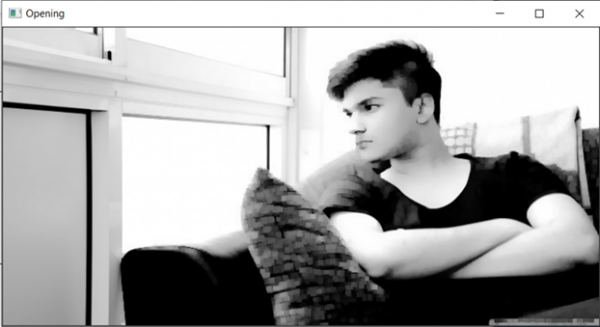
In this program, we will perform the opening operation on an image using OpenCV. Opening removes small objects from the foreground of an image, placing them in the background. This technique can also be used to find specific shapes in an image. Opening is mathematically defined as erosion followed by dilation.
The function we use for this task is cv2.morphologyEx(image, cv2.MORPH_OPEN, kernel).
Original Image

Algorithm
Step 1: Import cv2 and numpy
Step 2: Read the image
Step 3: Define the kernel (structuring element)
Step 4: Pass the image and kernel to cv2.morphologyEx() function
Step 5: Display the output
Example Code
import cv2
import numpy as np

# Read the input image
image = cv2.imread('testimage.jpg')

# Define a 5x5 rectangular kernel
kernel = np.ones((5,5), np.uint8)

# Perform opening operation
opened_image = cv2.morphologyEx(image, cv2.MORPH_OPEN, kernel)

# Display the result
cv2.imshow('Opening', opened_image)
cv2.waitKey(0)
cv2.destroyAllWindows()
How Opening Works
The opening operation consists of two steps:
- Erosion: Shrinks the white regions (foreground objects)
- Dilation: Expands the remaining white regions back to their original size
This process effectively removes small noise and thin connections between objects while preserving the shape of larger objects.
Kernel Size Effects
import cv2
import numpy as np

image = cv2.imread('testimage.jpg')

# Different kernel sizes
kernel_3x3 = np.ones((3,3), np.uint8)
kernel_7x7 = np.ones((7,7), np.uint8)

# Apply opening with different kernels
opening_3x3 = cv2.morphologyEx(image, cv2.MORPH_OPEN, kernel_3x3)
opening_7x7 = cv2.morphologyEx(image, cv2.MORPH_OPEN, kernel_7x7)

cv2.imshow('Original', image)
cv2.imshow('Opening 3x3', opening_3x3)
cv2.imshow('Opening 7x7', opening_7x7)
cv2.waitKey(0)
cv2.destroyAllWindows()
Output
Common Use Cases
- Removing noise from binary images
- Separating connected objects
- Smoothing object boundaries
- Eliminating thin protrusions
Conclusion
The opening operation in OpenCV effectively removes small objects and noise while preserving larger structures. Use smaller kernels for fine noise removal and larger kernels for more aggressive filtering.

929 Views
