
Article Categories
- All Categories
-
 Data Structure
-
 Networking
-
 RDBMS
RDBMS
-
 Operating System
-
 Java
Java
-
 MS Excel
-
 iOS
iOS
-
 HTML
HTML
-
 CSS
CSS
-
 Android
-
 Python
-
 C Programming
-
 C++
C++
-
 C#
C#
-
 MongoDB
-
 MySQL
MySQL
-
 Javascript
-
 PHP
PHP
-
 Economics & Finance
Selected Reading
How to verify an attribute is present in an element using Selenium WebDriver?
We can verify if an attribute is present in an element with Selenium webdriver. This is achieved with the help of the getAttribute method. In an html document, each element is identified with its tagname along with the element attributes with their values. To get an attribute value, we have to pass the element attribute as an argument to the getAttribute method.
Let us see the html code of an element and obtain the value of its src attribute. The value of its src attribute shall be /about/images/logo.png.

Example
Code Implementation.
import org.openqa.selenium.By;
import org.openqa.selenium.Keys;
import org.openqa.selenium.WebDriver;
import org.openqa.selenium.WebElement;
import org.openqa.selenium.chrome.ChromeDriver;
import java.util.concurrent.TimeUnit;
public class AttributeVal{
   public static void main(String[] args) {
      System.setProperty("webdriver.chrome.driver", "C:\Users\ghs6kor\Desktop\Java\chromedriver.exe");
      WebDriver driver = new ChromeDriver();
      driver.get("https://www.tutorialspoint.com/about/about_careers.htm");
      driver.manage().timeouts().implicitlyWait(5, TimeUnit.SECONDS);
      // identify element
      WebElement l=driver.findElement(By.className("tp-logo"));
      // getAttribute() to get src value
      String value = l.getAttribute("src");
      System.out.println("Src attribute is: "+ value);
      driver.close()
   }
}
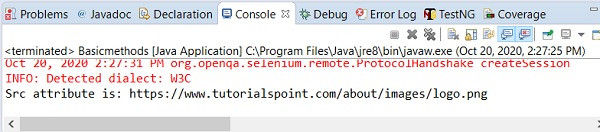
Output

Updated on: 2020-10-26T07:17:26+05:30
5K+ Views

Advertisements