
Article Categories
- All Categories
-
 Data Structure
-
 Networking
-
 RDBMS
RDBMS
-
 Operating System
-
 Java
Java
-
 MS Excel
-
 iOS
iOS
-
 HTML
HTML
-
 CSS
CSS
-
 Android
-
 Python
-
 C Programming
-
 C++
C++
-
 C#
C#
-
 MongoDB
-
 MySQL
MySQL
-
 Javascript
-
 PHP
PHP
-
 Economics & Finance
Selected Reading
How to set default download directory in selenium Chrome Capabilities?
We can set the default download directory in Selenium with Chrome capabilities. All the browsers have a download directory set by default. We can modify it via the browser settings.
We can change the setting manually, but it gets modified on triggering a script. We change the directory for download in Chrome browser with the help of ChromeOptions class.
We are required to add capabilities to the browser with the parameter download.default_directory. The path of the new location to be set is considered as its value.
Example
Code Implementation.
import java.io.File;
import org.openqa.selenium.By;
import java.io.IOException;
import org.openqa.selenium.chrome.ChromeDriver;
import org.openqa.selenium.chrome.ChromeOptions;
import java.util.HashMap;
import java.util.Map;
public class SetDownloadPathChrome {
   public static void main(String[] args) throws IOException {
      System.setProperty("webdriver.chrome.driver", "C:\Users\ghs6kor\Desktop\Java\chromedriver.exe");
      // new download path set
      Map<String, Object> p = new HashMap<String, Object>();
      // File.separator to get folder path p.put("download.default_directory", System.getProperty("user.dir") + File.separator + "Downloads" + File.separator + "FilesDownloadChrome");
      // adding capabilities to browser
      ChromeOptions o = new ChromeOptions();
      o.setExperimentalOption("prefs", p);
      // adding desired capabilities to browser
      ChromeDriver driver= new ChromeDriver(o);
      driver.get("https://www.seleniumhq.org/download/");
      //maximize window
      driver.manage().window().maximize();
      // identify element and start download
      driver.findElement(By.linkText("32 bit Windows IE")).click();
   }
}
Output
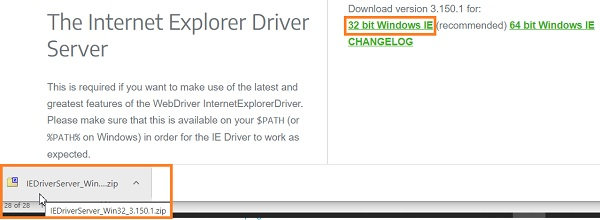
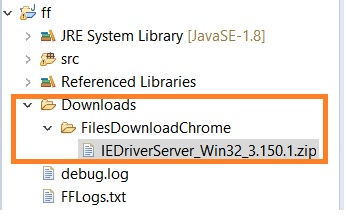
Moreover, the file gets downloaded within the project folder.

Updated on: 2020-12-28T12:57:25+05:30
4K+ Views

Advertisements