
Article Categories
- All Categories
-
 Data Structure
-
 Networking
-
 RDBMS
RDBMS
-
 Operating System
-
 Java
Java
-
 MS Excel
-
 iOS
iOS
-
 HTML
HTML
-
 CSS
CSS
-
 Android
-
 Python
-
 C Programming
-
 C++
C++
-
 C#
C#
-
 MongoDB
-
 MySQL
MySQL
-
 Javascript
-
 PHP
PHP
-
 Economics & Finance
Selected Reading
How can I download a file on a click event using selenium?
We can download a file on a click event in Selenium. Normally, on clicking on the download link, a pop-up comes with the file name along with the Open and Save option.
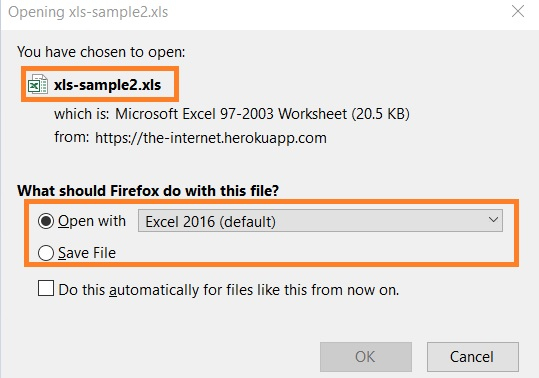
To download with a click event, an object of the FirefoxOptions class is to be created. Then with the addPreference method, we shall configure browser preferences.
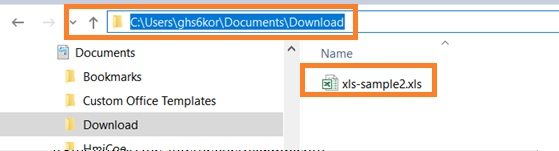
We shall mention the location where the download is to be done along with the neverAsk.openFile and neverAsk.saveToDisk preferences are to be set.
Example
Code Implementation.
import org.openqa.selenium.By;
import org.openqa.selenium.WebDriver;
import org.openqa.selenium.WebElement;
import org.openqa.selenium.firefox.FirefoxDriver;
import org.openqa.selenium.firefox.FirefoxOptions;
import java.util.concurrent.TimeUnit;
public class FileDwnloadWithClick{
   public static void main(String[] args) {
      System.setProperty("webdriver.gecko.driver", "C:\Users\ghs6kor\Desktop\Java\geckodriver.exe");
      // create object of FirefoxOptions class
      FirefoxOptions profile = new FirefoxOptions();
      // adding browser preferences with addPreference method
      profile.addPreference("browser.download.folderList", 2);
      // location of downloaded file
      profile.addPreference("browser.download.dir",
      "C:\Users\ghs6kor\Documents\Download");
      profile.addPreference("browser.helperApps.neverAsk.openFile", "text/csv,application/x msexcel,application/excel," + "application/x-excel,application/vnd.ms-excel," + "image/png,image/jpeg,text/html,text/plain," + "application/msword,application/xml");
      profile.addPreference("browser.helperApps.neverAsk.saveToDisk", "text/csv,application/x-msexcel," + "application/excel," + "application/x-excel," +"application/vnd.ms- excel,image/png,image/jpeg,text/html," +"text/plain,application/msword,application/xml");
      // connecting browser options to webdriver
      WebDriver driver = new FirefoxDriver(profile);
      driver.get("https://the-internet.herokuapp.com/download");
      //maximize window
      driver.manage().window().maximize();
      // identify element and start download
      driver.findElement(By.linkText("xls-sample2.xls")).click();
   }
}
Output
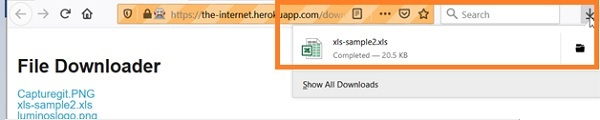
Moreover, file gets downloaded at the mentioned location.

Updated on: 2020-12-28T12:54:51+05:30
2K+ Views

Advertisements