
Article Categories
- All Categories
-
 Data Structure
-
 Networking
-
 RDBMS
RDBMS
-
 Operating System
-
 Java
Java
-
 MS Excel
-
 iOS
iOS
-
 HTML
HTML
-
 CSS
CSS
-
 Android
-
 Python
-
 C Programming
-
 C++
C++
-
 C#
C#
-
 MongoDB
-
 MySQL
MySQL
-
 Javascript
-
 PHP
PHP
-
 Economics & Finance
Selected Reading
How to save an R data frame as txt file?
If we want to use a data frame created in R in the future then it is better to save that data frame as txt file because it is obvious that data creation takes time. This can be done by using write.table function. For example, if we have a data frame df then we can save it as txt file by using the code write.table(df,"df.txt",sep="\t",row.names=FALSE)
Consider the below data frame −
Example
set.seed(111)
x1<-LETTERS[1:20]
x2<-sample(0:5,20,replace=TRUE)
x3<-rnorm(20,1,0.40)
x4<-rpois(20,3)
df<-data.frame(x1,x2,x3,x4)
df
Output
   x1 x2 x3 x4
1 A 5 1.1576216 1
2 B 2 1.3190114 2
3 C 3 0.3733339 0
4 D 2 0.9656596 2
5 E 0 0.8563442 5
6 F 2 0.5225564 4
7 G 4 1.1456747 3
8 H 2 1.1446650 1
9 I 3 1.1387857 3
10 J 1 1.0758946 3
11 K 0 0.9361693 2
12 L 4 1.1306197 7
13 M 4 1.2393017 1
14 N 1 0.2633863 4
15 O 3 2.0872222 1
16 P 5 1.0764978 5
17 Q 1 0.4794816 1
18 R 0 -0.2452869 2
19 S 2 0.6234570 1
20 T 0 1.5601035 2
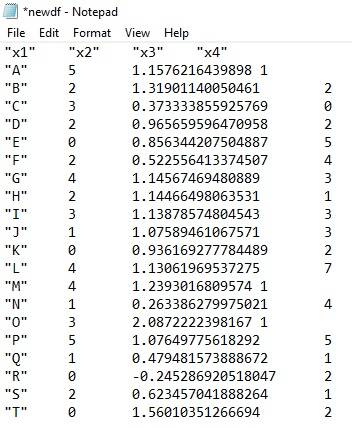
Saving the above data frame as txt file by naming the txt file as newdf:
Example
write.table(df,"newdf.txt",sep="\t",row.names=FALSE)
Output

Updated on: 2026-03-11T22:50:52+05:30
3K+ Views

Advertisements