
Article Categories
- All Categories
-
 Data Structure
-
 Networking
-
 RDBMS
RDBMS
-
 Operating System
-
 Java
Java
-
 MS Excel
-
 iOS
iOS
-
 HTML
HTML
-
 CSS
CSS
-
 Android
-
 Python
-
 C Programming
-
 C++
C++
-
 C#
C#
-
 MongoDB
-
 MySQL
MySQL
-
 Javascript
-
 PHP
PHP
-
 Economics & Finance
How to Run Python Flask App Online using Ngrok?
Ngrok is a tool that creates a secure tunnel between your local machine and the internet. It allows developers to expose their local web server to the internet without deploying it to a remote server. Python Flask lets you create web applications locally, but with Ngrok, you can showcase them online instantly.
Step 1: Install Ngrok
Download Ngrok from its official website (https://ngrok.com/download) for your operating system (Windows/macOS/Linux). Extract the archive to your preferred folder location.
Step 2: Create a Flask App
Create a new Python file called app.py with a simple Flask application ?
from flask import Flask

app = Flask(__name__)

@app.route('/')
def hello():
    return 'Hello, World!'

if __name__ == '__main__':
    app.run(port=5000)
Step 3: Run the Flask App Locally
Start your Flask application by running this command in your terminal ?
python app.py
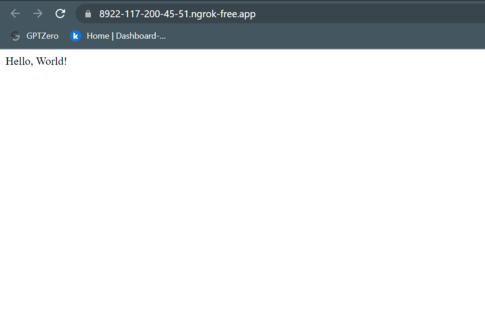
Test the app by visiting http://localhost:5000 in your browser. You should see "Hello, World!" displayed.
 * Running on http://127.0.0.1:5000
 * Debug mode: off
Step 4: Start Ngrok
Open a new terminal window and navigate to the Ngrok folder. Run the following command to create a tunnel to your Flask app ?
./ngrok http 5000
On Windows, use:
ngrok.exe http 5000
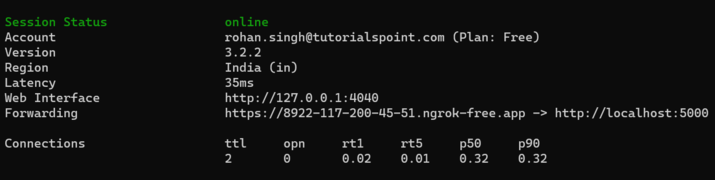
Ngrok will display a public URL (like https://abc123.ngrok.io) that tunnels to your local Flask app.
Step 5: Access Your Flask App Online
Copy the HTTPS URL provided by Ngrok and share it with anyone. They can access your Flask app from anywhere in the world using this URL.
Common Use Cases
| Use Case | Description |
|---|---|
| Testing | Test your Flask app on different devices and networks without deployment |
| Demonstrations | Showcase your work to clients or stakeholders instantly |
| Debugging | Share your app with other developers for remote debugging assistance |
| API Testing | Test webhooks and thirdparty service integrations |
| Prototyping | Quickly test new features without server deployment |
Security Considerations
Remember that Ngrok exposes your local application to the internet. For production use:
Use authentication on your Flask routes
Consider Ngrok's paid plans for password protection
Never expose sensitive data through public Ngrok URLs
Stop Ngrok tunnels when not in use
Conclusion
Ngrok provides an excellent solution for running Flask apps online without deployment. It's perfect for testing, demonstrations, and sharing your work instantly with anyone worldwide.

6K+ Views
