
Article Categories
- All Categories
-
 Data Structure
-
 Networking
-
 RDBMS
RDBMS
-
 Operating System
-
 Java
Java
-
 MS Excel
-
 iOS
iOS
-
 HTML
HTML
-
 CSS
CSS
-
 Android
-
 Python
-
 C Programming
-
 C++
C++
-
 C#
C#
-
 MongoDB
-
 MySQL
MySQL
-
 Javascript
-
 PHP
PHP
-
 Economics & Finance
Selected Reading
How to retrieve the value from a table cell with TableModel in Java?
At first, create a table with DefaultTableModel −
String data[][] = {
   {"Australia","5","1"},
   {"US","10","2"},
   {"Canada","9","3"},
   {"India","7","4"},
   {"Poland","2","5"},
   {"SriLanka","5","6"}
};
String col [] = {"Team","Selected Players","Rank"};
DefaultTableModel tableModel = new DefaultTableModel(data,col);
JTable table = new JTable(tableModel);
Now, use the getModel() to retrieve the value from table cell −
Object ob = table.getModel().getValueAt(3, 2);
System.out.println("Value = "+ob);
The following is an example to retrieve the value from a table cell with TableModel −
Example
package my;
import java.awt.Dimension;
import javax.swing.JFrame;
import javax.swing.JPanel;
import javax.swing.JRootPane;
import javax.swing.JScrollPane;
import javax.swing.JTable;
import javax.swing.table.DefaultTableModel;
public class SwingDemo {
   public static void main(String[] argv) throws Exception {
      JFrame frame = new JFrame("Demo");
      JPanel panel = new JPanel();
      String data[][] = {
         {"Australia","5","1"},
         {"US","10","2"},
         {"Canada","9","3"},
         {"India","7","4"},
         {"Poland","2","5"},
         {"SriLanka","5","6"}
      };
      String col [] = {"Team","Selected Players","Rank"};
      DefaultTableModel tableModel = new DefaultTableModel(data,col);
      JTable table = new JTable(tableModel);
      table.getTableHeader().setResizingAllowed(false);
      Dimension dim = new Dimension(50,2);
      table.setIntercellSpacing(new Dimension(dim));
      Object ob = table.getModel().getValueAt(3, 2);
      System.out.println("Value = "+ob);
      JScrollPane scrollPane = new JScrollPane(table);
      panel.add(scrollPane);
      frame.add(panel);
      frame.setSize(600,400);
      frame.setUndecorated(true);
      frame.setDefaultCloseOperation(JFrame.EXIT_ON_CLOSE);
      frame.getRootPane().setWindowDecorationStyle(JRootPane.INFORMATION_DIALOG);
      frame.setVisible(true);
   }
}
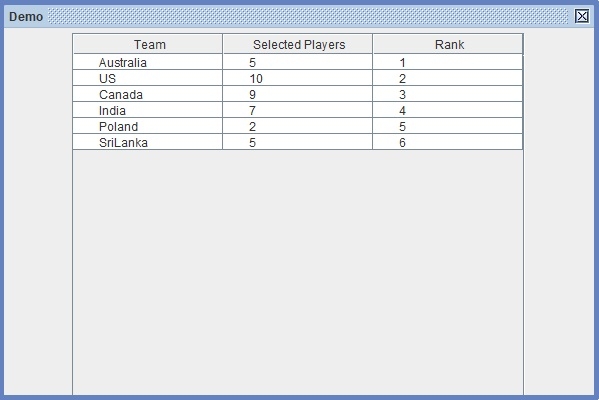
Output
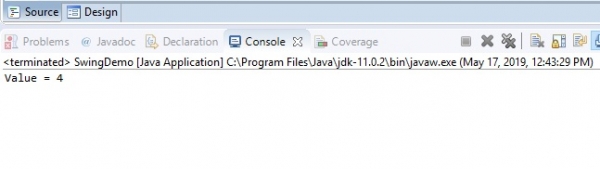
The value of the cell would be visible in the Console −

Updated on: 2019-07-30T22:30:26+05:30
1K+ Views

Advertisements