
Article Categories
- All Categories
-
 Data Structure
-
 Networking
-
 RDBMS
RDBMS
-
 Operating System
-
 Java
Java
-
 MS Excel
-
 iOS
iOS
-
 HTML
HTML
-
 CSS
CSS
-
 Android
-
 Python
-
 C Programming
-
 C++
C++
-
 C#
C#
-
 MongoDB
-
 MySQL
MySQL
-
 Javascript
-
 PHP
PHP
-
 Economics & Finance
Selected Reading
How to put url into a variable when button is clicked - jQuery?
For this, call a function on button click.
Example
Following is the code −
<!DOCTYPE html>
<html lang="en">
<head>
   <meta charset="UTF-8">
   <meta name="viewport" content="width=device-width, initial-scale=1.0">
   <title>Document</title>
</head>
<link rel="stylesheet" href="//code.jquery.com/ui/1.12.1/themes/base/jquery-ui.css">
<script src="https://code.jquery.com/jquery-1.12.4.js"></script>
<script src="https://code.jquery.com/ui/1.12.1/jquery-ui.js"></script>
<body>
   <button class="copyTheURL" onclick="demoForCopyURL()">
      ClickMeToCopyURL
   </button>
   https://www.tutorialspoint.com/index/
</body>
<script>
   function demoForCopyURL(e) {
      event.preventDefault();
      var rootText = event.target.parentElement.innerText
      var btnText = event.target.innerText
      var originalURLValue = rootText.substring(btnText.length + 1)
      console.log("THE URL IS=" + originalURLValue)
   }
</script>
</html>
To run the above program, save the file name “anyName.html(index.html)”. Right click on the file and select the option “Open with Live Server” in VSCode editor −
Output
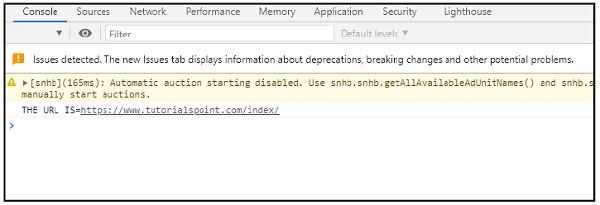
This will produce the following output on console −
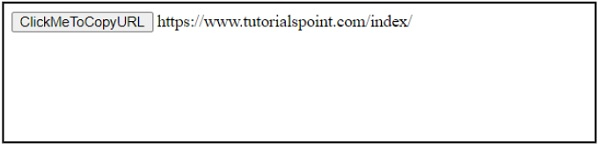
On clicking the button, you will get the following output on console −

Updated on: 2026-03-11T22:50:53+05:30
968 Views

Advertisements