
Article Categories
- All Categories
-
 Data Structure
-
 Networking
-
 RDBMS
RDBMS
-
 Operating System
-
 Java
Java
-
 MS Excel
-
 iOS
iOS
-
 HTML
HTML
-
 CSS
CSS
-
 Android
-
 Python
-
 C Programming
-
 C++
C++
-
 C#
C#
-
 MongoDB
-
 MySQL
MySQL
-
 Javascript
-
 PHP
PHP
-
 Economics & Finance
How to open a new window by the user pressing a button in a tkinter GUI?
Tkinter creates a default window (i.e., master or root window) for every application. In tkinter, we can create a popup window or child window by defining a Toplevel(master) constructor. This will allow the tkinter application to create another window which can be resized dynamically by defining its size property.
Basic Syntax
To create a new window, use the following syntax ?
new_window = Toplevel(parent_window)
new_window.geometry("widthxheight")
new_window.title("Window Title")
Example
In this example, we have created a button widget that will open a new window with a text label ?
# Import tkinter library
from tkinter import *
from tkinter import ttk

# Create an instance of tkinter frame or window
win = Tk()
# Set the geometry of tkinter frame
win.geometry("750x250")
win.title("Main Window")

# Define a new function to open the window
def open_win():
    new = Toplevel(win)
    new.geometry("750x250")
    new.title("New Window")
    # Create a Label in New window
    Label(new, text="Hey, Howdy?", font=('Helvetica', 17, 'bold')).pack(pady=30)

# Create a label
Label(win, text="Click the below button to Open a New Window",
      font=('Helvetica', 17, 'bold')).pack(pady=30)

# Create a button to open a New Window
ttk.Button(win, text="Open", command=open_win).pack()

win.mainloop()
Output
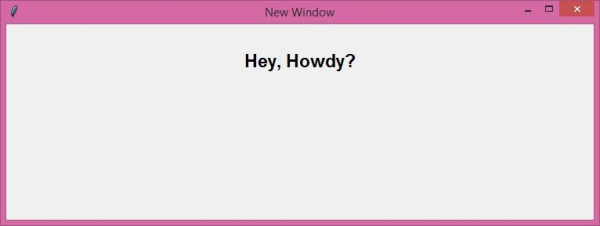
Running the above code will display a window that contains a button widget. When we click the button, it will open a new window.
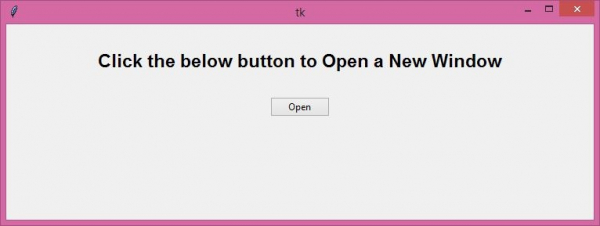
Now, click the "Open" button to open a new Window.
Key Features of Toplevel Windows
- Independent: Toplevel windows can be moved and resized independently
-
Modal behavior: You can make them modal using
grab_set() - Parent relationship: When the parent window closes, child windows close automatically
Advanced Example with Modal Dialog
Here's how to create a modal dialog that blocks interaction with the parent window ?
from tkinter import *
from tkinter import ttk

def create_modal_dialog():
    dialog = Toplevel(root)
    dialog.title("Modal Dialog")
    dialog.geometry("300x150")

    # Make it modal
    dialog.grab_set()

    Label(dialog, text="This is a modal dialog",
          font=('Arial', 12)).pack(pady=20)

    def close_dialog():
        dialog.grab_release()
        dialog.destroy()

    Button(dialog, text="Close", command=close_dialog).pack(pady=10)

root = Tk()
root.title("Main Application")
root.geometry("400x200")

Button(root, text="Open Modal Dialog",
       command=create_modal_dialog).pack(pady=50)

root.mainloop()
Conclusion
Use Toplevel() to create new windows in tkinter applications. For modal dialogs, use grab_set() to block interaction with the parent window until the dialog is closed.

15K+ Views
