
Article Categories
- All Categories
-
 Data Structure
-
 Networking
-
 RDBMS
RDBMS
-
 Operating System
-
 Java
Java
-
 MS Excel
-
 iOS
iOS
-
 HTML
HTML
-
 CSS
CSS
-
 Android
-
 Python
-
 C Programming
-
 C++
C++
-
 C#
C#
-
 MongoDB
-
 MySQL
MySQL
-
 Javascript
-
 PHP
PHP
-
 Economics & Finance
How to join two images horizontally and vertically using OpenCV Python?
Images in OpenCV are represented as numpy.ndarray. OpenCV provides two functions cv2.hconcat() and cv2.vconcat() to join images horizontally and vertically respectively.
These functions have the following requirements ?
They can join two or more images
All images must have the same dimensions (height and width)
All images must have the same number of channels
Syntax
cv2.hconcat(img_list)
cv2.vconcat(img_list)
Where img_list is a list of images [img1, img2, ?].
Steps to Join Images
Step 1: Import the required libraries ?
import cv2
import matplotlib.pyplot as plt
Step 2: Read the images using cv2.imread() function ?
img1 = cv2.imread('birds.jpg')
img2 = cv2.imread('lamp.jpg')
Step 3: Resize the images to make them the same size if needed ?
img1 = cv2.resize(img1, (700, 550))
img2 = cv2.resize(img2, (700, 550))
Step 4: Join the images using cv2.hconcat() or cv2.vconcat() ?
img = cv2.hconcat([img1, img2])  # Horizontal
# or
img = cv2.vconcat([img1, img2])  # Vertical
Input Images
We will use these sample images in the following examples ?


Joining Images Horizontally
Here's how to concatenate two images side by side ?
# import required libraries
import cv2
import matplotlib.pyplot as plt

# read two input images
img1 = cv2.imread('birds.jpg')
img2 = cv2.imread('lamp.jpg')

# resize both images to same dimensions
img1 = cv2.resize(img1, (700, 550))
img2 = cv2.resize(img2, (700, 550))

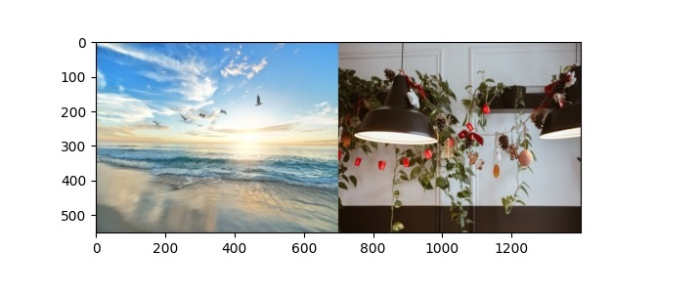
# join the two images horizontally
img = cv2.hconcat([img1, img2])

# convert BGR to RGB for matplotlib display
img = cv2.cvtColor(img, cv2.COLOR_BGR2RGB)
plt.imshow(img)
plt.show()
The output shows both images joined side by side ?
Joining Images Vertically
Here's how to stack two images one above the other ?
# import required libraries
import cv2
import matplotlib.pyplot as plt

# read two input images
img1 = cv2.imread('birds.jpg')
img2 = cv2.imread('lamp.jpg')

# resize both images to same dimensions
img1 = cv2.resize(img1, (700, 550))
img2 = cv2.resize(img2, (700, 550))

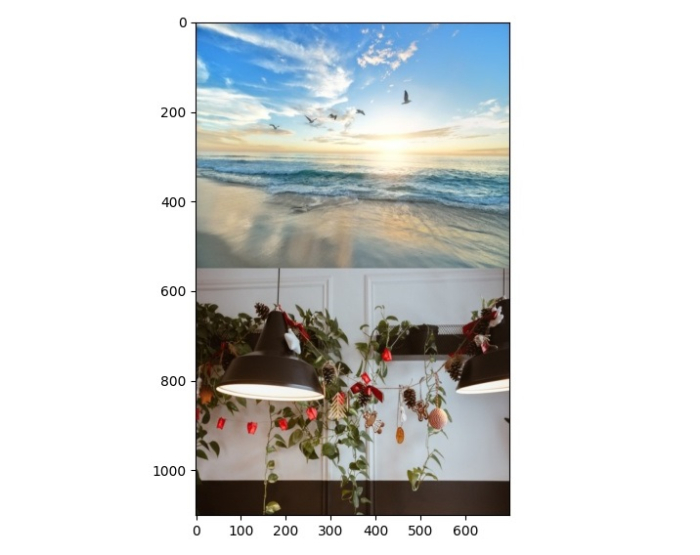
# join the two images vertically
img = cv2.vconcat([img1, img2])

# convert BGR to RGB for matplotlib display
img = cv2.cvtColor(img, cv2.COLOR_BGR2RGB)
plt.imshow(img)
plt.show()
The output shows both images stacked vertically ?
Key Points
cv2.hconcat() joins images horizontally (side by side)
cv2.vconcat() joins images vertically (top to bottom)
All images must have identical dimensions before joining
Use cv2.resize() to make images the same size
Convert BGR to RGB when using matplotlib for display
Conclusion
OpenCV's cv2.hconcat() and cv2.vconcat() functions provide an easy way to combine multiple images. Remember to resize images to matching dimensions before concatenation for successful joining.

6K+ Views
