
Article Categories
- All Categories
-
 Data Structure
-
 Networking
-
 RDBMS
RDBMS
-
 Operating System
-
 Java
Java
-
 MS Excel
-
 iOS
iOS
-
 HTML
HTML
-
 CSS
CSS
-
 Android
-
 Python
-
 C Programming
-
 C++
C++
-
 C#
C#
-
 MongoDB
-
 MySQL
MySQL
-
 Javascript
-
 PHP
PHP
-
 Economics & Finance
Selected Reading
How to hide and display JCombobox with a JCheckBox in Java?
To toggle visibility with JCheckBox, use isVisible() method:
JCheckBox toggleVisibility = new JCheckBox("Hide/Show");
toggleVisibility.setSelected(comboBox.isVisible());
toggleVisibility.addItemListener(e -> {
   comboBox.setVisible(e.getStateChange() == ItemEvent.SELECTED);
});
The following is an example to hide and display JCombobox with a JCheckBox in Java:
Example
import java.awt.BorderLayout;
import java.awt.event.ItemEvent;
import javax.swing.*;
public class SwingDemo {
   JFrame frame;
   SwingDemo(){
      frame = new JFrame("ComboBox");
      String Sports[]={"Select","Tennis","Cricket","Football"};
      JComboBox comboBox = new JComboBox(Sports);
      comboBox.setBounds(50, 50,90,20);
      frame.add(comboBox, BorderLayout.CENTER);
      JCheckBox toggleVisibility = new JCheckBox("Hide/Show");
      toggleVisibility.setSelected(comboBox.isVisible());
      toggleVisibility.addItemListener(e -> {
         comboBox.setVisible(e.getStateChange() == ItemEvent.SELECTED);
      });
      frame.add(toggleVisibility, BorderLayout.SOUTH);
      //frame.setLayout(null);
      frame.setSize(600,100);
      frame.setVisible(true);
   }
   public static void main(String[] args) {
      new SwingDemo();
   }
}
The output is as follows. By default, the following JComboBox is visible:
Output
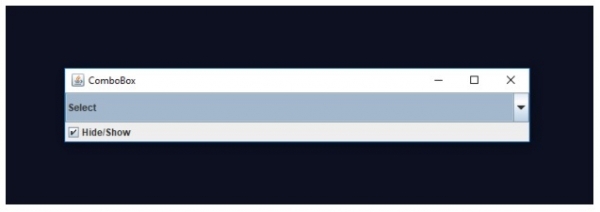
Now, uncheck on “Hide/Show” above to hide the JComboBox. On uncheck, the JComboBox will hide as shown below:


Updated on: 2019-07-30T22:30:26+05:30
865 Views

Advertisements