
Article Categories
- All Categories
-
 Data Structure
-
 Networking
-
 RDBMS
RDBMS
-
 Operating System
-
 Java
Java
-
 MS Excel
-
 iOS
iOS
-
 HTML
HTML
-
 CSS
CSS
-
 Android
-
 Python
-
 C Programming
-
 C++
C++
-
 C#
C#
-
 MongoDB
-
 MySQL
MySQL
-
 Javascript
-
 PHP
PHP
-
 Economics & Finance
Selected Reading
How to get the IIS Application Pool Recycle settings using PowerShell?
To get the IIS application Pool to recycle settings using GUI, you need to check the Application pool advanced settings.
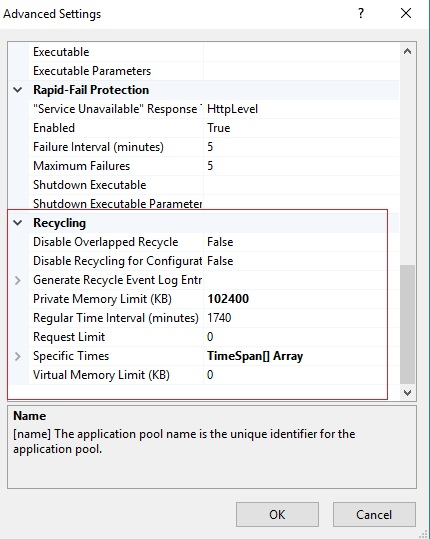
To retrieve the above settings using PowerShell, we can use the Get-IISAppPool command with the specific application pool name. We have the application pool, DefaultAppPool and we need to retrieve its Recycling settings.
PS C:\> (Get-IISAppPool -Name DefaultAppPool).Recycling
Output
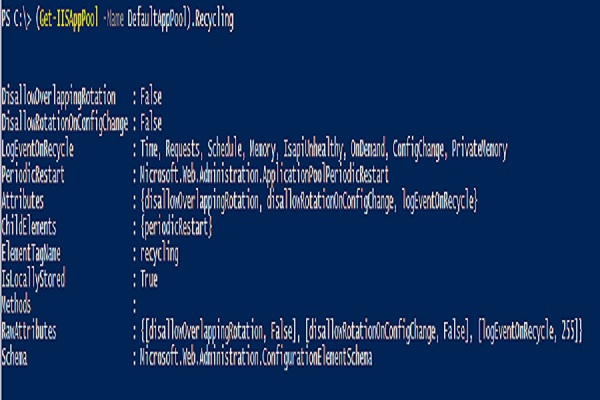
Below settings will be for the Periodic restart.
PS C:\> (Get-IISAppPool -Name DefaultAppPool).Recycling.PeriodicRestart
Output
Memory          : 0
PrivateMemory   : 102400
Requests        : 0
Schedule        : {add}
Time            : 1.05:00:00
Attributes      : {memory, privateMemory, requests, time}
ChildElements   : {schedule}
ElementTagName  : periodicRestart
IsLocallyStored : True
Methods         :
RawAttributes   : {[memory, 0], [privateMemory, 102400], [requests, 0], [time, 1.05:00:00]}
Schema          : Microsoft.Web.Administration.ConfigurationElementSchema
From the further expansion, you can add the Privatememory, Time, etc properties.

Updated on: 2021-04-28T13:38:50+05:30
3K+ Views

Advertisements