
Article Categories
- All Categories
-
 Data Structure
-
 Networking
-
 RDBMS
RDBMS
-
 Operating System
-
 Java
Java
-
 MS Excel
-
 iOS
iOS
-
 HTML
HTML
-
 CSS
CSS
-
 Android
-
 Python
-
 C Programming
-
 C++
C++
-
 C#
C#
-
 MongoDB
-
 MySQL
MySQL
-
 Javascript
-
 PHP
PHP
-
 Economics & Finance
Selected Reading
How to get the IIS Application Pool failure Settings using PowerShell?
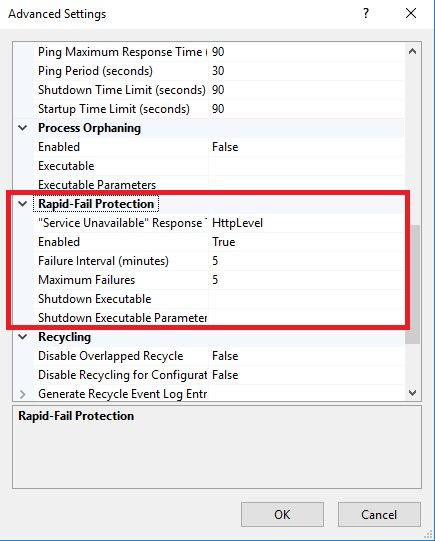
Using GUI from the IIS Manager, you can get the Application Pool Failure settings using App pool advanced settings from the Rapid-Fail Protection section as shown below.
To retrieve the above settings using PowerShell,
(Get-IISAppPool -Name DefaultAppPool).failure
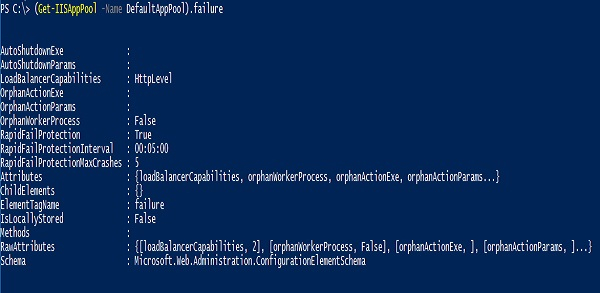
To run the above command we need the IISAdministration module. You can retrieve the same settings using the WebAdministration module and using IIS PSDrive.
(Get-ItemProperty IIS:\AppPools\DefaultAppPool\).failure
To retrieve the specific settings like Failure Interval or Maximum failures, use the below command.
Failure Intervals,
PS C:\> (Get-IISAppPool -Name DefaultAppPool).failure.rapidFailProtectionInterval

Days              : 0
Hours             : 0
Minutes           : 5
Seconds           : 0
Milliseconds      : 0
Ticks             : 3000000000
TotalDays         : 0.00347222222222222
TotalHours        : 0.0833333333333333
TotalMinutes      : 5
TotalSeconds      : 300
TotalMilliseconds : 300000
Maximum Failures.
(Get-IISAppPool -Name DefaultAppPool).failure.rapidFailProtectionMaxCrashes
5

Updated on: 2021-04-28T13:38:08+05:30
1K+ Views

Advertisements