
Article Categories
- All Categories
-
 Data Structure
-
 Networking
-
 RDBMS
RDBMS
-
 Operating System
-
 Java
Java
-
 MS Excel
-
 iOS
iOS
-
 HTML
HTML
-
 CSS
CSS
-
 Android
-
 Python
-
 C Programming
-
 C++
C++
-
 C#
C#
-
 MongoDB
-
 MySQL
MySQL
-
 Javascript
-
 PHP
PHP
-
 Economics & Finance
Selected Reading
How to get text found between span – Selenium
We can get the text found within the span tag with Selenium webdriver.
The text of a web element can be captured with the method getText. Let us see an example of an element having the text - © Copyright 2021. All Rights Reserved enclosed within the span tag.
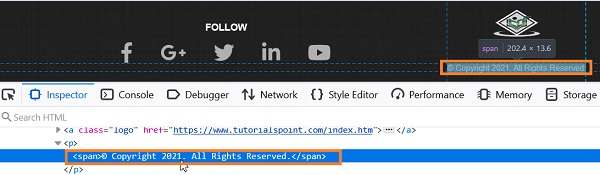
Syntax
WebElement l = driver.findElement(By.xpath("//p/span"));
String s = l.getText();
Example
import org.openqa.selenium.By;
import org.openqa.selenium.WebDriver;
import org.openqa.selenium.WebElement;
import org.openqa.selenium.firefox.FirefoxDriver;
import java.util.concurrent.TimeUnit;
public class SpanText{
   public static void main(String[] args) {
      System.setProperty("webdriver.gecko.driver",
"C:\Users\ghs6kor\Desktop\Java\geckodriver.exe");
      WebDriver driver = new FirefoxDriver();
      //implicit wait
      driver.manage().timeouts().implicitlyWait(5, TimeUnit.SECONDS);
      //maximize window
      driver.manage().window().maximize();
      //URL launch
      driver.get("https://www.tutorialspoint.com/index.htm");
      // scroll to element with Javascript Executor
      JavascriptExecutor js = (JavascriptExecutor) driver;
      js.executeScript("window.scrollTo(0, document.body.scrollHeight)");
      // identify element with span and get text
      WebElement l = driver.findElement(By.xpath("//p/span"));
      String s = l.getText();
      System.out.println("Text is: " + s);
      driver.quit();
   }
}
Output


Updated on: 2021-04-03T10:33:55+05:30
4K+ Views

Advertisements