
Article Categories
- All Categories
-
 Data Structure
-
 Networking
-
 RDBMS
RDBMS
-
 Operating System
-
 Java
Java
-
 MS Excel
-
 iOS
iOS
-
 HTML
HTML
-
 CSS
CSS
-
 Android
-
 Python
-
 C Programming
-
 C++
C++
-
 C#
C#
-
 MongoDB
-
 MySQL
MySQL
-
 Javascript
-
 PHP
PHP
-
 Economics & Finance
Selected Reading
How to enable the "disabled" attribute using jQuery on button click?
Set the disabled property to true in jQuery −
<input type="text" disabled=true id="showTxtBoxHide" value="My Name is David..">
Example
Following is the code −
<!DOCTYPE html>
<html lang="en">

<head>
  <meta charset="UTF-8">
  <meta name="viewport" content="width=device-width, initial-scale=1.0">
  <title>Document</title>
</head>
<link rel="stylesheet" href="//code.jquery.com/ui/1.12.1/themes/base/jquery-ui.css">
<script src="https://code.jquery.com/jquery-1.12.4.js"></script>
<script src="https://code.jquery.com/ui/1.12.1/jquery-ui.js"></script>

<body>
  <input type="text" disabled=true id="showTxtBoxHide" value="My Name is David..">
  <br>
  <br>
  <input type="button" id="change" value="ClickTheButtonToEnableTextBox">
</body>
<script>
  $("#change").click(function (buttonEvent) {
    buttonEvent.preventDefault();
    $('#showTxtBoxHide').prop("disabled", false);
  });
</script>

</html>
To run the above program, save the file name anyName.html(index.html). Right click on the file and select the option “Open with live server” in VS Code editor −
Output
The output is as follows −
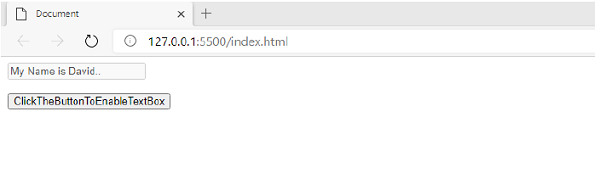
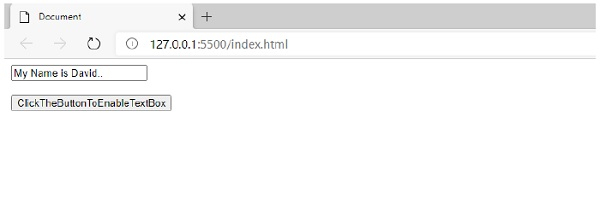
The text box property is disabled. To enable, you need to click the button −

Updated on: 2026-03-11T22:50:52+05:30
3K+ Views

Advertisements