
Article Categories
- All Categories
-
 Data Structure
-
 Networking
-
 RDBMS
RDBMS
-
 Operating System
-
 Java
Java
-
 MS Excel
-
 iOS
iOS
-
 HTML
HTML
-
 CSS
CSS
-
 Android
-
 Python
-
 C Programming
-
 C++
C++
-
 C#
C#
-
 MongoDB
-
 MySQL
MySQL
-
 Javascript
-
 PHP
PHP
-
 Economics & Finance
Selected Reading
How to draw a polygon in OpenCV using Java?
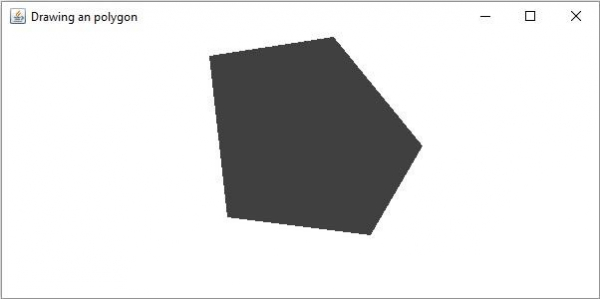
A polygon with all the interior angles less than 180 is known as a convex polygon. The org.opencv.imgproc package of Java OpenCV library contains a class named Imgproc. To draw a polygon you need to invoke the fillConvexPoly() method of this class. This method accepts 3 parameters −
A Mat object representing the image on which the polygon is to be drawn.
A MatOfPoint object points between which the polygon is to be drawn.
A Scalar object representing the color of the polygon.
Example
import org.opencv.core.Core;
import org.opencv.core.Mat;
import org.opencv.core.MatOfPoint;
import org.opencv.core.Point;
import org.opencv.core.Scalar;
import org.opencv.highgui.HighGui;
import org.opencv.imgcodecs.Imgcodecs;
import org.opencv.imgproc.Imgproc;
public class DrawingConvexPolygon {
   public static void main(String args[]) {
      //Loading the OpenCV core library
      System.loadLibrary( Core.NATIVE_LIBRARY_NAME );
      //Reading the source image in to a Mat object
      Mat src = Imgcodecs.imread("D:\images\blank.jpg");
      //Drawing an arrowed line
      MatOfPoint points = new MatOfPoint (
         new Point(108, 71), new Point(232, 52),
         new Point(321, 161), new Point(269, 250),
         new Point(126, 232), new Point(108, 71)
      );
      Scalar color = new Scalar(64, 64, 64);
      Imgproc.fillConvexPoly (src, points, color);
      //Saving and displaying the image
      Imgcodecs.imwrite("arrowed_line.jpg", src);
      HighGui.imshow("Drawing an polygon", src);
      HighGui.waitKey();
   }
}
Output
On executing, the above program generates the following window −

Updated on: 2020-04-10T07:55:56+05:30
725 Views

Advertisements