
Article Categories
- All Categories
-
 Data Structure
-
 Networking
-
 RDBMS
RDBMS
-
 Operating System
-
 Java
Java
-
 MS Excel
-
 iOS
iOS
-
 HTML
HTML
-
 CSS
CSS
-
 Android
-
 Python
-
 C Programming
-
 C++
C++
-
 C#
C#
-
 MongoDB
-
 MySQL
MySQL
-
 Javascript
-
 PHP
PHP
-
 Economics & Finance
Selected Reading
How to display OpenCV Mat object using Swings?
The class ImageIcon is an implementation of the Icon interface that paints Icons from Images. You can display images on a Swing window using this class, the constructor of this class accepts a BufferedImage object as a parameter.
Therefore to display an OpenCV image that is stored in a Mat object using Swing window, you need to convert it into a BufferedImage object and pass it as a parameter to the ImageIcon method.
Example
import java.awt.image.BufferedImage;
import java.io.ByteArrayInputStream;
import java.io.InputStream;
import javax.imageio.ImageIO;
import javax.swing.ImageIcon;
import javax.swing.JFrame;
import javax.swing.JLabel;
import org.opencv.core.Core;
import org.opencv.core.Mat;
import org.opencv.core.MatOfByte;
import org.opencv.imgcodecs.Imgcodecs;
public class DisplayingImagesUsingSwings {
   public static void main(String args[]) throws Exception {
      //Loading the OpenCV core library
      System.loadLibrary( Core.NATIVE_LIBRARY_NAME );
      //Reading the Image from the file
      String file = "D:\images\tree.jpg";
      Mat image = Imgcodecs.imread(file);
      //Encoding the image
      MatOfByte matOfByte = new MatOfByte();
      Imgcodecs.imencode(".jpg", image, matOfByte);
      //Storing the encoded Mat in a byte array
      byte[] byteArray = matOfByte.toArray();
      //Preparing the Buffered Image
      InputStream in = new ByteArrayInputStream(byteArray);
      BufferedImage bufImage = ImageIO.read(in);
      //Instantiate JFrame
      JFrame frame = new JFrame();
      //Set Content to the JFrame
      frame.getContentPane().add(new JLabel(new ImageIcon(bufImage)));
      frame.pack();
      frame.setVisible(true);
      System.out.println("Image Loaded");
   }
}
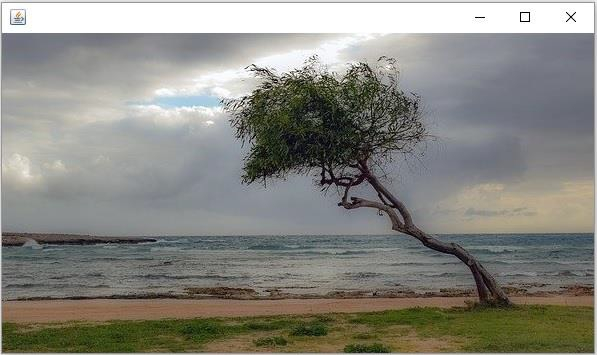
Output
On executing, the above program generates the following output −

Updated on: 2020-04-10T07:12:22+05:30
767 Views

Advertisements