
Article Categories
- All Categories
-
 Data Structure
-
 Networking
-
 RDBMS
RDBMS
-
 Operating System
-
 Java
Java
-
 MS Excel
-
 iOS
iOS
-
 HTML
HTML
-
 CSS
CSS
-
 Android
-
 Python
-
 C Programming
-
 C++
C++
-
 C#
C#
-
 MongoDB
-
 MySQL
MySQL
-
 Javascript
-
 PHP
PHP
-
 Economics & Finance
Selected Reading
How to determine whether the JSlider is currently snapping to tick marks in Java?
At first, we will create a slider and set it to snap to tick marks:
JSlider slider = new JSlider(JSlider.HORIZONTAL, 0, 100, 40);
slider.setMinorTickSpacing(10);
slider.setMajorTickSpacing(20);
slider.setPaintTicks(true);
slider.setPaintLabels(true);
slider.setSnapToTicks(true);
After that, we will check whether the slider is currently snapping to tick marks. The result would be displayed in the TRUE/FALSE boolean
slider.getSnapToTicks()
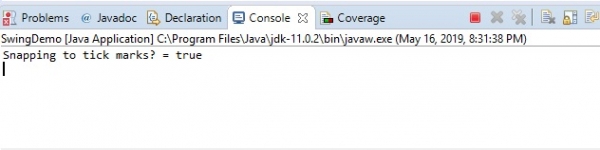
Display the result in the Console as shown below:
System.out.println("Snapping to tick marks? = "+slider.getSnapToTicks());
The following is an example to determine whether the slider is currently snapping to tick marks:
Example
package my;
import java.awt.Color;
import java.awt.Font;
import javax.swing.JFrame;
import javax.swing.JPanel;
import javax.swing.JSlider;
import javax.swing.WindowConstants;
public class SwingDemo {
   public static void main(String[] args) {
      JFrame frame = new JFrame("Frame with Slider");
      JSlider slider = new JSlider(JSlider.HORIZONTAL, 0, 100, 40);
      slider.setMinorTickSpacing(10);
      slider.setMajorTickSpacing(20);
      slider.setPaintTicks(true);
      slider.setPaintLabels(true);
      slider.setBackground(Color.CYAN);
      slider.setForeground(Color.black);
      slider.setSnapToTicks(true);
      System.out.println("Snapping to tick marks? = "+slider.getSnapToTicks());
      Font font = new Font("Serif", Font.BOLD, 13);
      slider.setFont(font);
      JPanel panel = new JPanel();
      panel.add(slider);
      frame.add(panel);
      frame.setDefaultCloseOperation(WindowConstants.EXIT_ON_CLOSE);
      frame.setSize(600, 300);
      frame.setVisible(true);
   }
}
Output
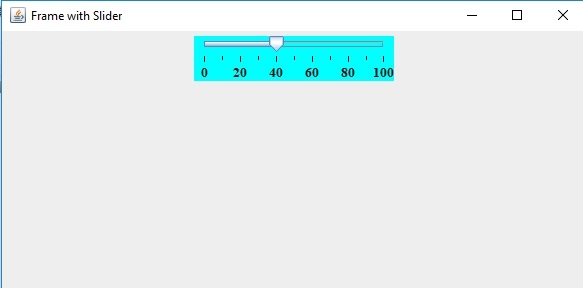
The console would display whether the Slider is snapping to tick marks or not:

Updated on: 2019-07-30T22:30:26+05:30
378 Views

Advertisements