
Article Categories
- All Categories
-
 Data Structure
-
 Networking
-
 RDBMS
RDBMS
-
 Operating System
-
 Java
Java
-
 MS Excel
-
 iOS
iOS
-
 HTML
HTML
-
 CSS
CSS
-
 Android
-
 Python
-
 C Programming
-
 C++
C++
-
 C#
C#
-
 MongoDB
-
 MySQL
MySQL
-
 Javascript
-
 PHP
PHP
-
 Economics & Finance
How to determine the current iPhone model information?
iOS Provides a UIDevice class which has all the information about your iPhone that does not violate any privacy laws Apple has.
Using the UIDevice we can access information like −
UIDevice.current.localizedModel − this returns the localized version of model
UIDevice.current.model − this returns model of current device, e.g. @"iPhone", @"iPod touch"
UIDevice.current.name − this returns the current name of the device in use, e.g. "My iPhone"
UIDevice.current.systemName − this returns the system name e.g. @"iOS"
UIDevice.current.systemVersion − this returns the system version e.g. @"4.0"
UIDevice.current.batteryLevel − this returns the battery level, if it is between 0 to 1, it will return the value otherwise if the state is UIDeviceBatteryStateUnknown it returns -1.0
UIDevice.current.batteryState − this returns the battery state, it has four possible values as per apple APIs
public enum BatteryState : Int {
   case unknown
   case unplugged
   case charging
   case full
}
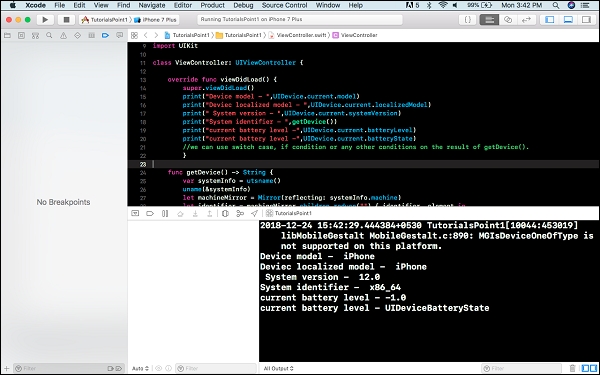
You can write the above code in View Controller's viewDidLoad and print to see the result.
print(UIDevice.current.model)
print(UIDevice.current.localizedModel)
print(UIDevice.current.systemVersion)
Which gave the following result while running on an iPhone 7 plus simulator.
iPhone
iPhone
12.0
Here is the result and example of how the above code can be used.

756 Views
