
Article Categories
- All Categories
-
 Data Structure
-
 Networking
-
 RDBMS
RDBMS
-
 Operating System
-
 Java
Java
-
 MS Excel
-
 iOS
iOS
-
 HTML
HTML
-
 CSS
CSS
-
 Android
-
 Python
-
 C Programming
-
 C++
C++
-
 C#
C#
-
 MongoDB
-
 MySQL
MySQL
-
 Javascript
-
 PHP
PHP
-
 Economics & Finance
Selected Reading
How to detect the value change of a JSlider in Java?
A JSlider is a subclass of JComponent class and it is similar to scroll bar which allows the user to select a numeric value from a specified range of integer values. A JSlider has a knob which can slide on a range of values and can be used to select a particular value. and it can generate a ChangeListener interface.
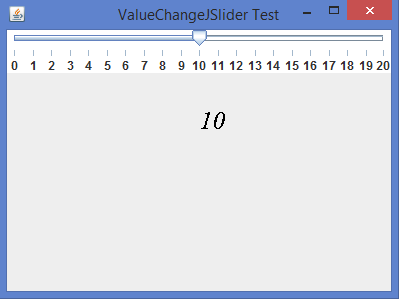
We can detect the value changed when the slider is moved horizontally using the Graphics2D class and override paint() method.
Example
import java.awt.*;
import java.awt.event.*;
import javax.swing.*;
import javax.swing.event.*;
public class ValueChangeJSliderTest extends JFrame {
   private JSlider slider;
   public ValueChangeJSliderTest() {
      setTitle("ValueChangeJSlider Test");
      slider = new JSlider(JSlider.HORIZONTAL, 0, 20, 1);
      slider.addChangeListener(new ChangeListener() {
         public void stateChanged(ChangeEvent ce) {
            repaint();
         }
      });
      setLayout(new BorderLayout());
      slider.setBackground(Color.white);
      slider.setMajorTickSpacing(1);
      slider.setPaintTicks(true);
      slider.setPaintLabels(true);
      add(slider, BorderLayout.NORTH);
      setSize(400, 300);
      setDefaultCloseOperation(JFrame.EXIT_ON_CLOSE);
      setLocationRelativeTo(null);
      setVisible(true);
   }
   public void <strong>paint</strong>(Graphics g) {
      super.paint(g);
      <strong>Graphics2D</strong> g2d = (Graphics2D) g;
      g2d.setFont(new Font("Serif", Font.ITALIC, 25));
<strong>      g2d.drawString(""+slider.getValue(), 200, 130);
</strong>   }
   public static void main(String[] args) {
      new ValueChangeJSliderTest();
   }
}
Output

Updated on: 2020-02-12T05:32:30+05:30
1K+ Views

Advertisements