
Article Categories
- All Categories
-
 Data Structure
-
 Networking
-
 RDBMS
RDBMS
-
 Operating System
-
 Java
Java
-
 MS Excel
-
 iOS
iOS
-
 HTML
HTML
-
 CSS
CSS
-
 Android
-
 Python
-
 C Programming
-
 C++
C++
-
 C#
C#
-
 MongoDB
-
 MySQL
MySQL
-
 Javascript
-
 PHP
PHP
-
 Economics & Finance
Selected Reading
How to detect shake gesture using Swift?
To detect a shake gesture in iOS UIKit provides three different methods, let’s see them one by one.
Method 1 − When the shake gesture begins.
override func motionBegan(_ motion: UIEvent.EventSubtype, with event: UIEvent?) {
// code you want to implement
}
Method 2 − When the shake gesture ends.
override func motionEnded(_ motion: UIEvent.EventSubtype, with event: UIEvent?) {
// Code you want to implement.
}
Method 3 − when the shake gesture is cancelled.
override func motionCancelled(_ motion: UIEvent.EventSubtype, with event: UIEvent?) {
// code you want to implement.
}
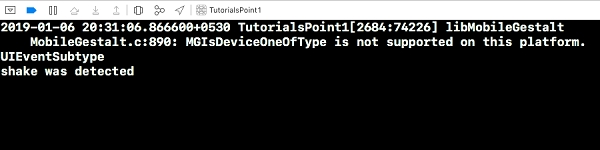
Now let’s add some code in our motionBegan method,
override func motionBegan(_ motion: UIEvent.EventSubtype, with event: UIEvent?) {
   print(motion)
   if motion == .motionShake {
      print("shake was detected")
   }
}
Also add “self.becomeFirstResponder()” in your viewDidLoad() method. When we run the above code on simulator, and use debug to produce a shake gesture, below is the result that’s produced. We can modify the code above according to our use and perform different operations In our app.

Updated on: 2020-06-29T14:03:26+05:30
1K+ Views

Advertisements