
Article Categories
- All Categories
-
 Data Structure
-
 Networking
-
 RDBMS
RDBMS
-
 Operating System
-
 Java
Java
-
 MS Excel
-
 iOS
iOS
-
 HTML
HTML
-
 CSS
CSS
-
 Android
-
 Python
-
 C Programming
-
 C++
C++
-
 C#
C#
-
 MongoDB
-
 MySQL
MySQL
-
 Javascript
-
 PHP
PHP
-
 Economics & Finance
How to detect a rectangle and square in an image using OpenCV Python?
To detect rectangles and squares in an image using OpenCV Python, we analyze contours and calculate aspect ratios. A square has an aspect ratio close to 1.0, while rectangles have ratios significantly different from 1.0.
Algorithm Overview
The detection process follows these key steps:
for cnt in contours:
    approx = cv2.approxPolyDP(cnt, epsilon, True)
    if len(approx) == 4:
        x, y, w, h = cv2.boundingRect(cnt)
        ratio = float(w)/h
        if ratio >= 0.9 and ratio <= 1.1:
            # Square detected
            cv2.putText(img, 'Square', (x, y), font, 0.6, color, 2)
        else:
            # Rectangle detected
            cv2.putText(img, 'Rectangle', (x, y), font, 0.6, color, 2)
Step-by-Step Implementation
Import Required Libraries
Import OpenCV for image processing operations ?
import cv2
import numpy as np
Load and Preprocess Image
Read the input image and convert it to grayscale for contour detection ?
img = cv2.imread('shapes.jpg')
gray = cv2.cvtColor(img, cv2.COLOR_BGR2GRAY)
Apply Thresholding
Create a binary image using thresholding to improve contour detection ?
ret, thresh = cv2.threshold(gray, 50, 255, 0)
Find Contours
Detect all contours in the binary image ?
contours, _ = cv2.findContours(thresh, cv2.RETR_TREE, cv2.CHAIN_APPROX_SIMPLE)
Process Each Contour
For each contour, approximate the polygon and check if it has 4 vertices ?
for cnt in contours:
    approx = cv2.approxPolyDP(cnt, 0.01*cv2.arcLength(cnt, True), True)
    if len(approx) == 4:
        x, y, w, h = cv2.boundingRect(cnt)
        ratio = float(w)/h
        if 0.9 <= ratio <= 1.1:
            # Square detected
            pass
        else:
            # Rectangle detected
            pass
Complete Example
Here's the complete implementation to detect rectangles and squares ?
import cv2
import numpy as np

img = cv2.imread('shapes.jpg')
gray = cv2.cvtColor(img, cv2.COLOR_BGR2GRAY)

ret, thresh = cv2.threshold(gray, 50, 255, 0)
contours, hierarchy = cv2.findContours(thresh, 1, 2)
print("Number of contours detected:", len(contours))

for cnt in contours:
    x1, y1 = cnt[0][0]
    approx = cv2.approxPolyDP(cnt, 0.01*cv2.arcLength(cnt, True), True)
    if len(approx) == 4:
        x, y, w, h = cv2.boundingRect(cnt)
        ratio = float(w)/h
        if ratio >= 0.9 and ratio <= 1.1:
            img = cv2.drawContours(img, [cnt], -1, (0,255,255), 3)
            cv2.putText(img, 'Square', (x1, y1), cv2.FONT_HERSHEY_SIMPLEX, 0.6, (255, 255, 0), 2)
        else:
            cv2.putText(img, 'Rectangle', (x1, y1), cv2.FONT_HERSHEY_SIMPLEX, 0.6, (0, 255, 0), 2)
            img = cv2.drawContours(img, [cnt], -1, (0,255,0), 3)

cv2.imshow("Shapes", img)
cv2.waitKey(0)
cv2.destroyAllWindows()
Key Parameters
| Parameter | Purpose | Typical Value |
|---|---|---|
| Threshold value | Binary image creation | 50-150 |
| Epsilon (approxPolyDP) | Contour approximation | 0.01-0.02 * perimeter |
| Aspect ratio range | Square detection | 0.9-1.1 |
Input and Output
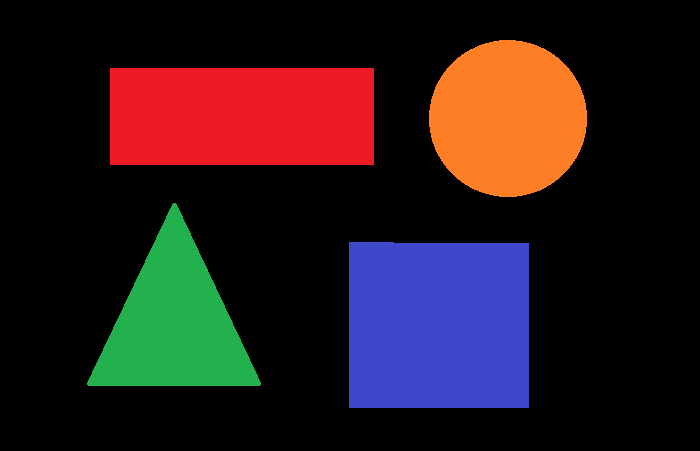
Consider the following input image:
The output shows detected rectangles and squares:
Number of contours detected: 4
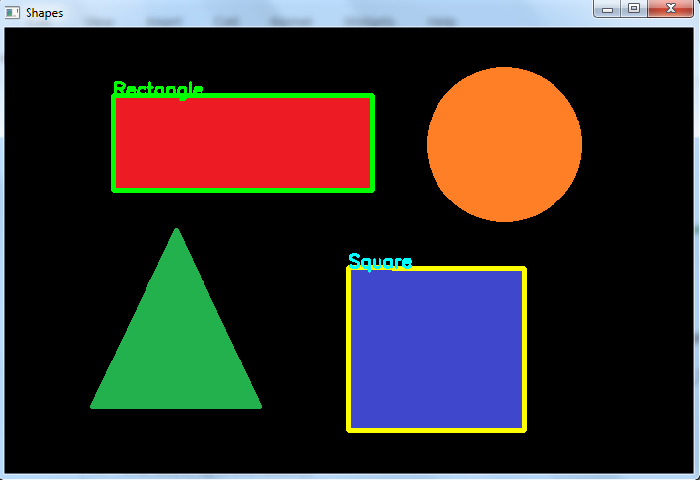
In the output image, one rectangle and one square are successfully detected and labeled.
Conclusion
This method effectively detects rectangles and squares by analyzing contour approximations and aspect ratios. Adjust threshold values and epsilon parameters based on your specific image characteristics for optimal results.

46K+ Views
