
Article Categories
- All Categories
-
 Data Structure
-
 Networking
-
 RDBMS
RDBMS
-
 Operating System
-
 Java
Java
-
 MS Excel
-
 iOS
iOS
-
 HTML
HTML
-
 CSS
CSS
-
 Android
-
 Python
-
 C Programming
-
 C++
C++
-
 C#
C#
-
 MongoDB
-
 MySQL
MySQL
-
 Javascript
-
 PHP
PHP
-
 Economics & Finance
Selected Reading
How to create a MenuButton in JavaFX?
A menu is a list of options or commands presented to the user, typically menus contain items that perform some action. The contents of a menu are known as menu items and a menu bar holds multiple menus.
A button controls in user interface applications, in general, on clicking the button it performs the respective action.
A MenuButton is simply, a button that shows a menu on clicking it. You can create a menu button by instantiating the javafx.scene.control.MenuButton class.
To populate its menu, create a required number of objects of the MenuItem class, add them to the observable list of MenuButton as −
menuButton.getItems(item1, item2, item3);
Example
The following Example demonstrates the creation of a MenuButton.
import javafx.application.Application;
import javafx.geometry.Insets;
import javafx.scene.Scene;
import javafx.scene.control.MenuButton;
import javafx.scene.control.MenuItem;
import javafx.scene.layout.HBox;
import javafx.stage.Stage;
public class MenuButtonExample extends Application {
   @Override
   public void start(Stage stage) {
      //Creating a menu
      MenuButton menu = new MenuButton("Technology");
      //Creating menu Items
      menu.setMnemonicParsing(true);
      MenuItem item1 = new MenuItem("Java");
      MenuItem item2 = new MenuItem("Python");
      MenuItem item3 = new MenuItem("C++");
      MenuItem item4 = new MenuItem("Big Data");
      MenuItem item5 = new MenuItem("Machine Learning");
      //Adding all the menu items to the menu
      menu.getItems().addAll(item1, item2, item3, item4, item5);
      //Adding the choice box to the scene
      HBox layout = new HBox(25);
      layout.getChildren().addAll(menu);
      layout.setPadding(new Insets(15, 50, 50, 150));
      layout.setStyle("-fx-background-color: BEIGE");
      //Setting the stage
      Scene scene = new Scene(layout, 595, 200);
      stage.setTitle("Menu Button");
      stage.setScene(scene);
      stage.show();
   }
   public static void main(String args[]){
      launch(args);
   }
}
Output
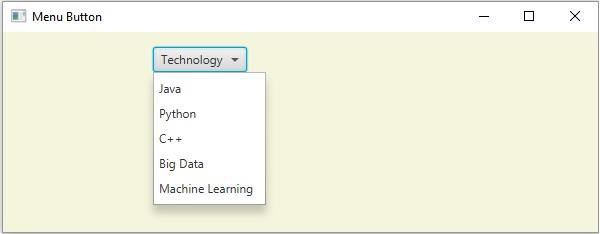

Updated on: 2020-05-20T07:45:04+05:30
879 Views

Advertisements