
Article Categories
- All Categories
-
 Data Structure
-
 Networking
-
 RDBMS
RDBMS
-
 Operating System
-
 Java
Java
-
 MS Excel
-
 iOS
iOS
-
 HTML
HTML
-
 CSS
CSS
-
 Android
-
 Python
-
 C Programming
-
 C++
C++
-
 C#
C#
-
 MongoDB
-
 MySQL
MySQL
-
 Javascript
-
 PHP
PHP
-
 Economics & Finance
Selected Reading
How to create a Junit report in Cypress?
We can create a Junit report in Cypress. To install the package for the JUnit report, run the command −
npm install cypress-junit-reporter --save-dev

Example
Implementation in cypress.json
{
   "reporter": "junit",
   "reporterOptions": {
      "mochaFile": "cypress/results/results.xml",
      "toConsole": true
   }
}
If we run multiple tests in a run and wish to have a unique report for individual spec files, we have to add [hash] in the mochaFile parameter in cypress.json.
Example
Implementation in cypress.json to avoid overriding report
{
   "reporter": "junit",
   "reporterOptions": {
      "mochaFile": "cypress/results/results-[hash].xml",
      "toConsole": true
   }
}
To generate a report for all specs in the integration folder of the Cypress project, run the command −
npx cypress run --reporter junit
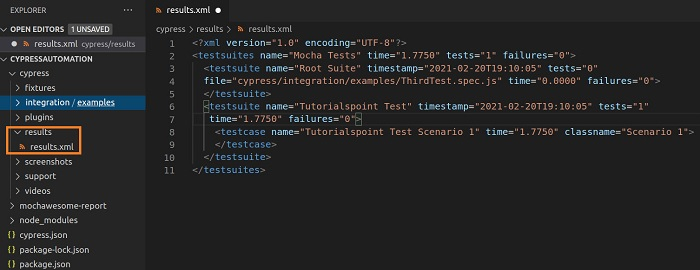
After execution is completed, the results folder gets generated within the Cypress project containing reports in xml format.

Updated on: 2021-11-19T10:01:36+05:30
3K+ Views

Advertisements