
Article Categories
- All Categories
-
 Data Structure
-
 Networking
-
 RDBMS
RDBMS
-
 Operating System
-
 Java
Java
-
 MS Excel
-
 iOS
iOS
-
 HTML
HTML
-
 CSS
CSS
-
 Android
-
 Python
-
 C Programming
-
 C++
C++
-
 C#
C#
-
 MongoDB
-
 MySQL
MySQL
-
 Javascript
-
 PHP
PHP
-
 Economics & Finance
Selected Reading
How to combine FlowLayout and BoxLayout in Java?
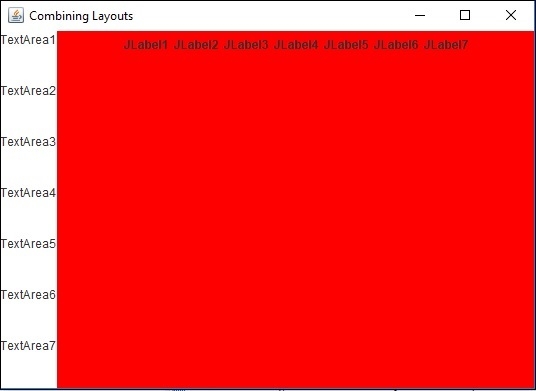
To combine both the layouts, here we have created two panels −
Frame f = new JFrame("Combining Layouts");
JPanel panel1 = new JPanel();
JPanel panel2 = new JPanel();
Now, set the layouts accordingly −
panel1.setLayout(new BoxLayout(panel1, BoxLayout.Y_AXIS));
panel2.setLayout(new FlowLayout());
Then after adding components to both the panels, add them to the frame −
f.add(panel1, BorderLayout.WEST);
f.add(panel2, BorderLayout.CENTER);
Example
package my;
import java.awt.BorderLayout;
import java.awt.Color;
import java.awt.FlowLayout;
import javax.swing.BoxLayout;
import javax.swing.JFrame;
import javax.swing.JLabel;
import javax.swing.JPanel;
import javax.swing.JTextArea;
public class SwingDemo {
   public static void main(String[] args) {
      JFrame f = new JFrame("Combining Layouts");
      JPanel panel1 = new JPanel();
      panel1.setLayout(new BoxLayout(panel1, BoxLayout.Y_AXIS));
      JPanel panel2 = new JPanel();
      panel2.setLayout(new FlowLayout());
      panel2.setBackground(Color.red);
      panel1.add(new JTextArea("TextArea1"));
      panel1.add(new JTextArea("TextArea2"));
      panel1.add(new JTextArea("TextArea3"));
      panel1.add(new JTextArea("TextArea4"));
      panel1.add(new JTextArea("TextArea5"));
      panel1.add(new JTextArea("TextArea6"));
      panel1.add(new JTextArea("TextArea7"));
      panel2.add(new JLabel("JLabel1"));
      panel2.add(new JLabel("JLabel2"));
      panel2.add(new JLabel("JLabel3"));
      panel2.add(new JLabel("JLabel4"));
      panel2.add(new JLabel("JLabel5"));
      panel2.add(new JLabel("JLabel6"));
      panel2.add(new JLabel("JLabel7"));
      f.add(panel1, BorderLayout.WEST);
      f.add(panel2, BorderLayout.CENTER);
      f.setVisible(true);
      f.setSize(550, 400);
      f.setDefaultCloseOperation(JFrame.EXIT_ON_CLOSE);
   }
}
Output

Updated on: 2019-07-30T22:30:26+05:30
780 Views

Advertisements