
Article Categories
- All Categories
-
 Data Structure
-
 Networking
-
 RDBMS
RDBMS
-
 Operating System
-
 Java
Java
-
 MS Excel
-
 iOS
iOS
-
 HTML
HTML
-
 CSS
CSS
-
 Android
-
 Python
-
 C Programming
-
 C++
C++
-
 C#
C#
-
 MongoDB
-
 MySQL
MySQL
-
 Javascript
-
 PHP
PHP
-
 Economics & Finance
How to change the width of a Frame dynamically in Tkinter?
The Frame widget in Tkinter works like a container where we can place widgets and all the other GUI components. To change the frame width dynamically, we can use the configure() method and define the width property in it.
Example
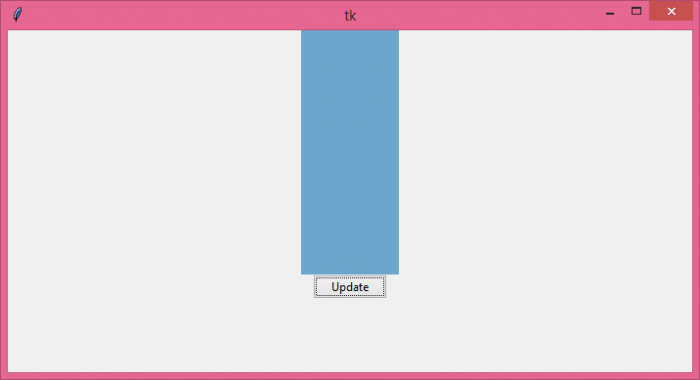
In this example, we have created a button that is packed inside the main window and whenever we click the button, it will update the width of the frame ?
# Import the required libraries
from tkinter import *
from tkinter import ttk

# Create an instance of tkinter frame or window
win = Tk()

# Set the size of the window
win.geometry("700x350")

def update_width():
    frame.config(width=100)

# Create a frame
frame = Frame(win, bg="skyblue3", width=700, height=250)
frame.pack()

# Add a button in the main window
ttk.Button(win, text="Update", command=update_width).pack()

win.mainloop()
Output
Run the above code to display a window that contains a frame widget and a button.
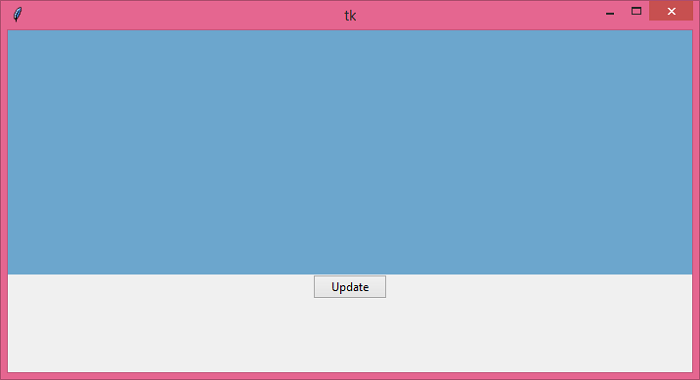
Click the "Update" button to update the width of the frame.
Dynamic Width Control
For more control over frame width changes, you can create multiple functions to set different widths ?
from tkinter import *
from tkinter import ttk

win = Tk()
win.geometry("800x400")

def set_width_small():
    frame.config(width=200)

def set_width_medium():
    frame.config(width=400)

def set_width_large():
    frame.config(width=600)

# Create a frame with initial width
frame = Frame(win, bg="lightblue", width=400, height=250)
frame.pack(pady=20)

# Create multiple buttons for different widths
button_frame = Frame(win)
button_frame.pack()

ttk.Button(button_frame, text="Small", command=set_width_small).pack(side=LEFT, padx=5)
ttk.Button(button_frame, text="Medium", command=set_width_medium).pack(side=LEFT, padx=5)
ttk.Button(button_frame, text="Large", command=set_width_large).pack(side=LEFT, padx=5)

win.mainloop()
Key Points
- Use
config(width=value)to change frame width dynamically - The width value is specified in pixels
- Changes take effect immediately when the function is called
- You can also use
configure()instead ofconfig()- both are equivalent
Conclusion
Use the config() method with the width parameter to dynamically change frame width in Tkinter. This approach allows for responsive GUI design where frame dimensions can be adjusted based on user interaction.

26K+ Views
