
Article Categories
- All Categories
-
 Data Structure
-
 Networking
-
 RDBMS
RDBMS
-
 Operating System
-
 Java
Java
-
 MS Excel
-
 iOS
iOS
-
 HTML
HTML
-
 CSS
CSS
-
 Android
-
 Python
-
 C Programming
-
 C++
C++
-
 C#
C#
-
 MongoDB
-
 MySQL
MySQL
-
 Javascript
-
 PHP
PHP
-
 Economics & Finance
Selected Reading
How to add JList to Scroll pane in Java?
To add JList to Scroll pane in Java, use JScrollPane:
JList list = new JList(sports);
JScrollPane scrollPane = new JScrollPane(list);
After that set it to Container:
Container contentPane = frame.getContentPane();
contentPane.add(scrollPane, BorderLayout.CENTER);
The following is an example to add JList to Scroll pane:
Example
package my;
import java.awt.event.*;
import java.awt.*;
import javax.swing.*;
class SwingDemo extends JFrame {
   static JFrame frame;
   static JList list;
   public static void main(String[] args) {
      frame = new JFrame("JList Demo");
      frame.setDefaultCloseOperation(JFrame.EXIT_ON_CLOSE);
      String sports[]= {"Tennis","Archery","Football","Fencing","Cricket","Squash","Hockey","Rugby"};
      list = new JList(sports);
      JScrollPane scrollPane = new JScrollPane(list);
      Container contentPane = frame.getContentPane();
      contentPane.add(scrollPane, BorderLayout.CENTER);
      frame.setSize(400,100);
      frame.setVisible(true);
   }
}
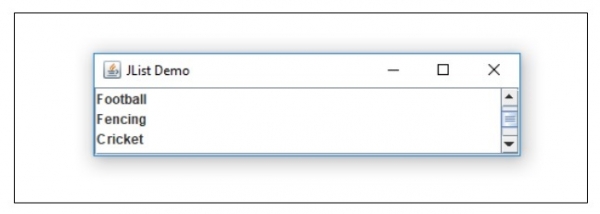
The output is as follows. As you can see ScrollPane is visible for the items:
Output

Updated on: 2019-07-30T22:30:26+05:30
2K+ Views

Advertisements