
Article Categories
- All Categories
-
 Data Structure
-
 Networking
-
 RDBMS
RDBMS
-
 Operating System
-
 Java
Java
-
 MS Excel
-
 iOS
iOS
-
 HTML
HTML
-
 CSS
CSS
-
 Android
-
 Python
-
 C Programming
-
 C++
C++
-
 C#
C#
-
 MongoDB
-
 MySQL
MySQL
-
 Javascript
-
 PHP
PHP
-
 Economics & Finance
Selected Reading
How can we add different font style items to JList in Java?
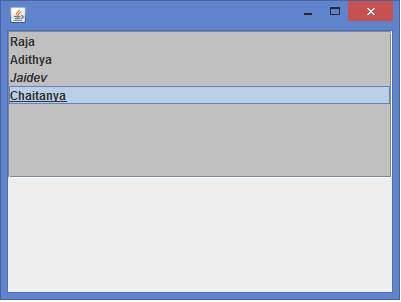
A JList is a subclass of JComponent class and it can be used to display a list of objects that allows the user to select one or more items. A JList can generate a ListSelectiionListener interface and need to implement the abstract method valueChanged(). A DefaultListModel class provides a simple implementation of a list model, which can be used to manage items displayed by a JList control. We can add the items to a JList using the addElement() method of the DefaultListModel class, we can also add items with different fonts to JList using HTML tags like for bold style text, for italic style text, for underlined style text etc.
Example
import java.awt.*;
import javax.swing.*;
public class JLabelListTest {
   public static void main(String[] args) {
      SwingUtilities.invokeLater(new Runnable() {
         @Override
         public void run() {
            new JLabelListTest().makeUI();
         }
      });
   }
   public void makeUI() {
      String[] data = {"<strong><html>Raja</html>", "<html><b>Adithya</b></html>", "<html><i>Jaidev</i> </html>", "<html><u>Chaitanya</u></html></strong>"};
      JList list = new JList(data);
      list.setBackground(Color.lightGray);
      JFrame frame = new JFrame();
      frame.getContentPane().add(new JScrollPane(list), BorderLayout.NORTH);
      frame.setDefaultCloseOperation(JFrame.EXIT_ON_CLOSE);
      frame.setSize(400, 300);
      frame.setLocationRelativeTo(null);
      frame.setVisible(true);
   }
}
Output

Updated on: 2020-02-12T06:54:41+05:30
948 Views

Advertisements