
Article Categories
- All Categories
-
 Data Structure
-
 Networking
-
 RDBMS
RDBMS
-
 Operating System
-
 Java
Java
-
 MS Excel
-
 iOS
iOS
-
 HTML
HTML
-
 CSS
CSS
-
 Android
-
 Python
-
 C Programming
-
 C++
C++
-
 C#
C#
-
 MongoDB
-
 MySQL
MySQL
-
 Javascript
-
 PHP
PHP
-
 Economics & Finance
Selected Reading
How can I parse a website using Selenium and Beautifulsoup in python?
We can parse a website using Selenium and Beautiful Soup in Python. Web Scraping is a concept used to extract content from the web pages, used extensively in Data Science and metrics preparation. In Python, it is achieved with the BeautifulSoup package.
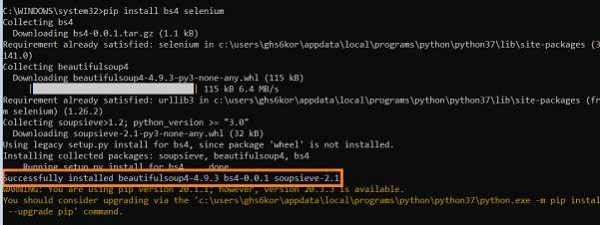
To have BeautifulSoup along with Selenium, we should run the command −
pip install bs4 selenium
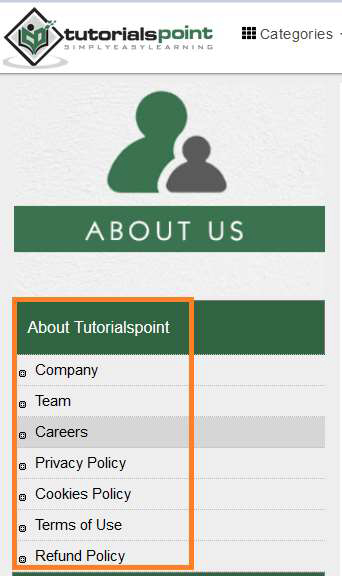
Let us scrap the below links appearing on the page −
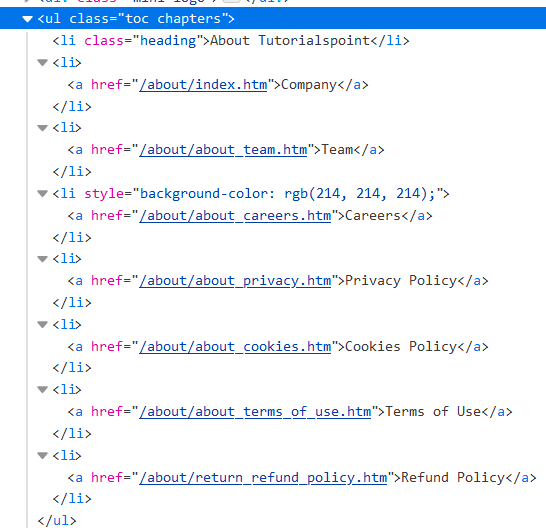
Then investigate the html structure of the above elements −
Example
from selenium import webdriver
from bs4 import BeautifulSoup
#path of chromedriver.exe
driver = webdriver.Chrome (executable_path="C:\chromedriver.exe")
#launch browser
driver.get ("https://www.tutorialspoint.com/about/about_careers.htm")
#content whole page in html format
s = BeautifulSoup(driver.page_source, 'html.parser')
#access to specific ul element with BeautifulSoup methods
l = s.find('ul', {'class':'toc chapters'})
#get all li elements under ul
rs = l.findAll('li')
for r in rs:
#get text of li elements
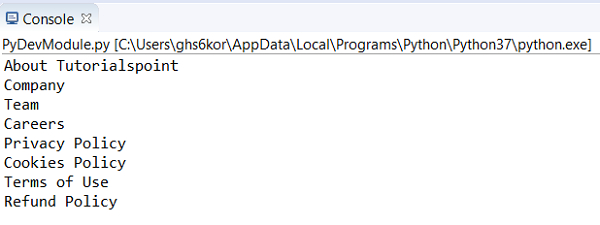
   print(r.text)
Output

Updated on: 2021-01-30T12:58:38+05:30
2K+ Views

Advertisements