
Article Categories
- All Categories
-
 Data Structure
-
 Networking
-
 RDBMS
RDBMS
-
 Operating System
-
 Java
Java
-
 MS Excel
-
 iOS
iOS
-
 HTML
HTML
-
 CSS
CSS
-
 Android
-
 Python
-
 C Programming
-
 C++
C++
-
 C#
C#
-
 MongoDB
-
 MySQL
MySQL
-
 Javascript
-
 PHP
PHP
-
 Economics & Finance
Handling errors in SAP GUI Scripting code
You can take reference from the GUI Scripting help section, and it can explain things in detail for error handling in SAP GUI Scripting.
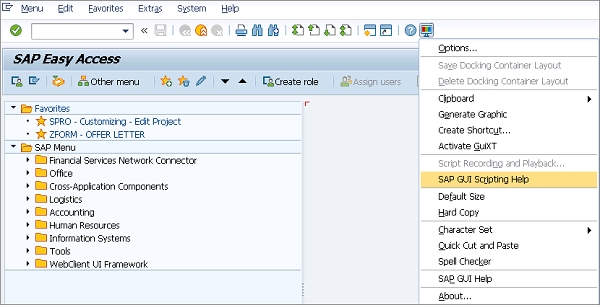
SAP GUI provides default property types for handling different message scenarios. If you want to perform the next step, stop, or abort a user step, you can use the following message type properties ?
| Value | Description |
|---|---|
| S | Success |
| W | Warning |
| E | Error |
| A | Abort |
| I | Information |
Error Handling Example
The status bar in SAP GUI contains message information that can be accessed using the messagetype property. Below is the code that uses the above property types to display different messages and handle errors ?
Public Sub get_status_bar_value_exit_if_Error()
    Dim usr_resp As String

    If (session.findById("wnd[0]/sbar").messagetype = "E" Or _
       session.findById("wnd[0]/sbar").messagetype = "W") Then

        usr_resp = MsgBox(session.findById("wnd[0]/sbar").Text & Chr(13) & _
                         "Show the Error in SAP ?", vbYesNo)

        If usr_resp = vbYes Then
            ' Display error in SAP
        Else
            Call go_to_Sap_home
        End If
    End If
End Sub
This function checks the SAP status bar for error (E) or warning (W) messages. If found, it displays a message box asking the user whether to show the error in SAP or navigate to the SAP home screen.
Conclusion
Error handling in SAP GUI Scripting is essential for creating robust automation scripts that can gracefully handle different message types and provide appropriate user feedback based on the SAP system responses.

2K+ Views
